SERVICE MANUAL FOR INFANT INCUBATOR EDITION/REVISION B/0
5.3.3 PROCEDURE
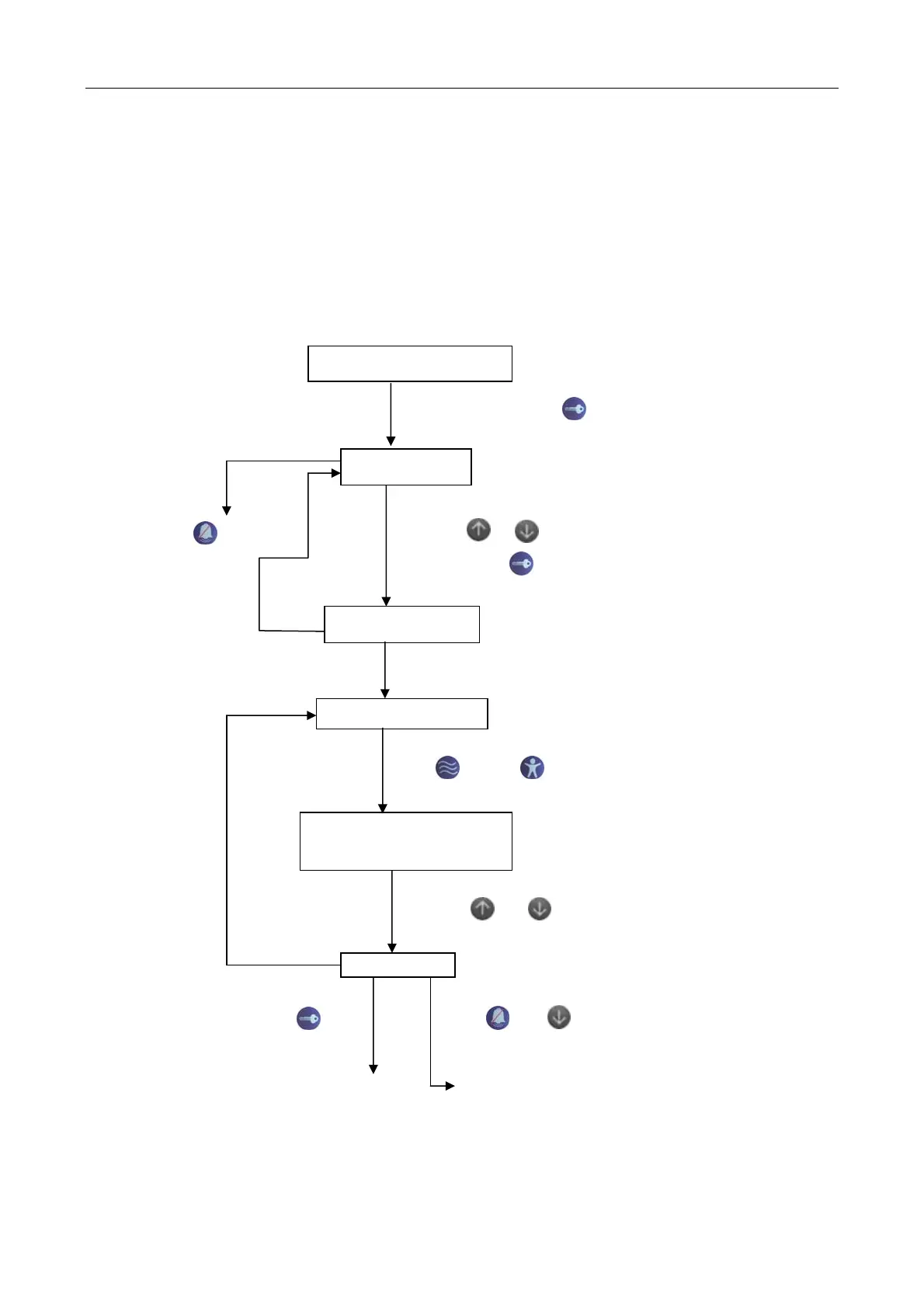
At first, connected power supply, press and hold Set key for 2s as soon as switch on until Air
temprature indicator displays “ --.-“, and no display on Skin and Set temprature indicator. And then,
press Up or Down until Air temprature indicator displays “78.6”, after then, press Set key to enter into
the system set screen, or press Silence/Reset key to exit.
After entering into the set screen, Set temprature indicator displays set code, Air temprature
indicator displays the specific set data.
Turn on the power switch
5-3
I2
Press and hold the for 3s
Enter password
Press key, EXIT Press or key to enter password 78.6,
Then press key to confirm
Error Password check
YES
System setting screen
Press key or Key, set temperature indicator displays
the set code
Press or Key can change
current set value
END
Press key Press and together
SAVE and EXIT Return to original set
Brightness set of indicator
Figure 5.2


 To Next Page