EasyManua.ls Logo

Ninja Hot & Cold Brewed System CP307 - User Manual

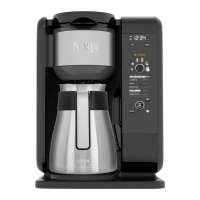
Ninja Hot & Cold Brewed System CP307
39 pages
Print Icon
To Next Page IconTo Next Page
Loading...
ninjakitchen.com
TM/MC
CP307
OWNER’S GUIDE
GUIDE D’UTILISATION
MANUAL DEL PROPIETARIO

Table of Contents

Questions and Answers

  • D
    dianaprestonAug 18, 2025
    What to do if my Ninja Hot & Cold Brewed System CP307 Coffee Maker is leaking?
    • J
      Jerome TaylorAug 18, 2025
      If water is leaking from the brew basket, ensure all parts are correctly and securely assembled. If the leak is coming from the bottom, call Customer Service at 1-877-646-5288. If there is a small amount of water in the reservoir valve after removing the water reservoir, this can be easily removed with a dry cloth.
  • S
    Sara LawrenceAug 21, 2025
    What to do if the CLEAN light is on on my Ninja Hot & Cold Brewed System CP307?
    • J
      Jamie PalmerAug 21, 2025
      If the CLEAN light is on, run a clean cycle. If you have recently completed a clean cycle, you may need to run a second cycle to remove additional mineral buildup that occurs naturally over time.
  • A
    Anthony NicholsAug 23, 2025
    What does “Add” “Wtr” mean on my Ninja Coffee Maker?
    • C
      Curtis SchroederAug 23, 2025
      The “Add” “Wtr” message indicates that you need to add fresh water to the reservoir. After adding water, press the START/SELECT dial to resume brewing.
  • P
    powellkathyAug 26, 2025
    Why does the brew basket overflow on my Ninja Hot & Cold Brewed System CP307?
    • M
      Michael Tucker Jr.Aug 26, 2025
      The bottom of the filter holder may be clogged. Medium-ground coffee is recommended.
  • T
    Tyrone KnappAug 28, 2025
    What does “CLn” mean on my Ninja Coffee Maker display?
    • C
      Christian FitzgeraldAug 28, 2025
      The system has detected that a clean cycle needs to be run immediately to remove calcium scale buildup in the boiler.
  • J
    Jeffrey MendozaAug 30, 2025
    How to make Ninja Hot & Cold Brewed System CP307 Coffee Maker brew stronger coffee?
    • T
      Thomas MasonAug 30, 2025
      To make stronger coffee with your Ninja Coffee Maker, use the RICH brew setting, try darker roast beans, or use the permanent filter rather than a paper filter. For an even bolder flavor, add more coffee grinds to the brew basket. For stronger tea, use the RICH brew setting, or add more tea to the brew basket.
  • D
    Derrick Howard Jr.Sep 1, 2025
    How to make Ninja Hot & Cold Brewed System CP307 brew weaker coffee?
    • J
      Jill MccormickSep 1, 2025
      To make milder coffee, use the CLASSIC brew setting, use lighter roast beans, or use a paper filter rather than the permanent filter. To make milder tea, use the CLASSIC brew setting, or use less tea in the brew basket.
  • L
    Lauren HowardSep 3, 2025
    Why is Ninja Coffee Maker OVER ICE Brew not cold?
    • A
      Anthony CarterSep 3, 2025
      Ensure your cup, travel mug, or carafe is filled all the way to the top with ice cubes before brewing.
  • C
    Christine CarrSep 6, 2025
    How to reduce sediment in Ninja Hot & Cold Brewed System CP307 coffee?
    • M
      Melissa HallSep 6, 2025
      The sediment at the bottom of the brewed coffee may be due to using finely ground coffee. To reduce the amount of sediment, use a slightly coarser grind or use a paper filter.
  • K
    Kelsey WilliamsSep 8, 2025
    What does “Hot” “Wtr” mean on my Ninja Hot & Cold Brewed System CP307 Coffee Maker?
    • J
      James FoxSep 8, 2025
      The “Hot” “Wtr” message means you should remove the reservoir and empty the hot water. Then, refill the reservoir with fresh, cool water and return it to the base of the system. Wait until the display no longer shows “Hot” “Wtr” before using the system again.

Summary

Important Safeguards

General Precautions

Basic safety precautions for using the appliance, covering child safety, electrical hazards, and proper usage.

Operating Notice

Guidelines for safe operation, including handling hot surfaces, liquids, and appliance placement.

Thermal Carafe Safety

Safety instructions specific to the thermal carafe, covering cleaning, usage, and handling.

Care and Maintenance Advice

General advice on cleaning and maintenance, emphasizing regular cleaning for hygiene.

Using the Control Panel

Control Panel Overview

Describes the functions of buttons, indicators, and the dial on the control panel.

SCA Certification

SCA Certified Home Brewer

Information about the Specialty Coffee Association certification and its standards.

Before First Use

Setting the Clock

Priming Your Ninja Hot & Cold Brewed System

Preparing & Using Your Ninja System

Preparing & Using Your Ninja System (Continued)

Setting the Delay Brew

Frothing Milk

Care and Maintenance

Cleaning & Descaling Your Brewing System

Descaling Procedure

Steps to descale the brewer using vinegar or a descaling solution.

Troubleshooting Guide

System Messages and Errors

Explains display messages like 'Add Wtr', 'CLn', 'Hot Wtr', and error codes.

Leaks and Cleaning Indicator

Troubleshooting for leaks and the illuminated CLEAN indicator.

One Year Limited Warranty

Ninja Hot & Cold Brewed System CP307 Specifications

General IconGeneral
Colorblack/stainless steel, black
Coffee Preparation Methoddrip
Coffee Typegrounds
Coffee Strength Controlyes
Built-In Grinderno
Removable Water Tankyes
Serving Size6
Single / Multi Servemulti serve, single serve
Programmableyes
Carafeyes
Carafe Capacity10 cups
Warming Plateno
Removable Drip Trayno
Frotheryes
Filterpermanent
Control Typebutton, dial
Power Consumption1500 watts
Voltage120 volts
Weight and Dimensions IconWeight and Dimensions
Depth11.8 inches
Height15 inches
Width10.1 inches
Net Weight11.73 pounds

Related product manuals