EasyManua.ls Logo

Nintendo CONTROL DECK - NES Components Identification; Control Deck and Accessories; Connection Port Views; Connecting NES to TV via Audio;Video

Nintendo CONTROL DECK
13 pages
Print Icon
To Next Page IconTo Next Page
To Previous Page IconTo Previous Page
Loading...
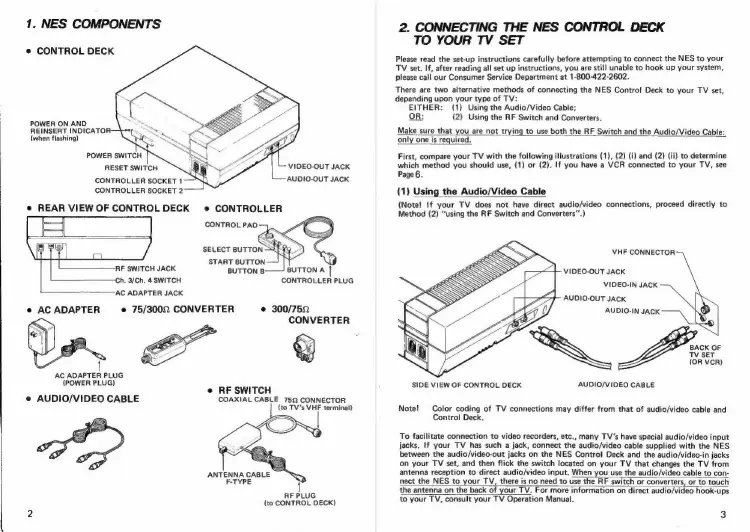
1.
NES
COMPONENTS
e
CONTROL
DECK
POWER
ON
AND
REINSERT
INDICATOR
(when
flashing)
VIDEO-OUT
JACK
AUDIO-OUT
JACK
RESET
SWITCH
CONTROLLER
SOCKET
1
CONTROLLER
SOCKET
2
e
REAR
VIEW
OF
CONTROL
DECK
e
CONTROLLER
CONTROL
PAD
SELECT
BUTTON
START
BUTTON
RF
SWITCH
JACK
BUTTON
B.
BUTTON
A
————
Ch,
3/Ch.
4
SWITCH
CONTROLLER
PLUG
AC
ADAPTER
JACK
e
75/3002
CONVERTER
e@
300/752
CONVERTER
e
AC
ADAPTER
AC
ADAPTER
PLUG
(POWER
PLUG)
@
AUDIO/VIDEO
CABLE
e
RF
SWITCH
COAXIAL
CABLE
752
CONNECTOR
{to
TV's
VHF
terminal)
ANTENNA
CABLE
F-TYPE
1
RF
PLUG
{to
CONTROL
DECK)
2.
CONNECTING
THE
NES
CONTROL
DECK
TO
YOUR
TV
SET
Please
read
the
set-up
instructions
carefully
before
attempting
to
connect
the
NES
to
your
TV
set.
If,
after
reading
all
set
up
instructions,
you
are
still
unable
to
hook
up
your
system,
please
call
our
Consumer
Service
Department
at
1-800-422-2602.
There
are
two
alternative
methods
of
connecting
the
NES
Control
Deck
to
your
TV
set
depending
upon
your
type
of
TV:
EITHER:
(1)
Using
the
Audio/Video
Cable;
OR:
{2)
Using
the
RF
Switch
and
Converters.
Make
sure
that
you
are
not
trying
to
use
both
the
RF
Switch
and
the
Audio/Video
Cable:
only
one
is
required.
First,
compare
your
TV
with
the
following
illustrations
(1),
(2)
(i)
and
(2)
(ii)
to
determine
which
method
you
should
use,
(1)
or
(2).
If
you
have
a
VCR
connected
to
your
TV,
see
Page
6.
(1)
Using
the
Audio/Video
Cable
(Note!
!f
your
TV
does
not
have
direct
audio/video
connections,
proceed
directly
to
Method
(2)
“using
the
RF
Switch
and
Converters”’.)
VHF
CONNECTOR
VIDEO-OUT
JACK
VIDEO-IN
JACK
AUDIO-OUT
JACK
AUDIO-IN
JACK
(OR
VCR)
SIDE
VIEW
OF
CONTROL
DECK
AUDIO/VIDEO
CABLE
Note!
Color
coding
of
TV
connections
may
differ
from
that
of
audio/video
cable
and
Control
Deck.
To
facilitate
connection
to
video
recorders,
etc.,
many
TV's
have
special
audio/video
input
jacks.
If
your
TV
has
such
a
jack,
connect
the
audio/video
cable
supplied
with
the
NES
between
the
audio/video-out
jacks
on
the
NES
Control
Deck
and
the
audio/video-in
jacks
on
your
TV
set,
and
then
flick
the
switch
located
on
your
TV
that
changes
the
TV
from
antenna
reception
to
direct
audio/video
input.
When
you
use
the
audio/video
cable
to
con-
nect
the
NES
to
your
TV,
there
is
no
need
to
use
the
RF
switch
or
converters,
or
to
touch
the
antenna
on
the
back
of
your
TV.
For
more
information
on
direct
audio/video
hook-ups
to
your
TV,
consult
your
TV
Operation
Manual.
3

Related product manuals