EasyManua.ls Logo

Nintendo CONTROL DECK - Connecting NES to TV via RF Switch

Nintendo CONTROL DECK
13 pages
Print Icon
To Next Page IconTo Next Page
To Previous Page IconTo Previous Page
Loading...
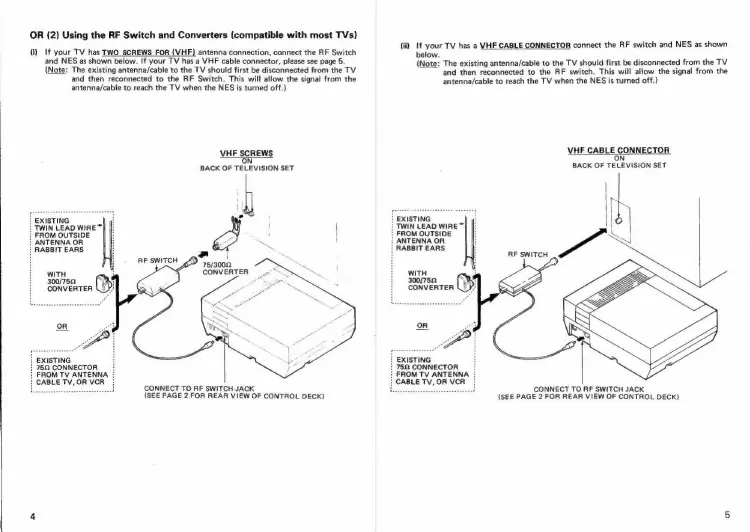
OR
(2)
Using
the
RF
Switch
and
Converters
(compatible
with
most
TVs)
(i)
If
your
TV
has
TWO
SCREWS
FOR
(VHF)
antenna
connection,
connect
the
RF
Switch
and
NES
as
shown
below.
If
your
TV
has
a
VHF
cable
connector,
please
see
page
5.
(Note:
The
existing
antenna/cable
to
the
TV
should
first
be
disconnected
from
the
TV
and
then
reconnected
to
the
RF
Switch.
This
will
allow
the
signal
from
the
antenna/cable
to
reach
the
TV
when
the
NES
is
turned
off.)
VHF
SCREWS
ON
BACK
OF
TELEVISION
SET
:
EXISTING
:
TWIN
LEAD
WIRE™
:
FROM
OUTSIDE
:
ANTENNA
OR
|
RABBIT
EARS
a
75/3002
CONVERTER
RF
SWITCH
SD
WITH
300/752,
CONVERTER
}
EXISTING
752
CONNECTOR
i
FROM
TV
ANTENNA
i
CABLE
TV,OR
VCR
CONNECT
TO
RF
SWITCH
JACK
{SEE
PAGE
2
FOR
REAR
VIEW
OF
CONTROL
DECK)
(ii),
If
your
TV
has
a
VHF
CABLE
CONNECTOR
connect
the
RF
switch
and
NES
as
shown
below.
(Note:
The
existing
antenna/cable
to
the
TV
should
first
be
disconnected
from
the
TV
and
then
reconnected
to
the
RF
switch.
This
will
allow
the
signal
from
the
antenna/cable
to
reach
the
TV
when
the
NES
is
turned
off.)
VHE
CABLE
CONNECTOR
IN
BACK
OF
TELEVISION
SET
TWIN
LEAD
WIRE~
ROM
OUTSIDE
NTENNA
OR
ABBIT
EARS
RF
SWITCH
WITH
300/752.
CONVERTER
|
EXISTING
}
75Q
CONNECTOR:
i
FROM
TV
ANTENNA
:
CABLETV,OR
VCR
:
CONNECT
TO
RF
SWITCH
JACK
(SEE
PAGE
2
FOR
REAR
VIEW
OF
CONTROL
DECK)

Related product manuals