EasyManua.ls Logo

Nintendo CONTROL DECK - NES System Component Connections; AC Adapter and Controller Hookup

Nintendo CONTROL DECK
13 pages
Print Icon
To Next Page IconTo Next Page
To Previous Page IconTo Previous Page
Loading...
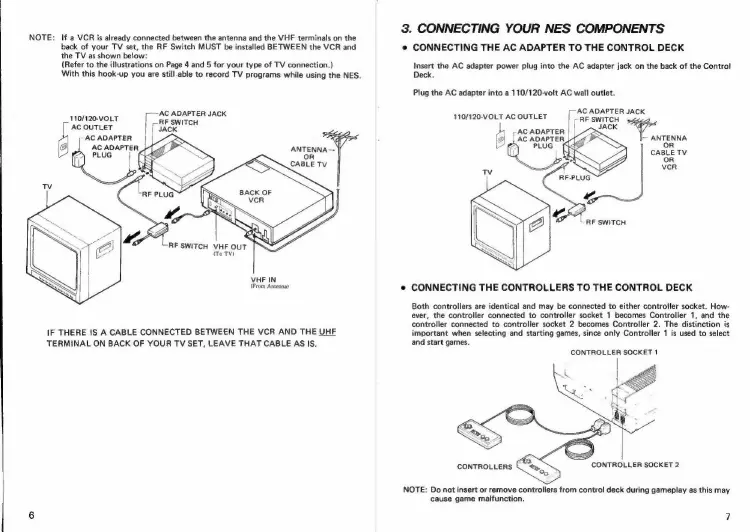
NOTE:
If
a
VCR
is
already
connected
between
the
antenna
and
the
VHF
terminals
on
the
back
of
your
TV
set,
the
RF
Switch
MUST
be
installed
BETWEEN
the
VCR
and
the
TV
as
shown
below:
(Refer
to
the
illustrations
on
Page
4
and
5
for
your
type
of
TV
connection.)
With
this
hook-up
you
are
still.able
to
record
TV
programs
while
using
the
NES.
;—~AC
ADAPTER
JACK
110/120-VOLT
RF
AC
OUTLET
ce
AC
ADAPTER
|
AC
ADAPTER
ANTENNA--
PLUG
j
(|
OR
CABLE
Tv
“RF
SWITCH
VHF
OUT
(To
TV)
VHF
IN
(From
Antenna)
IF
THERE
IS
A
CABLE
CONNECTED
BETWEEN
THE
VCR
AND
THE
UHF
TERMINAL
ON
BACK
OF
YOUR
TV
SET,
LEAVE
THAT
CABLE
AS
IS.
3.
CONNECTING
YOUR
NES
COMPONENTS
¢
CONNECTING
THE
AC
ADAPTER
TO
THE
CONTROL
DECK
Insert
the
AC
adapter
power
plug
into
the
AC
adapter
jack
on
the
back
of
the
Control
Deck.
Plug
the
AC
adapter
into
a
110/120-volt
AC
wall
outlet.
j-AC
ADAPTER
JACK
RF
SWITCH
JACK
r-
RY
-
ANTENNA
:
oR
CABLE
TV
110/120-VOLT
AC
OUTLET
b
AC
ADAPTER
9
,
AC
ADAPTER
U
PLUG’
(|
Tv
“4
“RF
SWITCH
e
CONNECTING
THE
CONTROLLERS
TO
THE
CONTROL
DECK
Both
controllers
are
identical
and
may
be
connected
to
either
controller
socket.
How-
ever,
the
controller
connected
to
controller
socket
1
becomes
Controller
1,
and
the
controller
connected
to
controller
socket
2
becomes
Controller
2.
The
distinction
is
important
when
selecting
and
starting
games,
since
only
Controller
1
is
used
to
select
and
start
games.
CONTROLLER
SOCKET
1
CONTROLLERS
CONTROLLER
SOCKET
2
“<
NOTE:
Do
not
insert
or
remove
controllers
from
control
deck
during
gameplay
as
this
may
cause
game
malfunction.

Related product manuals