EasyManua.ls Logo

Nintendo CONTROL DECK - Operating the Nintendo Entertainment System; Starting a Game and Game Pak Insertion; Safe Game Pak Swapping Procedures

Nintendo CONTROL DECK
13 pages
Print Icon
To Next Page IconTo Next Page
To Previous Page IconTo Previous Page
Loading...
4.
OPERATING
YOUR
NES
e@
TO
START
PLAY
1.
Turn
your
television
on
to
Channel
3.
Note:
If
Channel
3
is
broadcasting
in
your
area
and
interfering
with
the
game,
set
the
television
and
the
switch
on
the
back
of
the
Control
Deck
to
Channel
4.
2.
If
your
TV
has
an
automatic
fine
tuning
contro!
(AFC),
turn
it
off.
(Use
the
manual
fine
tune
dial
to
adjust
the
picture
after
inserting
the
game
pak
as
described
below).
Note:
If
you
have
a
color
TV
that
turns
black
and
white
when
the
AFC
is
turned
off,
leave
the
AFC
on.
3.
Make
sure
that
the
power
switch
on
the
Control
Deck
is
off.
CAUTION!!
ALWAYS
MAKE
SURE
THAT
THE
POWER
SWITCH
ON
THE
CONTROL
DECK
IS
OFF
BEFORE
INSERTING
OR
REMOVING
A
GAME
PAK!!
ALWAYS
CHECK
THE
GAME
PAK
EDGE
CONNECTOR
FOR
FOREIGN
MATERIAL
BEFORE
INSERTING
THE
GAME
PAK
INTO
THE
CONTROL
DECK!!
4,
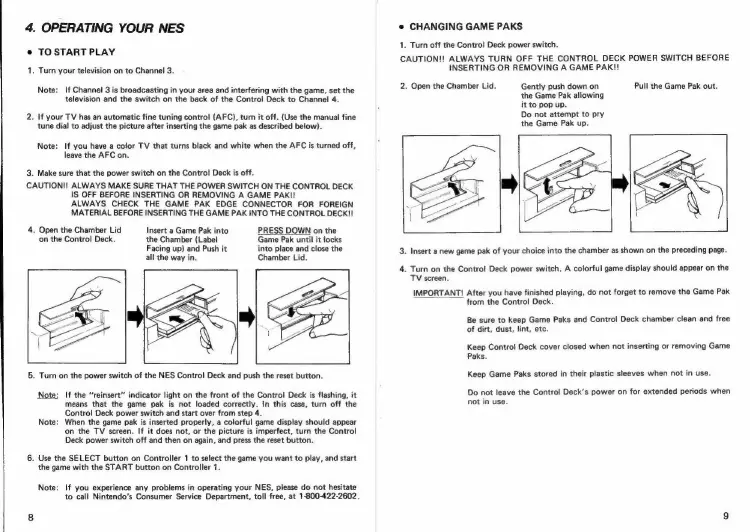
Open
the
Chamber
Lid
on
the
Control
Deck.
Insert
a
Game
Pak
into
the
Chamber
(Label
Facing
up)
and
Push
it
all
the
way
in.
PRESS
DOWN
on
the
Game
Pak
until
it
locks
into
place
and
close
the
Chamber
Lid.
5.
Turn
on
the
power
switch
of
the
NES
Control
Deck
and
push
the
reset
button.
ote:
If
the
“reinsert”
indicator
light
on
the
front
of
the
Control
Deck
is
flashing,
it
means
that
the
game
pak
is
not
loaded
correctly.
In
this
case,
turn
off
the
Control
Deck
power
switch
and
start
over
from
step
4.
Note:
When
the
game
pak
is
inserted
properly,
a
colorful
game
display
should
appear
on
the
TV
screen.
If it
does
not,
or
the picture
is
imperfect,
turn
the
Control
Deck
power
switch
off
and
then
on
again,
and
press
the
reset
button.
6.
Use
the
SELECT
button
on
Controller
1
to
select
the
game
you
want
to
play,
and
start
the
game
with
the
START
button
on
Controller
1.
Note:
If
you
experience
any
problems
in
operating
your
NES,
please
do
not
hesitate
to
call
Nintendo’s
Consumer
Service
Department,
toll
free,
at
1-800-422-2602.
e
CHANGING
GAME
PAKS
1.
Turn
off
the
Control
Deck
power
switch.
CAUTION!!
ALWAYS
TURN
OFF
THE
CONTROL
DECK
POWER
SWITCH
BEFORE
INSERTING
OR
REMOVING
A
GAME
PAK!!
2.
Open
the
Chamber
Lid.
Pull
the
Game
Pak
out.
Gently
push
down
on
the
Game
Pak
allowing
it
to
pop
up.
Do
not
attempt
to
pry
the
Game
Pak
up.
3.
Insert
a
new
game
pak
of
your
choice
into
the
chamber
as
shown
on
the
preceding
page.
4.
Turn
on
the
Control
Deck
power
switch.
A
colorful
game
display
should
appear
on
the
TV
screen.
IMPORTANT!
After
you
have
finished
playing,
do
not
forget
to
remove
the
Game
Pak
from
the
Control
Deck.
Be
sure
to
keep
Game
Paks
and
Control
Deck
chamber
clean
and
free
of
dirt,
dust,
lint,
etc.
Keep
Control
Deck
cover
closed
when
not
inserting
or
removing
Game
Paks.
Keep
Game
Paks
stored
in
their
plastic
sleeves
when
not
in
use.
Do
not
leave
the
Control
Deck’s
power
on
for
extended
periods
when
not
in
use.

Related product manuals