10
9
Description of Accessories (When using
Game Paks for the Game Boy Advance)
• You cannot change the screen colour during the game.
• Once you change the screen colour, you cannot change it while the power is turned ON.
If you want to change the screen colour, turn the power OFF and turn it ON again.
• The screen colour can’t be changed when you’re using Game Paks for Game Boy Advance,
Game Boy Color, or dual mode Game Pak for Game Boy & Game Boy Color.
• Some of the selected colour patterns may cause a problem displaying the screen clearly.
ABOUT ACCESSORIES
You will enjoy a wider range of functions while using accessories designed for Game Boy
Advance (each sold separately). You will find icons on the Game Paks and in the Instruction
Booklets indicating which accessories are supported.
NOTE: Please see the Instruction Booklets for how to use each accessory properly.
CONNECTING A GAME BOY ADVANCE
GAME LINK CABLE (AGB-005) TO YOUR GAME BOY ADVANCE
The Game Boy Advance Game Link cable (AGB-005) can only be used with Game Paks designed
for Game Boy Advance when playing a Multi-Player game on the Game Boy Advance hardware.
Connect the Game Boy Advance Game Link cable with the External Extension Connector.
NOTE: Use of this cable with Game Boy Series Game Paks may cause loss of game infor-
mation.
You can also use other accessories licensed by Nintendo that are connected to the Game Pak
Slot. Please see the individual accessory Instruction Booklet for details.
NOTE: When using Game Paks designed for Game Boy Advance, ONLY connect Game Boy
Advance accessories to the External Extension Connector. Otherwise the Game Boy Advance
unit or accessories might not function properly and thus cause a malfunction.
11
7
8
Changing Screen Colours on Original Game Paks
STARTING A GAME
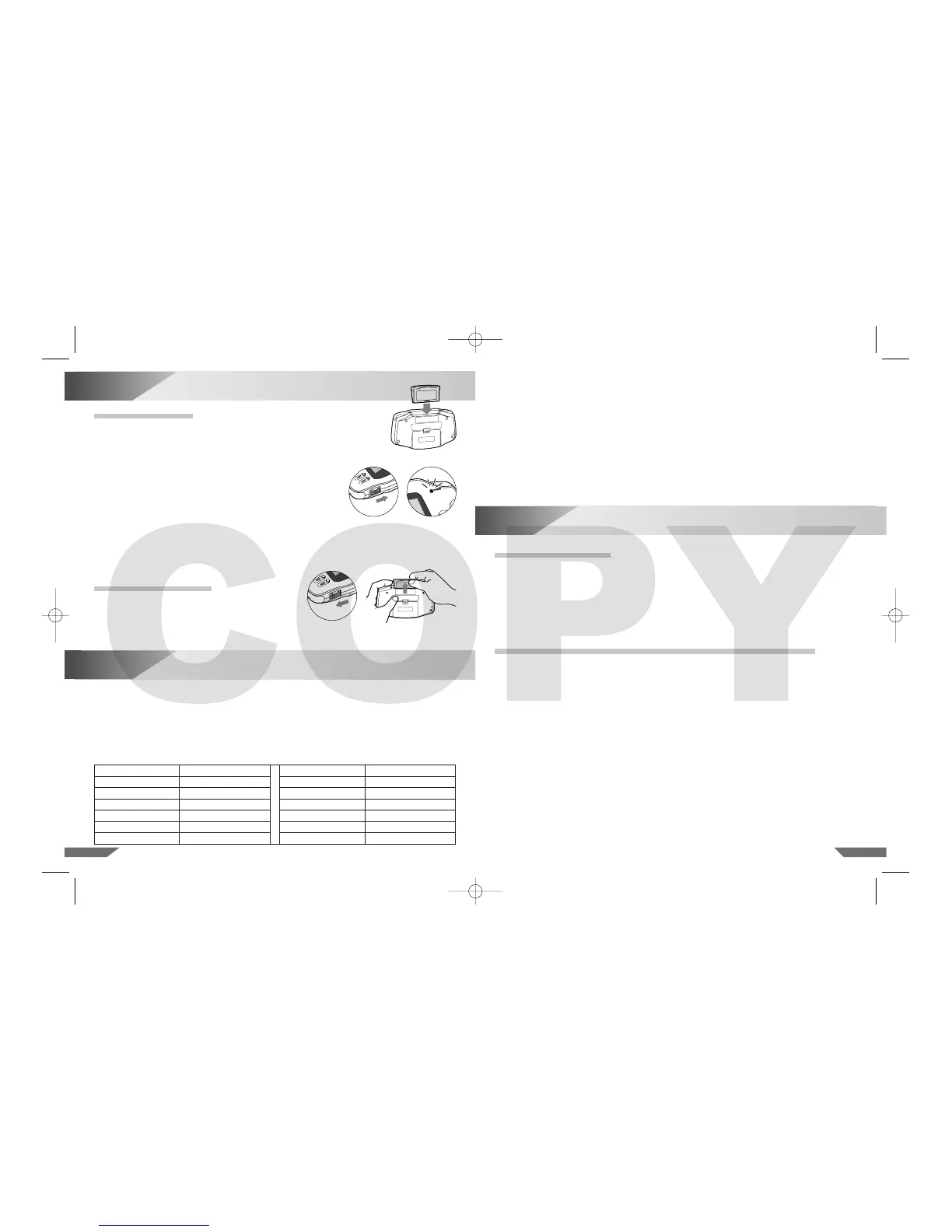
1. Insert a Game Pak into the Game Pak Slot in the back of the Game Boy
Advance. The label should face away from the Game Boy Advance when
inserting. (See illustration 2.)
2. Turn the power ON. The Power Indicator LED will light up. (See
illustration 3 and 4.)
3. The screen displays the “GAME BOY” logo. Before starting the
game, always make sure you read the Game Pak Instruction
Booklet for the game you are playing.
NOTE: To get maximum picture brightness on your Game Boy
Advance, be sure to play in a well-lit area. Natural sunlight near
a window works well, as does playing near a lamp, etc. A light source that is above or
behind the player will maximize the brightness of the game. Try holding the Game Boy
Advance at different viewing angles for optimum screen reflection.
REMOVING GAME PAK
1. Turn the power OFF (see illustration 5).
2. Cautiously take the Game Pak out of the Game
Pak Slot (see the illustration 6).
Illustration 2










 To Next Page