SYSTEM OPERATIONSYSTEM OPERATION
SYSTEM OPERATIONSYSTEM OPERATION
5 6
7
8
When using a Nintendo GameCube Controller to play your
Game Boy Game Paks, it can be plugged into any of the
Controller Sockets on the front of the console. See the table
below for equivalent Game Boy game control functions.
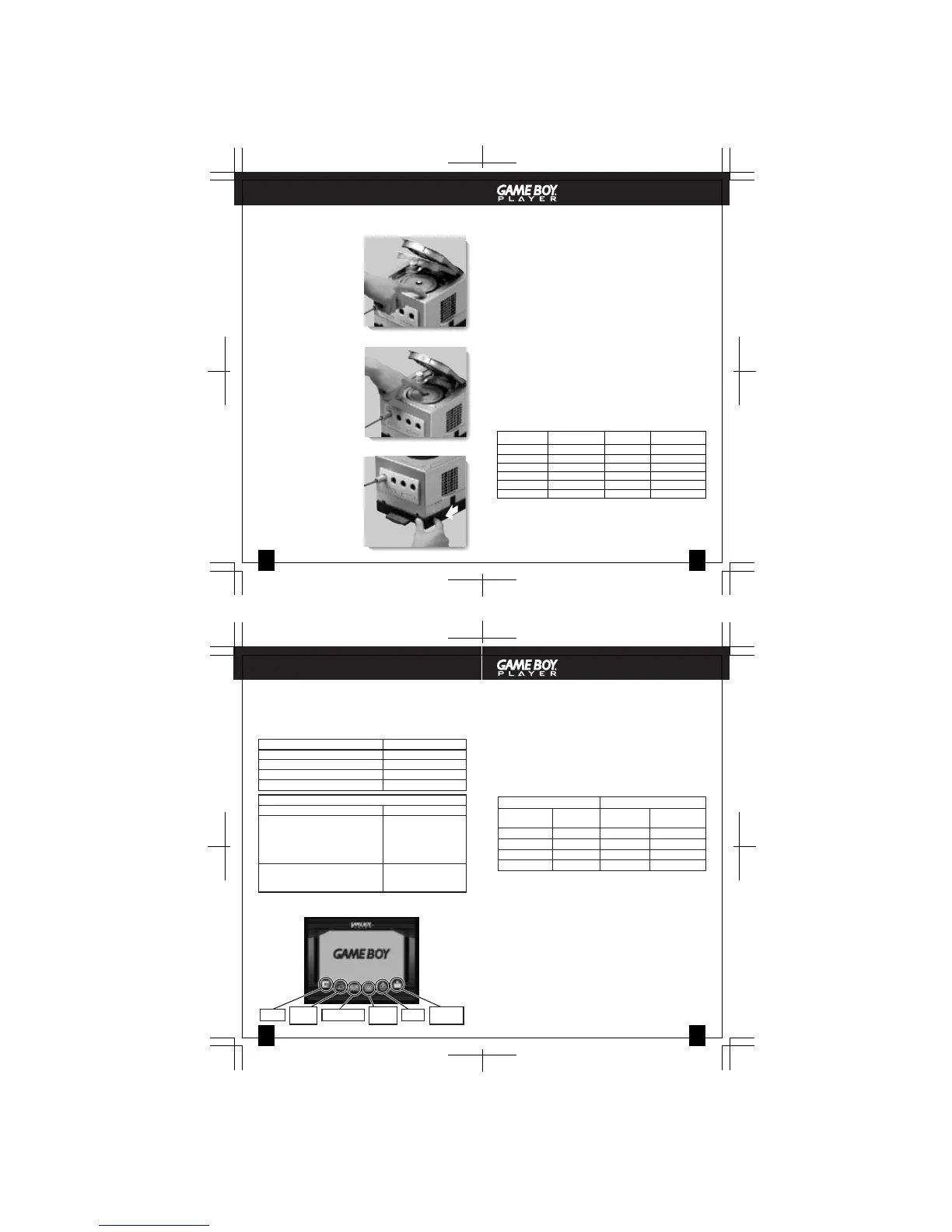
1. While the power is ON,
push the Open Button to
open the Disc Cover of
the Nintendo GameCube.
NOTE: If the Disc Cover is
opened after the power is
turned OFF, the Start-up Disc
may still be spinning. If this
happens, wait until the disc
stops spinning before
removing it from the console.
2. Push the Disc Release
Button and remove the
Start-up Disc from the
console.
3. Close the Disc Cover and
turn OFF the power.
4. Slide the Game Pak
Ejector towards the front
of the Nintendo GameCube
to eject the Game Pak.
NOTE: To keep out dirt, dust
or other foreign material,
keep a Game Pak plugged
into the Game Boy Player
when not being used.
IMPORTANT:
• A few original Game Boy Game Paks may have
display
or sound problems if used with the Game Boy
Player.
• Motion sensor (tilt feature), rumble feature and
infrared feature Game Paks will not work with in the
Game Boy Player.
1. You can adjust the screen size for original Game Boy and
Game Boy Color Game Paks by pressing the L and R
Buttons on your GameCube Controller or Game Boy
Advance system. (This may make some of the images
distorted or hard to see.) The screen size is not
adjustable with Game Boy Advance Game Paks.
2. There are 12 different color palettes that can be used with
original monochrome Game Boy games. To set the color,
you must press up, down, left or right with the Control
Stick or + Control Pad and the A or B Button (see table
below). This must be done while the Game Boy
logo appears on the TV screen right after you turn the
power ON.
REMOVING THE START-UP DISC AND
GAME BOY GAME PAK
USING GAME BOY GAME PAKS WITH THE
GAME BOY PLAYER
USING A NINTENDO GAMECUBE CONTROLLER
The Menu Screen can only be accessed by pressing the
Z Button on the Nintendo GameCube Controller.
Frame Select from 20 different frame designs that
border the game play area of the screen.
Screen Size
Select Normal or Full display screen size.
Controller Select between two sets of button functions for
the X, Y, L and R Buttons and the C Stick. See
the table below for the equivalent Game Boy
game control functions:
Setting 1 Setting 2
Controller Game Boy Controller Game Boy
Advance Advance
X/Y Buttons SELECT X Button R Button
L Button L Button Y Button L Button
R Button R Button L/R Buttons SELECT
C Stick Not used C Stick + Control Pad
Screen Filter Select Soft, Normal or Sharp display quality.
On some games, images may flicker, shake, or appear
doubled when scrolled across the screen. Try adjusting the
display quality settings to correct this. More information is
available at http://www.nintendo.com/gameboyplayer.jsp.
Timer You can set a timer to notify you with a sound
and message on the TV screen. The timer can
be canceled by pressing the B Button.
Change Select this option to change Game Paks without
Game Pak having to turn the power off.
You can also change Game Paks by pressing
and holding the Z Button and START/PAUSE on
the GameCube Controller.
IMPORTANT: Before changing a Game Pak, be sure to
save your game data if it has a save function.
GAME BOY PLAYER MENU SCREEN
UP BROWN
UP + A RED
UP + B DARK BROWN
DOWN PASTEL MIX
DOWN + A ORANGE
DOWN + B YELLOW
LEFT BLUE
LEFT + A DARK BLUE
LEFT + B GRAY
RIGHT GREEN
RIGHT + A DARK GREEN
RIGHT + B REVERSE
PRESS
COLOR PRESS COLOR
Nintendo GameCube Controller Game Boy Advance
Control Stick or + Control Pad + Control Pad
A Button A Button
B Button B Button
START/PAUSE START
Other Controller Button Functions
Z Button Menu Screen
X Button These buttons are
Y Button programmable, see
L Button the Menu Screen
R Button section on page 8.
C Stick (Controller option)
Z Button and START/PAUSE Change Game Paks
(Press and hold simultaneously) (Follow the on-screen
instructions)
Game Boy Player Menu Screen
(See descriptions of menu items on Page 8)
FRAME
SCREEN
SIZE
CONTROLLER
SCREEN
FILTER
TIMER
CHANGE
GAME PAK









 To Next Page