GBA Service Manual
Page 20
10.0 Accessories
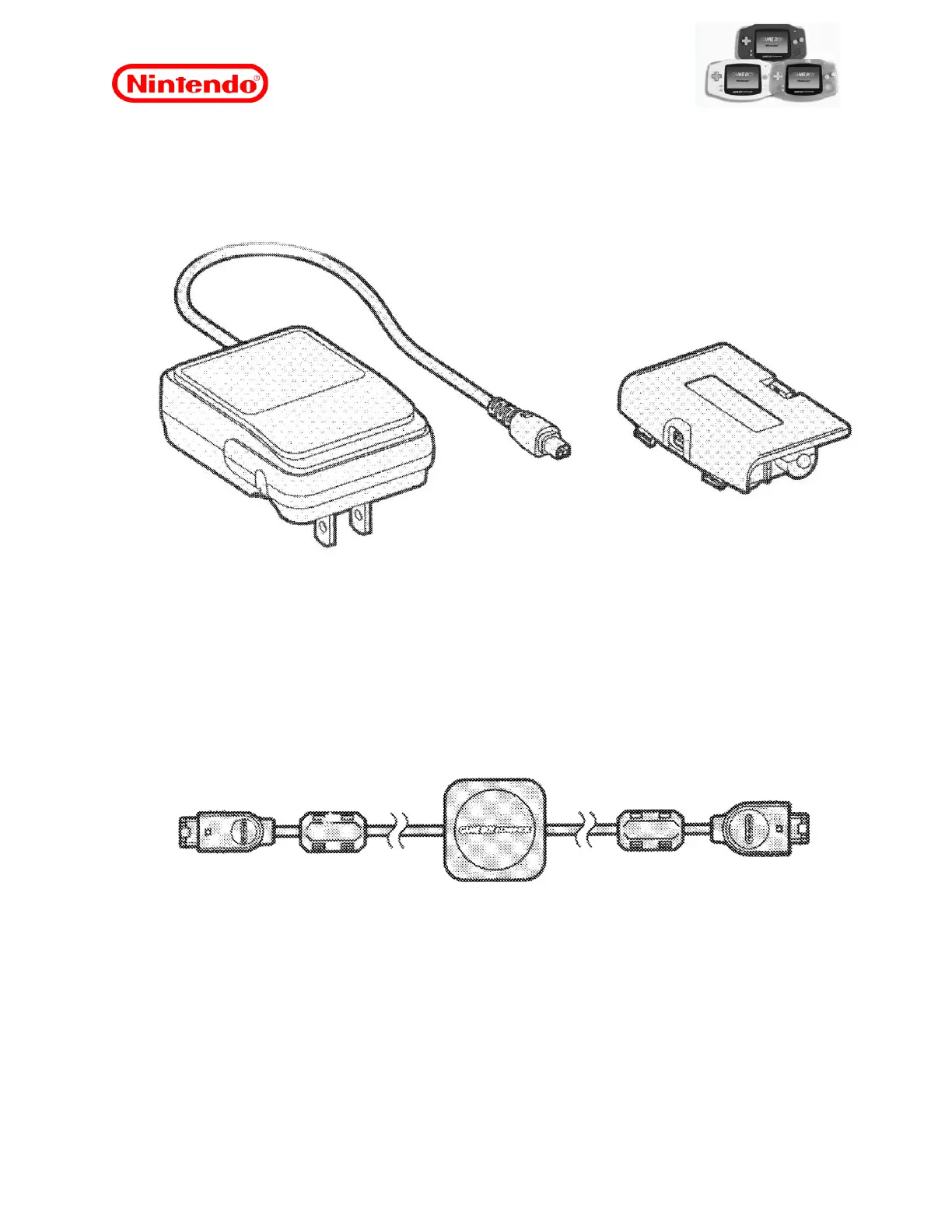
10.1 GBA AC adapter / Power connector
Figure 16
The GBA AC Adapter and power connector are maintenance-free parts. Do not
maintenance these parts as there will be no replacement components and they should be
exchanged for a new product. For out-of-warranty items, an accessory must be budgeted
new.
If the AC Adapter is not supplying power to the GBA, turn it off, disconnect the AC Adapter
from the outlet and leave without power for two minutes. After this time, plug the AC adapter
into the power outlet and turn on the GBA. If it does not turn on and is a unit known to be in
good working order, then the AC Adapter is defective and needs to be replaced.
10.2 GBA Game Link Cable
Figure 17
GBA Game Link Cable does not accept maintenance. Do not maintain this part as there will
be no replacement components and they must be replaced with a new product. To those out
of warranty a new accessory budget must be made.
Multiplayer gaming at GBA is possible using the Game Link Cable. Multiplayer mode can be
done in 2 ways, depending on how the game was designed.
Method 1 - Player 1 has a game cartridge in his GBA and players 2, 3, and / or 4 can
download the game to their respective GBAs.
Method 2 - All players have the same game cartridge in their GBA.










 To Next Page