10
CHARGING INSTRUCTIONS
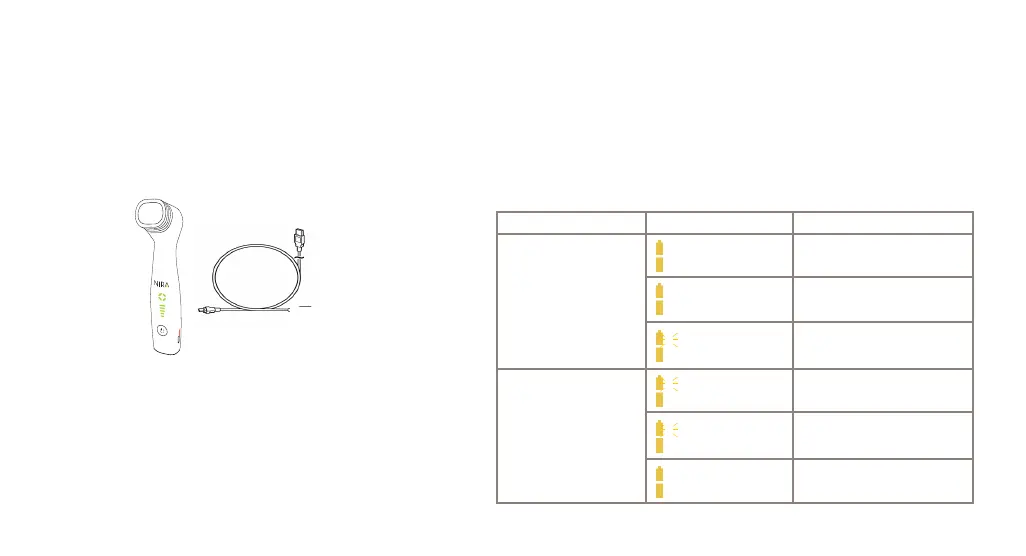
• First, connect the USB-C cable to the charging port of the device. Next connect the large end of the USB cable to a wall plug adaptor and plug into a wall
outlet. Battery indicator lights on the device will start to flash.
• Once the battery is fully charged, the battery indicator lights will stop flashing. It should take no longer than 3 hours to fully charge the device.
• A fully charged device will last approximately 40 mins of continuous use. This equates to 3 days of daily usage between charges. This time will vary with
• settings and will lessen as the battery ages.
• Your NIRA Pro will not work when it is plugged into the battery charger. Unplug your NIRA Pro to begin application.
Note: Application is disabled during charging.
Accessories:
Micro USB 2.0 Type C Cable, AC input 110 V/60 Hz (or 100-240 V/50-60
Hz) and DC output 5 V current 1 A or more Fixed Blade Wall Plug-in Power
Supply (not supplied in the SKU)
Charger State Battery Indicators Condition
Charger disconnected
Normal operation—Battery over
half charge
Normal operation—Battery less
than half charge
Very low charge. May stop
functioning.
Charger connected
Still charging. Less than half
charge.
Still charging. More than half
charge.
Charge complete.
Disconnect and use.
Top is OFF
Bottom is Blinking
Top is Blinking
Bottom is ON
Top is ON
Bottom is ON
Top is OFF
Bottom is Blinking
Top is OFF
Bottom is ON
Top is ON
Bottom is ON


 To Next Page