2
NIRA Pro
QUICK START
HOW TO USE
1
Wash & Dry Face
• Remove all makeup thoroughly.
• Cleanse your skin with your preferred skin cleanser.
• Dry your face completely before using this device.
2
Power On Device & Learn Reject Tone
• Turn on device by pressing the power button.
• Identify the reject tone: While holding the device in front
of you, briefly contact the device with your skin and
immediately lift the device away from your skin. You will
hear a low-pitched beep that indicates a rejection pulse.
• The rejection tone indicates that the device tip did not
have full contact with the skin. If you hear this tone, lift the
device tip and place on the skin making sure there is full
skin contact for the full cycle.
IMPORTANT: Read all instructions before first use.
CAUTION: Do not apply the device in the same spot twice in a row as the heat may build up
and you may feel discomfort.
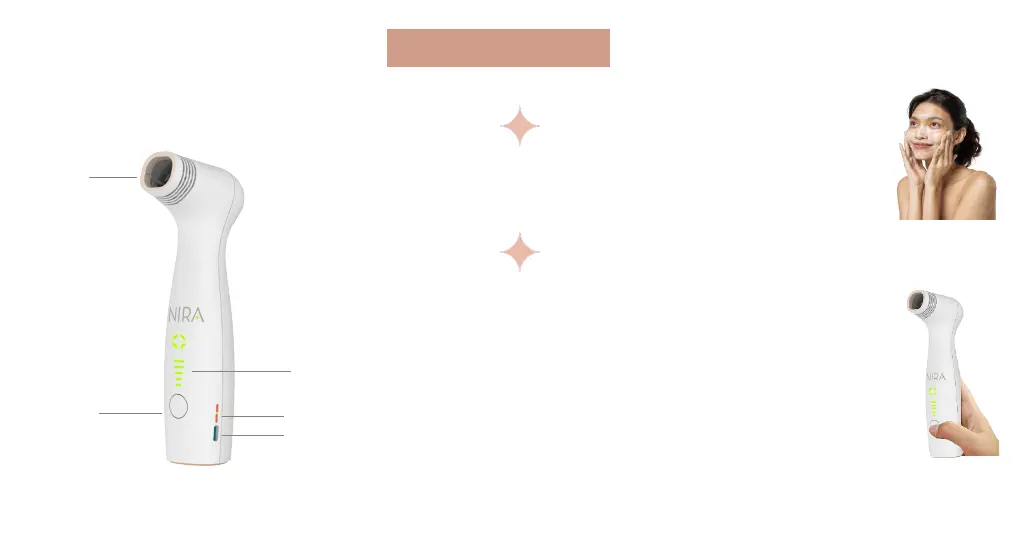
Power Level Indicator
Power Select
Button
Laser
Aperture
Battery Indicator
Charging Port


 To Next Page