3
Application
• Press and release the power button to adjust the power level. Set your
NIRA Pro to level 1. (see below)
• Place the device tip on the skin. The device will automatically fire the
laser once. You will hear a series of 2 beeps. The first beep indicates
the laser has begun firing. The second beep indicates the laser
finished firing for that one spot.
• Move the laser, repeat this process and continue to increase the
power level until you have reached a power level where you feel
warmth without pain.
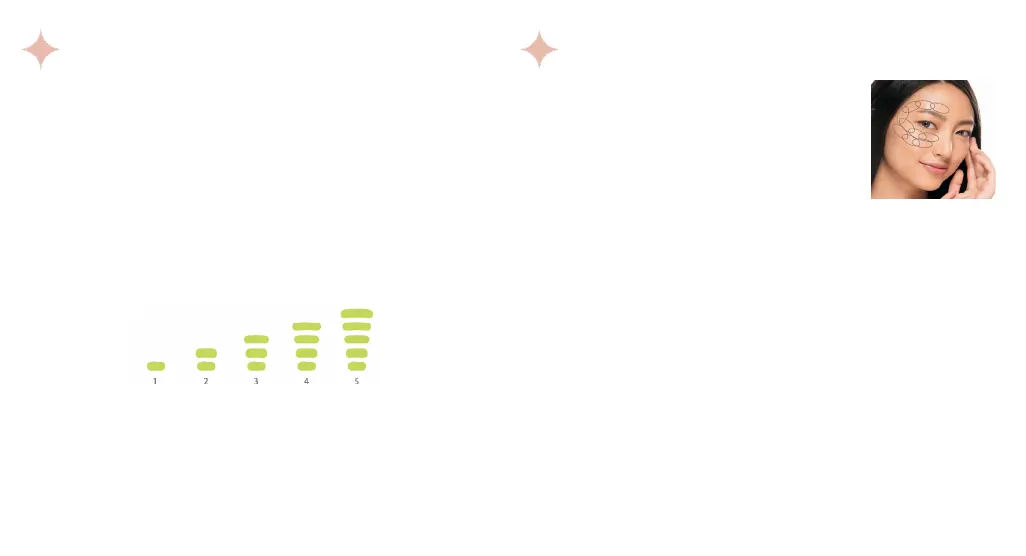
Find Your Ideal Power Level
3 4
CAUTION: Be sure to move the laser to a new spot for each pulse. If you apply to the
same spot twice in a row, the heat in your skin may build up to a point where you feel
discomfort or pain. This is not recommended and should be avoided.
Illustration of power levels from low to high
• Using the chosen power level, hold the device tip
against the skin beginning at the desired target area.
• Hold the device tip in place until you hear a series
of two beeps approximately one second apart
indicating that the pulse has been completed.
• Lift and move the laser so it is slightly overlapping
with the previous spot (See illustration for
overlapping application pattern).
• Follow the pattern shown in the illustration, repeat this process for 10
pulses on the desired target area. Once 10 successful pulses have been
completed, you will hear a set of three fast-paced jingle-like tones that
indicate the application for that area is complete.
• Repeat this process for all desired target areas.
• Power down the device by holding down the power button until the
power lights turn off. NIRA will automatically power down after 2
minutes without use.
• Continue with daily skincare regimen.
FOR BEST RESULTS:
Use the device daily according to the instructions for 90 days or more. You may use twice
daily for possible enhanced results. We recommend waiting 1 minute before reapplying to
each area. Do not apply more than twice within a 1-hour period.
Application pattern


 To Next Page