12
SERVICE AND MAINTENANCE
The device does not require assembly or regular maintenance. Never attempt to service it in any manner. If you have any
questions regarding servicing or maintenance, please call Dermal Photonics Corporation.
CLEANING AND DISINFECTION
The interior of the tip should be cleaned once a week with a cotton swab. Gently place the cotton swab into the opening on the Laser Aperture to clean the glass
lens and remove any debris. If debris has fallen into the laser output window and it will not come out using the cotton swab, gently shake the device to let the
debris fall out. Disinfect all surfaces with 70% alcohol solution between each use.
ENVIRONMENTAL CONDITIONS
NIRA Pro should be used in a comfortable environment.
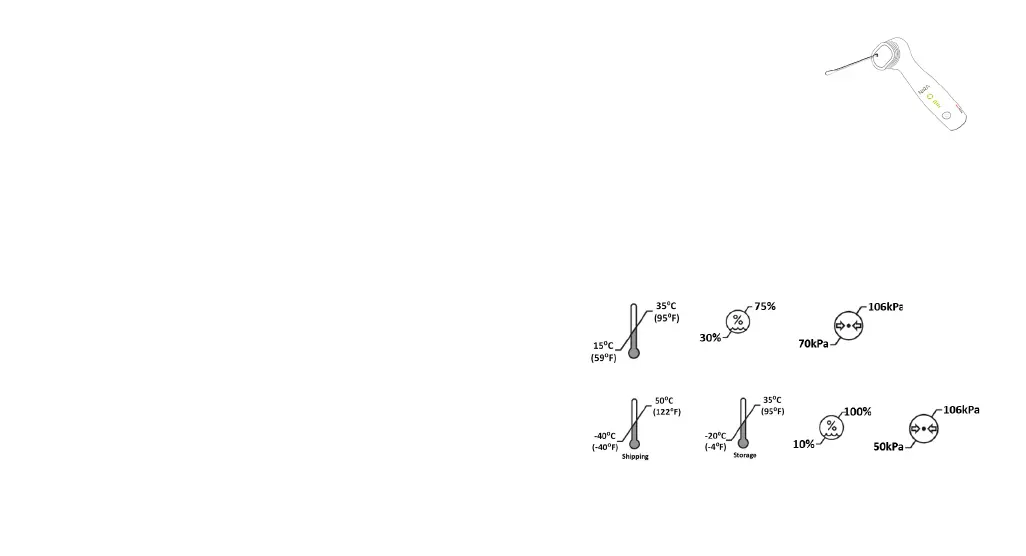
Temperature: 15°C to 35°C (59°F to 95°F)
Relative Humidity: 30-75%
Atmospheric Pressure: 70-106 kPa
REQUIRED SHIPPING AND STORAGE CONDITIONS
NIRA Pro should be stored in a dry place at normal room temperature.
Shipping Temperature: –40°C to 50°C (-40°F to 122°F)
Storage Temperature: –20°C to 35°C (-4°F to 95°F)
Relative Humidity: 10-100%
Atmospheric Pressure: 50-106 kPa


 To Next Page