Page 3
Wi-Fi Buddy share
The Nitesite R-camera module has Wi-Fi capability that is
automatically activated when the module is switched on. This
allows one user at a time to tune in and share the image that is
seen on the rifle mounted LCD Screen & illuminator module. The
range of the Wi-Fi capability is approximately 5-6meters if you
are viewing within a vehicle, or up to 10-12 meters in open areas
with a clear line of sight. To use the R-camera buddy share Wi-Fi
feature, first download the free NIteSite application to your device
via the App store or Google Play store. The name of the
application is NitePlayer. Once the application is downloaded
then the correct Wi-Fi option has to be selected on the viewing
device.(tablet or mobile phone) With the R-camera module
switched on, select the settings menu on the chosen viewing
device, then select the Wi-Fi options. The device will start to
search for the R-camera Wi-Fi. Wait until the NiteSite option
appears in the menu. Then select the NiteSite Wi-Fi option. Add
the password 12345678. Once selected leave the settings menu
and select the NitePlayer Application on the device. It will take a
few seconds for the R-camera module and the device to
synchronise so please be patient.
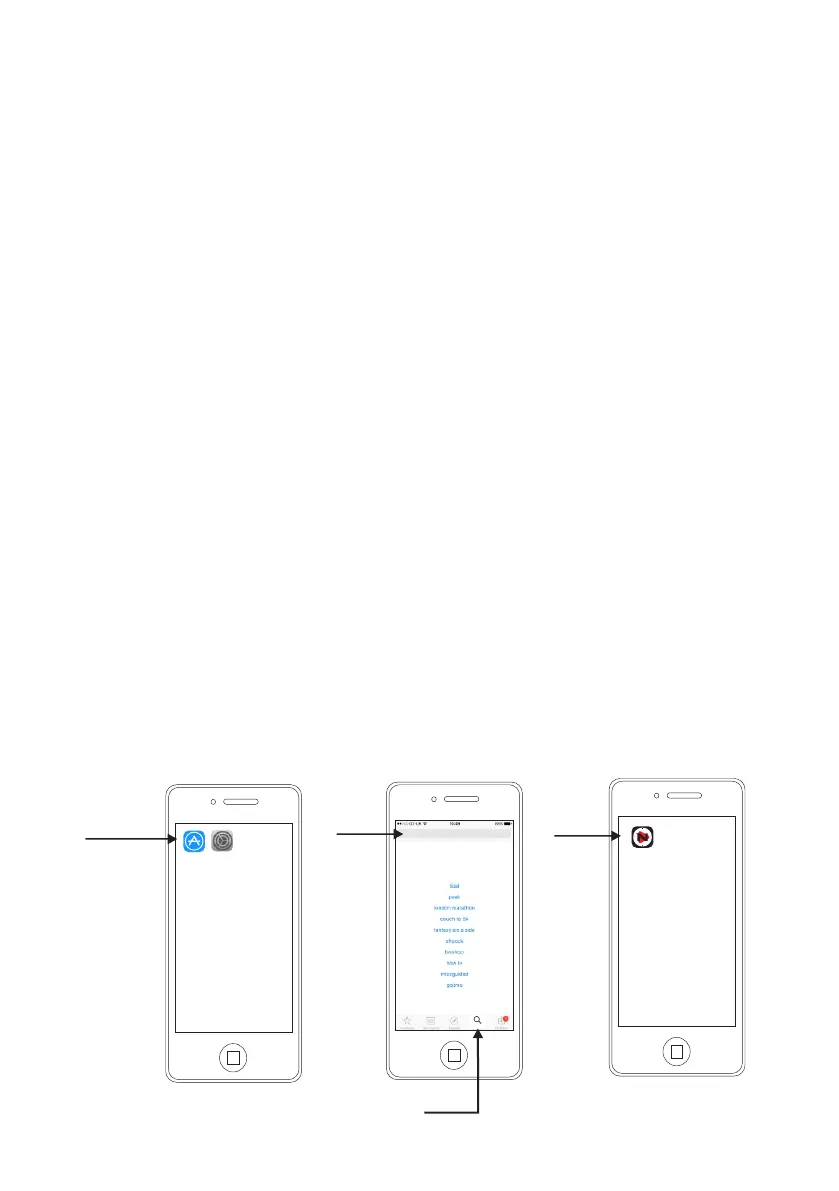
Downloading the iphone Application
R-Camera NitePlayer iOS platform
Settings
App Store
NitePlayer
App store
Search
Select
menu select
Trending Searches
Search
NitePlayer
Search for
NitePlayer
Select
NitePlayer
1
2
3



 To Next Page