Need help?
Do you have a question about the Nitrox OR600 and is the answer not in the manual?
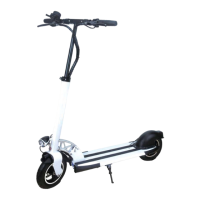
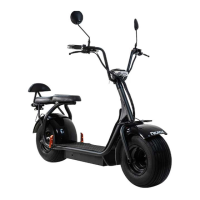
The Nitrox OR600 and OR2000 are electric scooters designed for personal transportation. They are intended for adults only, and children under the age of 16 should not use them. The scooters are not considered industrial machines but rather vehicles for individual transport.
Both models feature an aluminum alloy frame and 10-inch air tires. The OR600 has a maximum load of 120kg, a maximum speed of 20km/h (limited), and a gradeability of 20°. Its max range is 40-55km. The OR2000 shares the same max load, speed, and gradeability but offers a longer max range of 70-85km.
Brake System:
Weight and Dimensions:
Electrical System:
Suspension: Both models feature double front & double rear suspension with swingarm.
Display: Both models come with a Multicolor LCD display.
Lights: Both models are equipped with front, rear, and side lights.
Vibrations: The vibration value exposed to the hand-arm system is 2.5 m/s2. The measurement uncertainty is 0.5 m/s2. The vibration can be altered due to rough terrain, but this alteration will not depend on the scooter.
Airborne Noise: The A-weighted emission sound pressure level is 35 dB (A).
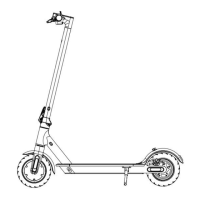
Main Parts: The scooter features an LCD display, lever lock for handlebar height adjustment, handlebar sleeve, brake wire, brake handle, throttle, front suspension, front light, front mudguard, front air tire, front disc brake (hydraulic on OR2000), front motor (OR2000), folding system, rear light, side lights, parking stand, rear motor, rear air tire, rear mudguard, rear disc brake (hydraulic on OR2000), and rear suspension.
First Assembling: The manual provides instructions for assembling the scooter, including tightening screws for the screen, accelerator, and brake lever. It also advises to loosen screws inside the handlebar sleeves when folded to prevent handlebar vibrations and shaking. Regular checks (every 2 months) are recommended to tighten nuts on the rear wheel of the motor to avoid vibrations.
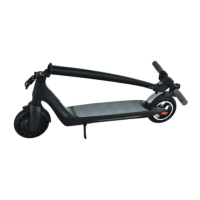
Folding/Unfolding: The scooter is designed with a folding system for portability and storage.
Display Functions (Home Screen): The LCD display shows:
Display Operation:
Parameter Settings: The display allows access to various settings:
Riding Operations:
Tyres: Nitrox scooters use rubber elastic tires. Check tires monthly for wear or punctures and replace them if needed. Contact the distributor for replacements. Inspect screws and tires every month, tightening any loose ones.
Battery: Equipped with a lithium polymer battery, with an average lifespan of 1000 cycles. Under normal use, the battery lifespan can reach more than 1000 cycles. Charge the battery to full before first use. Avoid totally depleting the battery; always make sure it is minimum 10% charged. For satisfactory vehicle performance, the battery should be charged minimum 50%. Do not leave the scooter with a significantly discharged battery for a few hours. Charge it promptly. For long periods, store the battery at 40-50% charged.
Charger: Use only the original Joyor charger. Do not leave the scooter in cold temperatures below 0 or under direct sun. Keep the battery dry. Negative environmental conditions can damage the battery. Lithium polymer batteries can be treated with extreme caution. Unappropriated charging, damage, or overheating can result in fire. Do not leave the scooter to charge without supervision. Do not leave the electric scooter to charge overnight. Always supervise the electric scooter while it is charging and avoid battery over-charge. Do not use, charge or leave a damaged battery unattended and follow the disposal protocols immediately.
The dedicated charger has a charging protection timing function. Charging Instructions: Open the charging port cover, insert the charger output connector, then plug the charger into a power socket (AC110V-220V). The charger light is red during charging and turns green when fully charged. Charge in a dry, ventilated environment.
General Recommendations: Check and adjust screws monthly. For professional or intensive use, change screws every 6 months. Frequently check and adjust the brakes.
Warranty Scope: This limited warranty covers defects in new Joyor devices for 24 months after the first retail purchase for electric parts (display, controller, motor, charger) against manufacturing defects on a replacement basis. The battery has a 12-month or 2000km warranty (whichever comes first) under normal installation, use, service, and maintenance. Coverage is for consumers purchasing from an authorized Joyor retailer or reseller and extends only to the original purchaser.
Warranty Limitations: The warranty does not cover problems caused by:
Warranty Application Process: Nitrox will not provide warranty coverage unless the claim complies with the warranty statement and the proper return procedure is followed. To request warranty service, contact Nitrox.


 To Next Page
 General