10 11
Step 5. To maintain an opmal baery charge, leave the UPS plugged
into an AC outlet at all mes.
Step 6. Before storing the UPS for an extended period of me, turn
the unit OFF. Then cover it and store it with the baeries fully charged.
Recharge the baeries every three months to ensure good baery
capacity and long baery life. Maintaining a good baery charge will help
prevent possible damage to the unit from baery leakage.
Step 7. The UPS has one USB port and one Serial port that allows
connecon and communicaon between the UPS and any aached
computer running the Power Master soware. The UPS can control the
computer’s shutdown during a power outage through the connecon
while the computer can monitor the UPS and alter various programmable
parameters.
NOTE: Only one communicaon port can be used at a me. The port not
in use will automacally become disabled or the serial port will be disabled if
both ports are aached.
Step 8. To avoid electric shock, turn the unit OFF and disconnect the
unit from ulity power before hardwiring the UPS (in/out power cord).
The in/out power cord MUST be grounded.
4.2 Soware installaon guide
Install soware: For opmal computer system protecon, install the UPS
monitoring soware from hp://www.powermonitor.soware/ to fully
congure UPS shutdown.
Operaons
5
English
Română
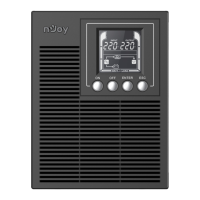
5.1 Buon operaon
Buon Operaon Descripon
ON
Press this buon to turn on UPS.
In line mode, ECO mode, or converter mode, press
the “ON” buon for 5 seconds to acvate the baery
test.
OFF Press this buon to turn o UPS.
ENTER
Press this buon for 5 seconds to get into seng
mode while in bypass mode, or standby mode.
In seng mode, press this buon to conrm
selecon, or press this buon for long me to exit
seng mode and saving changes.
Press this buon to scroll up in the LCD menu.
ESC
In seng mode, press this buon to display next
selecon, or press this buon for long me to exit
seng mode without saving changes.
Press the “ESC” buon for 5 seconds to disable and
enable buzzer alarm.
Press this buon to scroll down in the LCD menu.
ENTER + ESC
Switch to bypass mode: When the main power is
normal, press these two buons simultaneously for 5
seconds, then UPS will enter to bypass mode.



 To Next Page