8 9
• Cauon - risk of electric shock. Even aer the unit is disconnected
from the mains (building wiring outlet), components inside the UPS
system are sll connected to the baery and electrically live and
dangerous.
• Before carrying out any kind of service and/or maintenance,
disconnect the baeries and verify that no current is present and no
hazardous voltage exists in the terminals of high capability capacitor
such as BUS-capacitors.
• Only persons are adequately familiar with baeries and with the
required precauonary measures may replace baeries and supervise
operaons. Unauthorized persons must be kept well away from the
baeries.
• Cauon - risk of electric shock. The baery circuit is not isolated
from the input voltage. Hazardous voltages may occur between the
baery terminals and the ground. Before touching, please verify that
no voltage is present!
• Baeries may cause electric shock and have a high short-circuit
current. Please take the precauonary measures specied in this
manual and any other measures necessary when working with
baeries: remove wristwatches, rings and other metal objects, use
only tools with insulated grips and handles.
• When changing baeries, install the same number and same type of
baeries.
• Do not aempt to dispose of baeries by burning them. This could
cause baery explosion.
• Do not open or destroy baeries. Escaping electrolyte can cause
injury to the skin and eyes. It may be toxic.
• Please replace the fuse only with the same type and amperage in
order to avoid re hazards.
• Do not dismantle the UPS system.
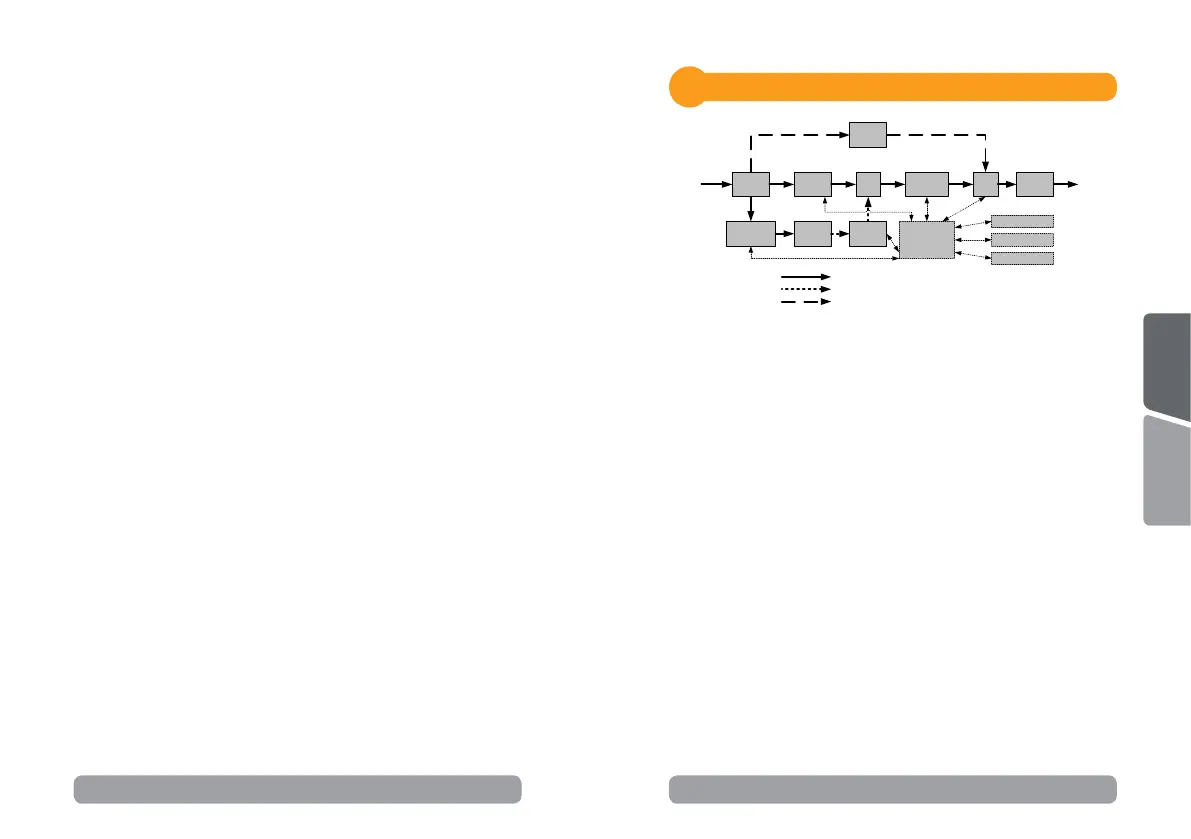
Output
Input
Filter
PFC
AC/DC
BUS
Inverter
DC/AC
INV
RY
Charger
AC/DC
Bypass
Battery
Output
Filter
Input
Line Mode
Battery Mode
Bypass Mode
Control
&
Monitoring
LCD Module
USB & DB9
SNMP Slot
DC/DC
Installaon
4
System block diagram
4.1 Hardware installaon guide
Step 1. Baery charge loss may occur during shipping and storage.
Before using the UPS, it’s strongly recommended to charge baeries for
four hours to ensure the baeries’ maximum charge capacity. To recharge
the baeries, simply plug the UPS into an AC outlet.
Step 2. Connect your computer, monitor and any externally-powered
data storage device (Hard drive, Tape drive, etc.) into the outlets only
when the UPS is o and unplugged. DO NOT plug a laser printer, copier,
space heater, vacuum, paper shredder or other large electrical device into
the UPS. The power demands of these devices will overload and possibly
damage the unit.
Step 3. Press the ON switch to turn the UPS on. If an overload is
detected, an audible alarm will sound and the UPS will connuously emit
one beep per second. For reseng the unit, unplug some equipment
from the outlets. Make sure your equipment carries a load current within
the unit’s safe range, (refer to the technical specicaons).
Step 4. This UPS is equipped with an auto-charge feature. When the
UPS is plugged into an AC outlet, the baery will automacally charge,
even when the unit is switched o.
English
Română



 To Next Page