EasyManua.ls Logo

Nobsound NS-04G - User Manual

Nobsound NS-04G
2 pages
Print Icon
To Next Page IconTo Next Page
Loading...
1. Before turning on the amp, please make sure the volume knob
at the leftmost end, avoid high volume ( high output power )
damaging your speakers.
2. Default OPTIONAL 19V power supply, whose output power is
enough to drive most home speakers. If you buy the version
without power supply or want higher output power, please
prepare high-quality power supply by yourself. Powered by 24V
power supply(4Ω load), the actual output power can reach 50W
or 100W per channel.
NS-04G / NS-04G PRO
50W*2 / 100W*2 Stereo Digital Power Amplifier
NOTICE
1. Please connect power adapter to the amplifier firstly and then
plug the power cord to the socket.
2. Connect audio device such as TV, CD player to the amp’s input
with high-quality RCA cable, and connect proper passive
speakers to amp’s output.
3. Clockwise rotate the knob to turn it on, then you can rotate
the volume knob to get proper volume and enjoy HiFi music.
HOW TO USE
PARAMETERS
1
Model
Max. output power
Chip
Op amp
Audio input
Audio output
Number of channel
THD
Frequency response
SNR
Input sensitivity
Speaker impedance
Matched loudspeakers
Working voltage
Default power supply(optional)
Dimensions(W*D*H)
Package dimensions(W*D*H)
Net weight
TL072
Stereo L/R RCA
Banana speaker jacks
2.0
≤0.1%(1KHz)
20Hz-20KHz
≥ 118dB
≤ 280mV
4Ω-8Ω
DC12-24V (5.5mm / 2.5mm)
19V
90*108*35mm / 3.54*4.25*1.37in
150*150*50mm / 5.91*5.91*1.97in
252g / 0.56lb
2
NS-04G PRO
100W+100W
TPA3116D2 ×2
NS-04G
50W+50W
TPA3116
3-8 inch 10-150W 3-10 inch 10-200W
Question and Answer IconNeed help?

Do you have a question about the Nobsound NS-04G and is the answer not in the manual?

Overview

This document describes the Nobsound NS-04G / NS-04G PRO Stereo Digital Power Amplifier, a device designed to amplify audio signals for passive speakers.

Function Description

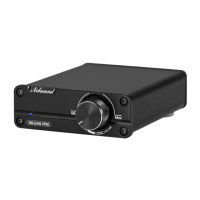
The Nobsound NS-04G / NS-04G PRO is a stereo digital power amplifier that takes an audio input and amplifies it to drive passive speakers. It supports both RCA audio input and banana speaker jack or bare wire output. The amplifier features a volume knob that also functions as a power switch. It is designed for various applications, including driving outdoor/bookshelf speakers, computer/desktop speakers, and ceiling speakers.

Important Technical Specifications

The amplifier comes in two main versions: NS-04G and NS-04G PRO, with differing power outputs and some component variations.

  • Max. Output Power:
    • NS-04G: 50W+50W
    • NS-04G PRO: 100W+100W
  • Chip:
    • NS-04G: TPA3116
    • NS-04G PRO: TPA3116D2 ×2
  • Op Amp: TL072
  • Audio Input: Stereo L/R RCA
  • Audio Output: Banana speaker jacks
  • Number of Channels: 2.0
  • THD (Total Harmonic Distortion): ≤0.1% (at 1KHz)
  • Frequency Response: 20Hz-20KHz
  • SNR (Signal-to-Noise Ratio): ≥ 118dB
  • Input Sensitivity: ≤ 280mV
  • Speaker Impedance: 4Ω-8Ω
  • Matched Loudspeakers:
    • NS-04G: 3-8 inch, 10-150W
    • NS-04G PRO: 3-10 inch, 10-200W
  • Working Voltage: DC12-24V (5.5mm / 2.5mm connector)
  • Default Power Supply (optional): 19V
  • Dimensions (WDH): 9010835mm / 3.544.251.37in
  • Package Dimensions (WDH): 15015050mm / 5.915.911.97in
  • Net Weight: 252g / 0.56lb

Usage Features

The device is designed for straightforward operation with a few important considerations:

  • Initial Setup:
    1. Always connect the power adapter to the amplifier first, then plug the power cord into the wall socket.
    2. Connect your audio source (e.g., TV, CD player, phone, MP3, PC/Mac/Computer) to the amplifier's RCA input using a high-quality RCA cable.
    3. Connect appropriate passive speakers to the amplifier's output using banana plugs or bare wire.
  • Power On/Off and Volume Control: Rotate the knob clockwise to turn the device on. Continue rotating to adjust the volume.
  • Volume Precaution: Before turning on the amplifier, ensure the volume knob is at its leftmost (minimum) position to prevent high volume or high output power from damaging your speakers.
  • Power Supply: The default optional 19V power supply is sufficient for most home speakers. For higher output power or if purchasing the version without a power supply, a high-quality 24V power supply is recommended. With a 24V power supply and 4Ω load, the actual output power can reach 50W or 100W per channel, depending on the model.

Maintenance Features (Troubleshooting Guide)

The manual provides a comprehensive troubleshooting guide for common issues:

  • Cannot Start Up:
    • Problem: Power adapter isn't connected. Solution: Connect power adapter or restart.
    • Problem: Power switch isn't pressed or toggled. Solution: Press or toggle power switch.
    • Problem: Power adapter is broken. Solution: Use another power adapter to check.
  • No Sound Output:
    • Problem: Audio source isn't connected or mute. Solution: Connect audio source or turn up volume.
    • Problem: Volume of amp is adjusted to minimum. Solution: Turn up volume.
    • Problem: Select incorrect input mode. Solution: Turn down the volume of amp.
    • Problem: Output shorted or speaker isn't matched. Solution: Check output or change matched speaker.
  • Noise:
    • Problem: Poor power adapter. Solution: Change to a high-quality power adapter.
    • Problem: Poor cables. Solution: Change to shielded audio/speaker cables.
    • Problem: Poor audio source. Solution: Use your mobile phone as a player to test.
    • Problem: Poor speakers. Solution: Change to high-quality matched speakers.
  • Bluetooth Can't Connect:
    • Problem: Searched and clicked wrong Bluetooth Name. Solution: Search for and click the correct Bluetooth Name.
    • Problem: Bluetooth has been paired by another device. Solution: Disconnect all devices and turn off Bluetooth.
    • Problem: Bluetooth input is prior and has been paired. Solution: Disconnect all devices and turn off Bluetooth.
  • LINE Input Can't Connect: (This section seems to be a duplicate of Bluetooth troubleshooting in the manual, suggesting a potential error in the source document. Assuming it refers to general LINE input issues if Bluetooth is not the primary input.)
  • Distortion:
    • Problem: Output power exceeds rated output. Solution: Turn down the volume of amp/preamp/source.
  • Stop Working After a While:
    • Problem: Exceeds rated output power. Solution: Turn down the volume of amp/preamp/source.

Contact Information:

For further assistance, the manufacturer provides the following contact details:
  • Address: Room 1329, Wang Cheng Building, Long Guan street, Long Hua new District, Shenzhen, Guang Dong, China
  • Contact Person: LIU CHENXI
  • Tel: +86-18570015672
  • Email: nobsound@doukaudio.com

Nobsound NS-04G Specifications

General IconGeneral
BrandNobsound
ModelNS-04G
CategoryAmplifier
LanguageEnglish

Related product manuals