Need help?
Do you have a question about the Nobsound NS-14G and is the answer not in the manual?
Crucial notices on volume control, power supply selection, and initial setup to prevent damage.
A systematic approach to diagnose and resolve audio noise issues by checking cables, connections, and components.
Comprehensive specifications including model, audio inputs/outputs, power ratings, impedance, SNR, THD, and dimensions.
Step-by-step instructions for connecting power adapters, speakers, and audio sources for wired and wireless inputs.
Guidance on switching between RCA and Bluetooth inputs and adjusting volume, bass, and treble for optimal sound.
Physical address, contact person, telephone number, and email for customer support and inquiries.
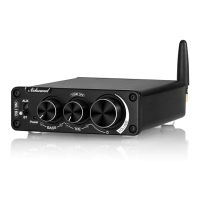
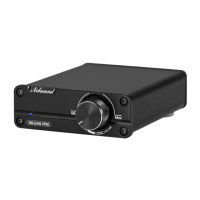
The Nobsound NS-14G, NS-14G BT5.0, and NS-14G PRO are versatile 2.1 channel stereo digital power amplifiers designed to enhance your audio experience. These amplifiers are capable of delivering a robust output, making them suitable for driving a variety of home speakers and subwoofers. With their compact design and user-friendly interface, they offer a convenient solution for both wired and wireless audio setups.
At its core, this device functions as a power amplifier, taking audio signals from various sources and amplifying them to drive passive speakers and subwoofers. It supports a 2.1 channel configuration, meaning it can power two main (left and right) speakers and one subwoofer, providing a full-range audio experience with enhanced bass.
The amplifier offers multiple input options to accommodate different audio sources. For wired connections, it features L/R RCA inputs, allowing you to connect devices such as TVs, CD players, PCs, Macs, Echo Dots, or turntables. This ensures compatibility with a wide array of existing audio equipment.
For those who prefer a wireless setup, the NS-14G BT5.0 and NS-14G PRO versions incorporate Bluetooth connectivity. This feature enables seamless streaming of audio from Bluetooth-enabled devices like smartphones and tablets, offering flexibility and convenience by eliminating the need for physical cables between your source device and the amplifier. The Bluetooth chip used in these versions ensures a stable and high-quality wireless connection.
The amplifier's output is designed to connect to passive speakers and subwoofers via banana speaker jacks, a common and reliable connection method in audio systems. This allows users to pair the amplifier with their preferred speakers, offering customization in their sound system.
Operating the Nobsound amplifier is straightforward, with a focus on user convenience and sound customization.
Before powering on the amplifier, it is crucial to ensure the volume knob is set to its leftmost (minimum) position. This precaution helps prevent potential damage to your speakers from sudden high-volume output. Once the volume is set, connect the power adapter to the amplifier first, and then plug the power cord into a wall socket. This sequence ensures a safe and proper power-up.
After powering up, connect your passive left and right speakers and your subwoofer to the amplifier's output terminals. The banana speaker jacks provide a secure connection for your audio components.
To use a wired audio source, rotate the main volume knob from the leftmost end. The power indicator will illuminate steadily, signaling that the amplifier is ready. Then, connect your audio device (e.g., TV, CD player) to the amplifier's L/R RCA input using a high-quality stereo RCA cable.
For wireless operation, ensure the main volume knob is at its leftmost position and the power indicator is steady. On your Bluetooth-enabled device (e.g., smartphone), search for the amplifier's Bluetooth signal and connect to it.
If you have one of the Bluetooth-enabled versions, you can easily switch between RCA input and Bluetooth input. A short press of the main volume knob will toggle between the two modes: a red indicator light signifies RCA input, while a blue indicator light indicates Bluetooth input.
The amplifier provides comprehensive controls for fine-tuning your audio output:
By utilizing these controls, you can tailor the sound to your personal preferences and optimize it for different types of music or media, ensuring a more delicate and enjoyable listening experience.
The amplifier is designed to be flexible with its power supply. While a default 19V power supply is typically sufficient for most home speakers, users seeking higher output can opt for a 24V power supply. When powered by a 24V supply with a 4Ω load, the amplifier can achieve its maximum rated output power per channel. If you purchase the version without a power supply or desire enhanced performance, it is recommended to use a high-quality power supply to ensure optimal operation.
Maintaining the Nobsound amplifier involves understanding potential issues and implementing simple troubleshooting steps to ensure consistent performance and longevity.
Noise in an audio system can stem from various sources, including poor audio cables, sound sources, speakers, speaker cables, interference, poor contacts, or even the device itself. To diagnose and resolve noise:
By following these usage and maintenance guidelines, you can ensure your Nobsound NS-14G series amplifier provides a reliable and high-quality audio experience for years to come.
 General
| Frequency Response | 20Hz-20kHz |
|---|---|
| Output Impedance | 4-8Ω |
| Power Supply | DC 24V |
| Chipset | TPA3116D2 |
| SNR | ≥ 98dB |
| Input Mode | RCA |
| Output Power | 50W per channel |
| Input Impedance | 47kΩ |
| Impedance | 4-8Ω |
| THD | 0.1% |

 To Next Page