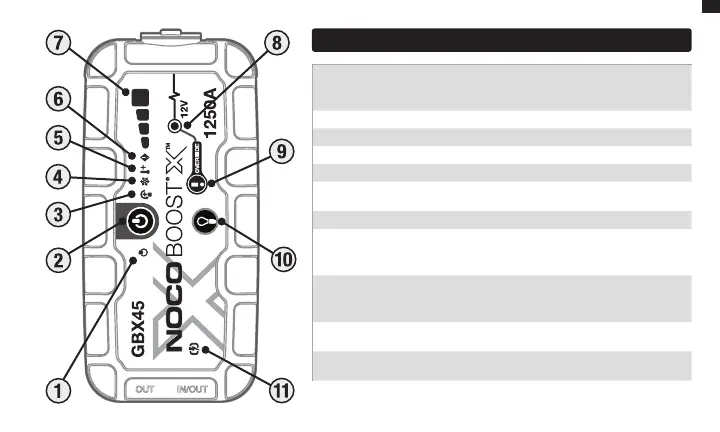
Interface
11. Fast Charge LED Illuminates white when fast charge is active. Fast charge LED turns
red (solid/blinking) when there is an error.
10. Light Mode Button Toggles the ultra-bright LED light through 7 light modes: 100%
> 50% > 10% > SOS > Blink > Strobe > O
9. Manual Override Button To enable, push and hold for three (3) seconds. WARNING:
Disables safety protection and manually forces Boost «On».Only for use when a
battery voltage is too low to be detected.
8. Boost LED Illuminates white when boost is active. If the unit is connected properly
to a battery, the GBX45 will automatically detect a battery and go into boost mode (LED
flashes white when manual override feature is active).
7. Internal Battery Level Indicates the charge level of the internal battery.
6. Error LED Blinks “on” and “o” in various sequences (from 1 to 6 blinks) to convey
error conditions.
5. Hot LED Illuminates solid or flashes red when internal temperature is too high.
4. Cold LED Illuminates solid or flashes blue when internal temperature is too low.
3. Reverse Polarity Error LED Illuminates red if reverse polarity is detected.
2. Power Button Push to turn unit “on” & “o” or restart boost after 60-second timeout.
1. Power LED Illuminates White when unit is “On”. Will illuminate orange after the
60-second timeout countdown until the clamps are removed from the Car Battery or the
GBX45 is power cycled ‘o’ and back ‘on’ again.
EN


 To Next Page