EasyManua.ls Logo

NOCO Genius GBX45 - User Manual

NOCO Genius GBX45
10 pages
Print Icon
To Next Page IconTo Next Page
Loading...
GBX45
www.no.co/support
User Guide & Warranty
DANGER
READ AND UNDERSTAND ALL SAFETY INFORMATION BEFORE USING THIS PRODUCT. Failure to
follow these safety instructions may result in ELECTRICAL SHOCK, EXPLOSION, FIRE, which
may result in a SERIOUS INJURY, DEATH, or PROPERTY DAMAGE.
Electrical Shock. Product is an electrical device that can shock and cause serious injury. Do not cut
power cords. Do not submerge in water or get wet.
Explosion. Unmonitored, incompatible, or damaged batteries can explode if used with product. Do not
leave product unattended while in use. Do not attempt to jump start a damaged or frozen battery. Use
product only with batteries of recommended voltage. Operate product in well ventilated areas.
Fire. Product is an electrical device that emits heat and is capable of causing burns. Do not cover
product. Do not smoke or use any source of electrical spark or fire when operating product. Keep
product away from combustible materials.
Eye Injury. Wear eye protection when operating product. Batteries can explode and cause flying debris.
Battery acid can cause eye and skin irritation. In the case of contamination of eyes or skin, flush aected
area with running clean water and contact poison control immediately.
Explosive Gases. Working in the vicinity of a lead-acid is dangerous. Batteries generate explosive
gases during normal battery operation. To reduce risk of battery explosion, follow all safety information
instructions and those published by the battery manufacturer and manufacturer of any equipment
intended to be used in the vicinity of battery. Review precautionary markings on these products and on
engine.
For more information and
support visit:
Question and Answer IconNeed help?

Do you have a question about the NOCO Genius GBX45 and is the answer not in the manual?

Summary

Safety Warnings and Dangers

Electrical Shock Hazard

Product is an electrical device that can shock and cause serious injury. Do not cut power cords or submerge.

Explosion Hazard

Unmonitored or damaged batteries can explode. Do not leave unattended or jump start frozen batteries.

Fire Hazard

Product emits heat and can cause burns. Do not cover, smoke, or use sparks near product.

Eye Injury and Acid Contamination

Wear eye protection. Battery acid causes irritation. Flush affected area with water and contact poison control.

Explosive Gases Warning

Batteries generate explosive gases. Follow all safety information and manufacturer instructions.

Important Safety Precautions

Manual Override Mode Risks

Disables safety measures, potentially causing injury or death. Use with caution.

General Charging and Storage Warnings

Do not overcharge. Charge in ventilated area. Store indoors. Not for commercial repair facilities.

Product Safety and Operation

Product Usage and Charging

Charging the GBX45

Charge fully before use via USB-C. Recharge time varies by power source and battery level.

Product Operation and Jump Starting

Connecting to the Vehicle Battery

Identify battery polarity. Connect red clamp to positive, black clamp to negative or chassis.

Jump Starting Procedure

Turn off vehicle loads. Press power button. White boost LED indicates proper connection.

Jump Starting Advanced Features

Low Voltage Battery Override

Feature allows jump starting batteries below 3-volts; disables safety protections. Use with extreme care.

Product Interface and Indicators

Manual Override Button

Enables boost for low voltage batteries, disabling safety features. Hold for 3 seconds.

Troubleshooting Common Errors

Reverse Polarity Error

Solid Red LED: Detected reverse polarity. Reverse battery connections.

Short Circuit Error

Single Flash: Short circuit detected. Remove loads, reconnect clamps.

Summary

Safety Warnings and Dangers

Electrical Shock Hazard

Product is an electrical device that can shock and cause serious injury. Do not cut power cords or submerge.

Explosion Hazard

Unmonitored or damaged batteries can explode. Do not leave unattended or jump start frozen batteries.

Fire Hazard

Product emits heat and can cause burns. Do not cover, smoke, or use sparks near product.

Eye Injury and Acid Contamination

Wear eye protection. Battery acid causes irritation. Flush affected area with water and contact poison control.

Explosive Gases Warning

Batteries generate explosive gases. Follow all safety information and manufacturer instructions.

Important Safety Precautions

Manual Override Mode Risks

Disables safety measures, potentially causing injury or death. Use with caution.

General Charging and Storage Warnings

Do not overcharge. Charge in ventilated area. Store indoors. Not for commercial repair facilities.

Product Safety and Operation

Product Usage and Charging

Charging the GBX45

Charge fully before use via USB-C. Recharge time varies by power source and battery level.

Product Operation and Jump Starting

Connecting to the Vehicle Battery

Identify battery polarity. Connect red clamp to positive, black clamp to negative or chassis.

Jump Starting Procedure

Turn off vehicle loads. Press power button. White boost LED indicates proper connection.

Jump Starting Advanced Features

Low Voltage Battery Override

Feature allows jump starting batteries below 3-volts; disables safety protections. Use with extreme care.

Product Interface and Indicators

Manual Override Button

Enables boost for low voltage batteries, disabling safety features. Hold for 3 seconds.

Troubleshooting Common Errors

Reverse Polarity Error

Solid Red LED: Detected reverse polarity. Reverse battery connections.

Short Circuit Error

Single Flash: Short circuit detected. Remove loads, reconnect clamps.

Overview

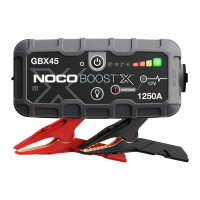
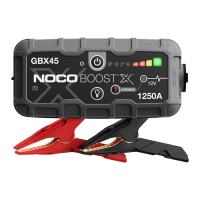
The NOCO BOOST X GBX45 is a portable jump starter and power bank designed for 12-volt lead-acid batteries. It is engineered to provide a powerful boost to start vehicles and also serves as a portable power source for charging USB devices.

Function Description:

The primary function of the GBX45 is to jump start 12-volt lead-acid batteries, even those discharged down to 3-volts. It features a manual override mode for extremely low-voltage batteries, though this mode disables safety protections like spark-proof and reverse polarity protection. The device also includes a USB-C IN/OUT port with Power Delivery 3.0 technology, allowing it to receive and deliver up to 60W of power. This enables fast charging of the internal battery and efficient charging of compatible USB-C devices like phones, laptops, and power banks. Additionally, it has a standard USB (Output) port for charging other USB devices. The GBX45 is equipped with an ultra-bright LED light offering seven light modes, including 100%, 50%, 10%, SOS, Blink, and Strobe, which can be useful in various situations.

Important Technical Specifications:

  • Internal Battery: 31Wh Lithium Ion
  • Peak Current Rating: 1250A
  • Operating Temperature: -20°C to +50°C
  • Charging Temperature: 0°C to +40°C
  • Storage Temperature: -20°C to +50°C (average temperature)
  • USB-C (In): 5V 1.5A/9V 3A/12V 3A/15V 3A/20V 3A
  • USB-C (Out): 5V 3A/9V 3A/12V 3A/15V 3A/20V 3A
  • USB (Output): 5VDC 2.1A Max / 10W Max
  • Housing Protection: IP65 (with ports closed), indicating protection against dust and water jets.
  • Cooling: Natural Convection
  • Dimensions (L x W x H): 6.8 x 3.3 x 2.1 Inches
  • Weight: 1.3 Pounds

Usage Features:

The GBX45 is designed for ease of use with several indicator LEDs and buttons.

  • Power LED: Illuminates white when on, orange after a 60-second timeout, and turns off when clamps are removed or power is cycled.
  • Power Button: Turns the unit on/off and restarts boost after a 60-second timeout.
  • Reverse Polarity Error LED: Illuminates red if reverse polarity is detected, indicating incorrect battery clamp connection.
  • Cold LED: Illuminates solid or flashes blue when the internal temperature is too low for optimal operation.
  • Hot LED: Illuminates solid or flashes red when the internal temperature is too high.
  • Error LED: Blinks in sequences (1 to 6 blinks) to convey various error conditions such as short circuit, high voltage, bad battery cell, charge timeout, or back-charge.
  • Internal Battery Level: A series of LEDs indicate the charge level of the internal battery (25%, 50%, 75%, 100%).
  • Boost LED: Illuminates white when boost is active, indicating the unit has detected a battery and entered boost mode. It flashes white when manual override is active.
  • Manual Override Button: Requires a three-second push and hold to enable. This feature disables safety protections and forces Boost "On," intended for use only when battery voltage is too low for automatic detection.
  • Light Mode Button: Toggles through the seven LED light modes.
  • Fast Charge LED: Illuminates white when fast charge is active (rate of charge exceeds 15W), indicating USB Power Delivery 3.0 is active. It turns red (solid/blinking) if there is a fast charge error.

To jump start a vehicle, users connect the battery clamps to the GBX45's 12V OUT port, then connect the positive (red) clamp to the positive battery terminal and the negative (black) clamp to the negative battery terminal or vehicle chassis. After ensuring all vehicle power loads are off, pressing the power button initiates the jump start sequence. A 60-second timeout countdown begins once a battery is detected. If the vehicle doesn't start immediately, a 20-30 second wait is recommended before trying again. The unit should not be used for more than five consecutive jump starts within a 15-minute period, with a 15-minute rest period recommended between attempts.

Charging the GBX45's internal battery is done via the USB-C IN/OUT port using the included USB-C charging cable. It can be recharged from any powered USB port, with faster charging achieved using a 60W USB-C Power Delivery 3.0 compatible charger. The charge LEDs indicate the charging progress, pulsing until fully charged, at which point the 100% LED turns solid green. Maintenance charging is indicated by a pulsing green 100% LED. The NOCO Auto Charger (not included) can also be used for fast charging when the vehicle is running.

Maintenance Features:

The device requires minimal maintenance. It should be cleaned and dried immediately if it comes into contact with liquid or contaminants, using a soft, lint-free (microfiber) cloth. Moisture should be avoided in openings. The internal lithium-ion battery is designed to be replaced only by NOCO and must be recycled separately from household waste. Users are advised not to attempt battery replacement themselves or handle damaged/leaking batteries. For optimal battery life, it's recommended to avoid charging the product for more than a week at a time and to disconnect it from power sources when not in use. The product should be stored in a dry location on a flat, secure surface, away from high concentrations of dust or airborne materials, and within the recommended storage temperature range. If the product becomes damaged, malfunctions, or comes into contact with any liquid, discontinue use and contact NOCO support. Any modifications to the product will void the warranty.

NOCO Genius GBX45 Specifications

General IconGeneral
BrandNOCO Genius
ModelGBX45
CategoryRemote Starter
LanguageEnglish

Related product manuals