Need help?
Do you have a question about the Nokia 125 2020 and is the answer not in the manual?
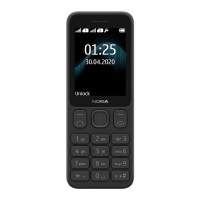
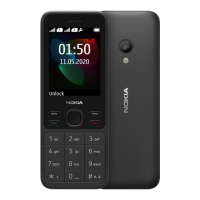
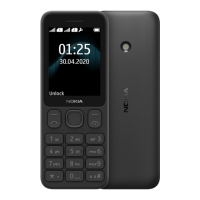
The Nokia 125 (2020) is a mobile phone designed for straightforward communication and basic functionalities, presented with a user-friendly interface. This user guide provides comprehensive instructions for setting up, operating, and maintaining the device, ensuring a smooth experience for its users.
The Nokia 125 (2020) primarily serves as a reliable communication tool, allowing users to make and receive calls and send text messages. It supports dual SIM cards, enabling users to manage two different phone numbers simultaneously, which can be beneficial for separating personal and professional contacts or for utilizing different network providers. The device includes essential features such as a contacts list for storing phone numbers, an alarm clock for reminders, a calendar for organizing events, and a calculator for basic arithmetic. For entertainment, it offers an FM radio, allowing users to listen to their favorite stations on the go. A built-in flashlight provides practical utility in low-light conditions. The phone's core design emphasizes ease of use, making it suitable for individuals who prefer a simple and dependable mobile experience without the complexities of advanced smartphones.
Getting started with the Nokia 125 (2020) is designed to be intuitive. The phone's physical keys and parts are clearly labeled, facilitating easy navigation. To begin, users need to insert a mini SIM card into the designated slot, and if applicable, a second SIM card into the SIM2 slot. The device is powered on by pressing and holding the Power/End key. Charging the phone is a simple process involving connecting the charger to a wall outlet and then to the phone. The battery comes partially charged from the factory, but a full charge is recommended before initial use. USB charging is also an option when a wall outlet is unavailable, though its efficiency may vary.
The keypad is the primary interface for interaction. Users can access applications and features by selecting "Menu" from the home screen and then navigating with the scroll key. The scroll key also allows for adjusting the phone's volume. A convenient flashlight feature can be activated by pressing the scroll key up twice and turned off by pressing it once. To prevent accidental key presses, the keypad can be locked and unlocked using specific key combinations.
Making calls is straightforward: users type in the desired phone number, including the '+' character for international calls by pressing '*' twice, and then press the call key. If two SIM cards are active, the user will be prompted to select which SIM to use for the call. Calls can be ended by pressing the end key. Answering a call is done by pressing the call key, and calls can be silenced quickly by selecting "Silence" if the user is unable to answer.
Managing contacts is a core function. New contacts can be added by navigating to "Menu > Contacts > Add contact," where users can choose to save the contact and input their name and number. Contacts can also be saved directly from the call log (Missed calls, Received calls, or Dialled numbers) by selecting the desired number and choosing to save it. Calling a contact is as simple as selecting their name from the contacts list and pressing the call key.
Sending messages involves going to "Menu > Messages > Create message." Users can compose messages using the keypad, with an option to enable predictive text for faster typing. After writing the message, users press the call key, select the desired SIM if prompted, and then enter a phone number or select a recipient from their contacts or groups.
Personalization options allow users to tailor the phone to their preferences. Ringtone and message tones can be changed via "Menu > Settings > Tone settings," with options to specify which SIM card the tone applies to. The home screen's appearance can be customized by choosing a new wallpaper through "Menu > Settings > Display settings > Wallpaper." Users can also choose to display the date and time on the home screen and set the phone to automatically update the time. The device offers various profiles (e.g., Silent, Outdoor) that can be personalized with specific ringtones, volumes, and message sounds to suit different situations. Shortcuts to frequently used apps and settings can be added to the "Go to" list, accessible from the bottom left of the home screen, allowing for quick access. Users can also reorganize this list to their liking.
The FM radio feature is accessed via "Menu > Radio." Users can search for available stations and save their favorites. Volume can be adjusted with the scroll key, and saved stations can be accessed using the keypad.
The clock, calendar, and calculator functions provide practical tools. The time and date can be set manually or automatically updated. Alarms can be set and configured to repeat on specific days. Calendar events can be added with reminders. The calculator supports basic arithmetic operations.
Maintaining the Nokia 125 (2020) involves adhering to several guidelines to ensure its longevity and optimal performance. The device should be kept dry, as precipitation, humidity, and liquids can corrode electronic circuits. It should not be stored in dusty, dirty, or extreme temperature environments, as high temperatures can damage the device and battery, and cold temperatures can lead to moisture formation inside the device when it warms up. Users are advised not to open the device unless specifically instructed in the user guide, as unauthorized modifications can cause damage and void the warranty.
Physical care includes avoiding dropping, knocking, or shaking the device, as rough handling can cause breakage. The device should be cleaned with a soft, clean, dry cloth. Painting the device is discouraged as it can hinder proper operation. Keeping the device away from magnets and magnetic fields is also important.
Battery and charger safety are paramount. Only batteries, chargers, and accessories approved by HMD Global Oy should be used. Incompatible products should not be connected. When unplugging a charger or accessory, users should hold and pull the plug, not the cord. The charger should be unplugged when not in use, as a fully charged battery will gradually lose its charge over time. Batteries should not be disposed of in fire, dismantled, cut, crushed, bent, punctured, or otherwise damaged. If a battery leaks, contact with skin or eyes should be avoided, and affected areas should be flushed with water, seeking medical help if necessary. Damaged batteries or chargers should never be used, and charging should only occur indoors, avoiding lightning storms.
For data security, users are advised to store important data in at least two separate places, such as the device, a memory card, or a computer, or to write down critical information. If the device needs to be reset, users can restore factory settings by typing *#7370# on the home screen. This action will remove all data and personalization, so users should ensure all private content is removed before disposing of the phone.
The user guide also includes important safety information, such as switching off the device in restricted areas (e.g., aircraft, hospitals, fuel stations) to prevent interference or danger. Road safety is emphasized, urging users to keep hands free while driving. Awareness of potential interference with other wireless devices and medical equipment is also highlighted. Users are cautioned about listening at high volume levels for extended periods to prevent hearing damage and to exercise caution when the loudspeaker is in use. Information on SAR (Specific Absorption Rate) values and RF exposure guidelines is provided, along with recommendations from the World Health Organization for reducing exposure. Finally, users are reminded to be cautious about harmful content like viruses and to respect copyright laws when using the device.
 General
| Brand | Nokia |
|---|---|
| Model | 125 2020 |
| Category | Cell Phone |
| Language | English |

 To Next Page