Nokia 3100 User Guide 15 Copyright © 2003 Nokia
• START SCREEN
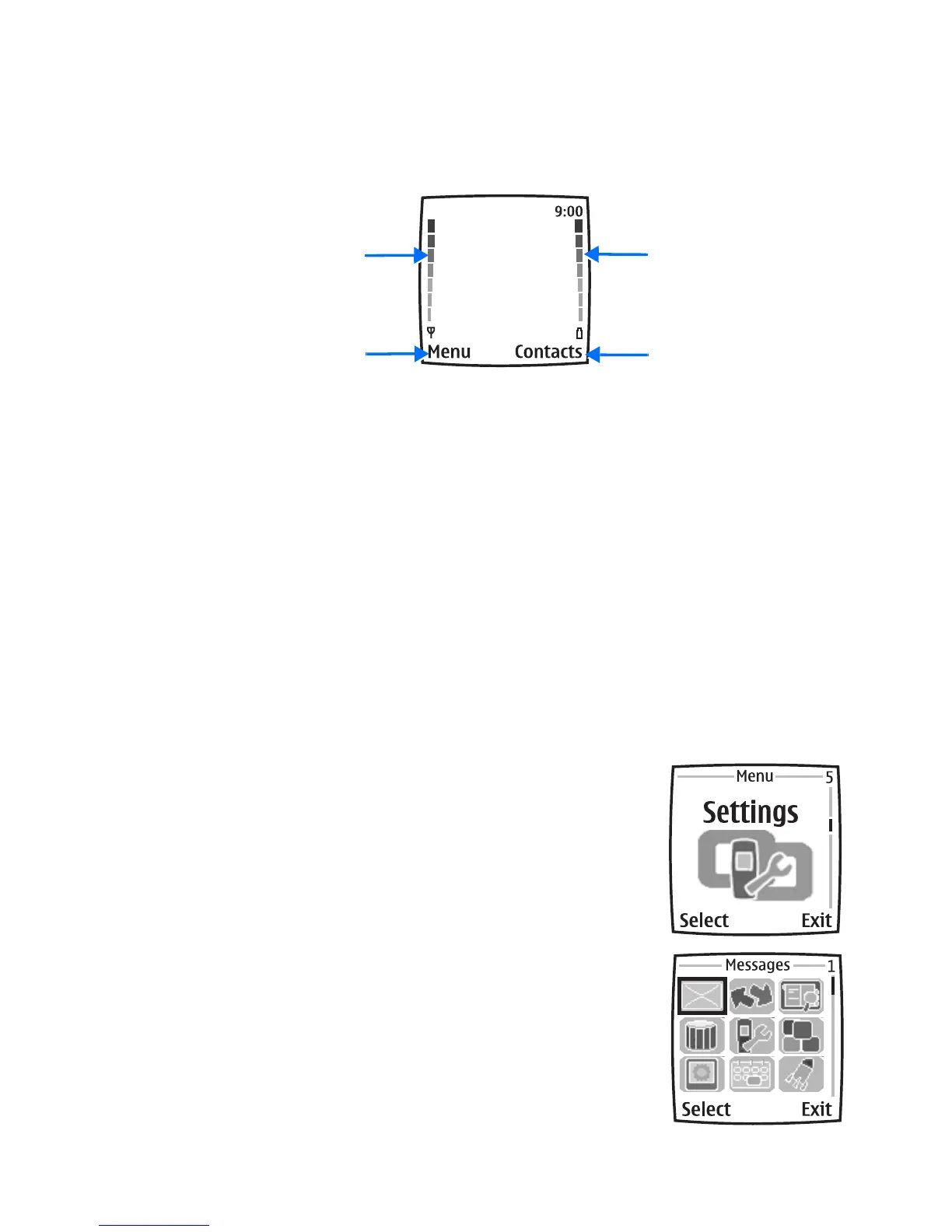
When you turn on your phone, the first screen that appears is the start screen.The
start screen is “home base” and indicates that the phone is in the standby mode.
Signal strength—A higher bar indicates a stronger network signal.
Battery level—A higher bar indicates more power in the battery.
Menu—The Left selection key in the standby mode accesses the menu functions.
Contacts—The Right selection key in the standby mode accesses either the
Contacts menu, the Go to menu, or a service provider’s home page.
After you set functions for the Right selection key, the word Contacts changes to
Go to in the start screen. To set the functions, see “Personal shortcuts” on page 59.
To activate a function in the Go to menu, select Go to in the start screen, scroll to
the desired function, and select Select.
• SPECIAL USER INTERFACE FEATURES
You can choose from two types of menu interface: List and Grid. See “Menu view”
on page 63 for more information.
In the List interface, full color images introduce every
menu. Use the Scroll up and Scroll down keys to navigate
through the menus.
In the Grid interface, multiple menu icons appear on a
single display. Use all four scroll keys to navigate through
the icons. The Grid interface is only available in the Nokia
3100b phone.
Battery level
Contacts
Signal strength
Menu








 To Next Page