nokia
CONNECTING PEOPLE
PAGE 14 (26) Approved 4.0
CMO Operations & Logistics
MGR
WW Service Solutions & Development
Bochum / Germany CONFIDENTIAL 17.3.2005
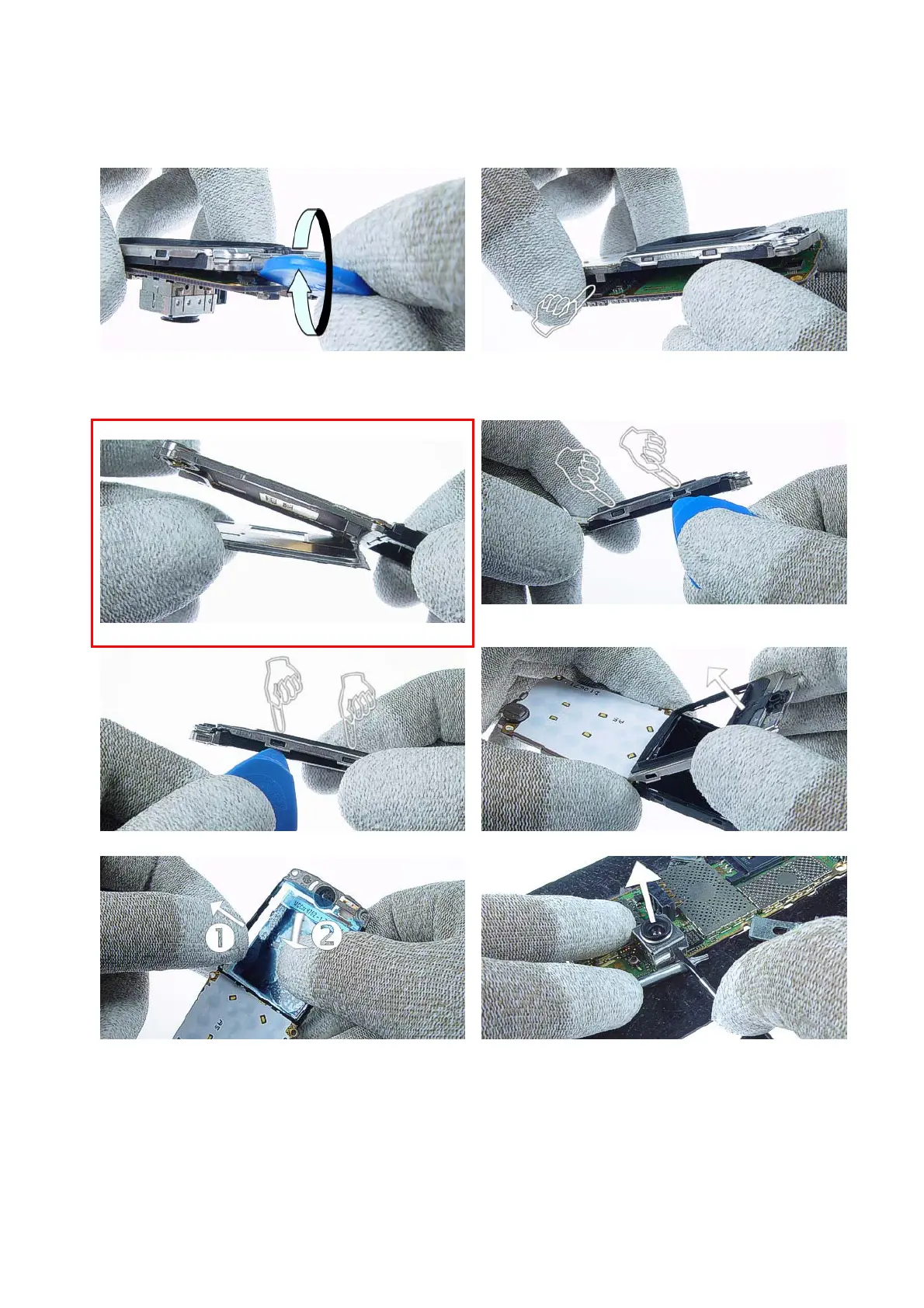
9.) Separate the UI Module Assy from Radio Module.
Use the SRT-6 at the display connector side and unplug
the LCD Module carefully.
10.) Separate the UI Module Assy from the Radio
Module by lifting up at one side. Note the guide pin at
the UI Module Assy.
3205n only!
11.) Remove the BB Shield.
12.) To remove the Display Shield open the four snaps.
Two on the right side and …
13.) two on the left side.
14.) Remove the Display Shield.
15.) Remove the LCD Module by pressing it out of the
LCD Frame.
16.) Put the Radio Module into the Soldering Jig RJ-47.
Use a slotted screwdriver as a lever to remove the
Conn Shield.
Service Manual 3200/3205n Level 1&2 Copyright © 2004-2005 NOKIA Corporation. All rights reserved.



 To Next Page