Get started
Copyright © 2007 Nokia. All rights reserved. 1
1. Get started
■ Install SIM card and
battery
Always switch the device off and
disconnect the charger before
removing the battery.
Keep all SIM cards out of the reach
of small children.
For availability and information on
using SIM card services, contact
your SIM card vendor. This may be
the service provider, network
operator, or other vendor.
This device is intended for use with
BL-5B battery. Always use original
Nokia batteries. See ”Nokia battery
authentication guidelines” p. 73.
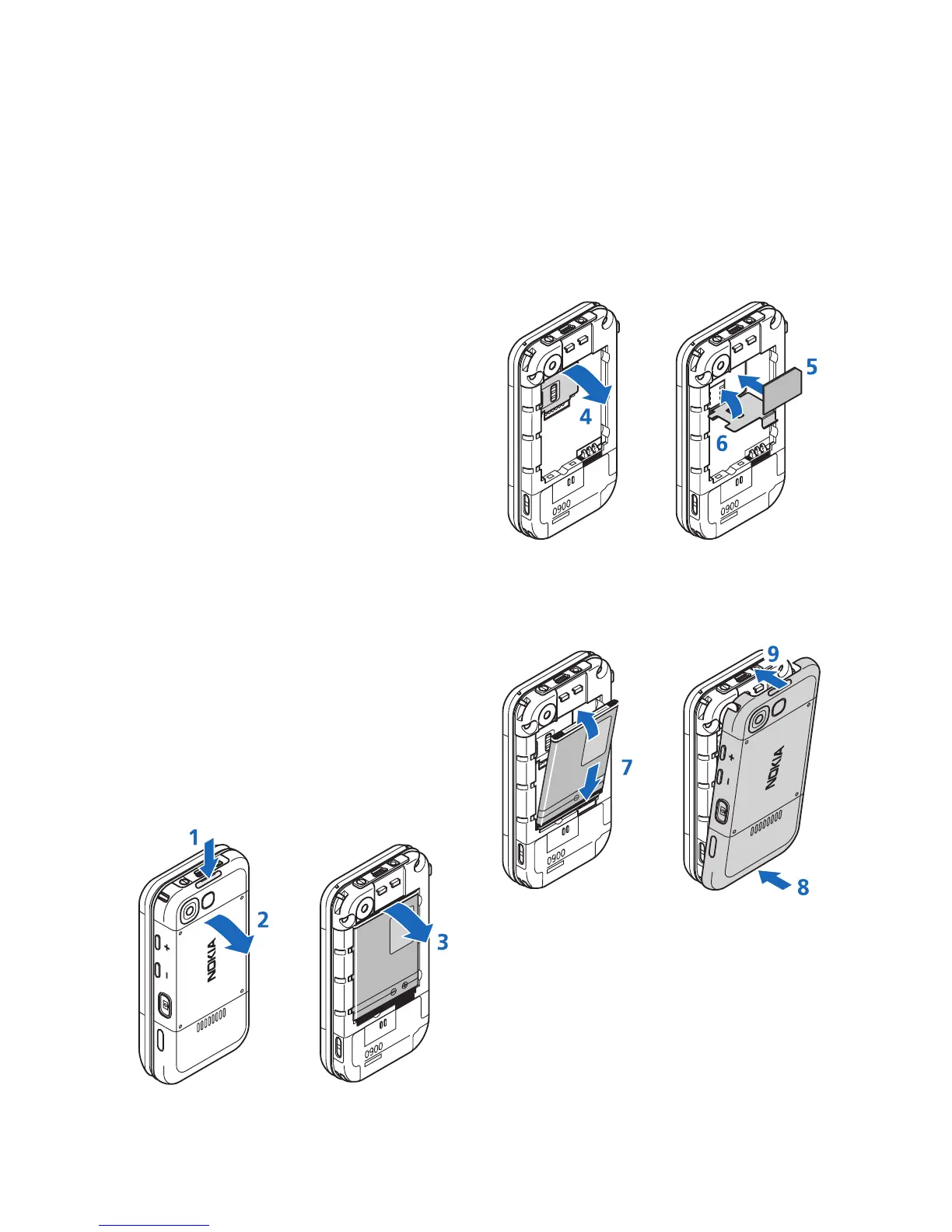
To remove the back cover of the
phone, push the back cover release
button (1), and detach the back
cover away from the phone (2).
Remove the battery as shown (3).
Open the SIM card holder (4), and
insert the SIM card properly into the
holder (5). Close the SIM card holder
(6).
Replace the battery (7). Slide the
back cover into its place (8, 9).





 To Next Page