Need help?
Do you have a question about the Nokia BH-701 and is the answer not in the manual?
The Nokia Bluetooth Headset BH-701 is designed to facilitate hands-free communication, allowing users to make and receive calls while on the move with compatible mobile devices that support Bluetooth wireless technology. This user guide provides comprehensive instructions for setting up, using, and maintaining the headset, ensuring a safe and optimal experience.
The primary function of the Nokia Bluetooth Headset BH-701 is to enable wireless audio communication with a mobile device. It connects via Bluetooth wireless technology, which allows for cable-free operation within a range of up to 10 meters (30 feet). The headset is compliant with Bluetooth Specification 2.0 + EDR, supporting Headset Profile 1.1 and Hands-Free Profile 1.5. This ensures compatibility with a wide range of Bluetooth-enabled devices.
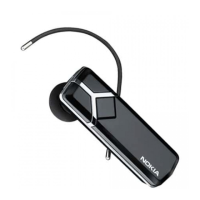
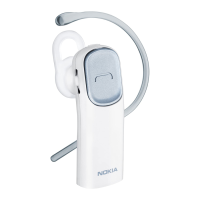
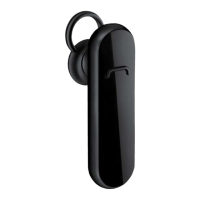
The headset features an internal, nonremovable, rechargeable battery, providing power for extended talk and standby times. An indicator light provides visual feedback on the headset's status, such as charging, pairing mode, and connection status. The multifunction key serves as the central control for various operations, including power on/off, call handling, and pairing. A dedicated volume key allows for easy adjustment of audio levels during calls. The microphone is integrated for clear voice capture, and the earpiece delivers audio to the user. The earloop is designed to secure the headset comfortably on the ear.
Before initial use, the headset's battery must be fully charged. The charging process involves connecting the charger cable to a wall outlet and then to the headset's charger connector. The indicator light will be red during charging and turn green once fully charged. It is recommended to use only Nokia-approved chargers to avoid invalidating any approvals or warranties and to prevent potential damage to the device.
To begin using the headset, it must be switched on by pressing and holding the multifunction key until an audible beep and the indicator light turn on. If the headset has not been previously paired with a device, it will automatically enter pairing mode, indicated by a quickly flashing blue light. For subsequent pairing with a new device or if it has been previously paired, the headset should be switched off, then the multifunction key pressed and held until the indicator light flashes blue quickly.
Pairing the headset with a mobile device involves activating the Bluetooth feature on the mobile device, searching for Bluetooth devices, and selecting "Nokia BH-701" from the list. A passcode of "0000" is required to complete the pairing and connection. Once successfully paired, the headset will appear in the mobile device's Bluetooth menu. The headset only needs to be paired once with a specific device.
For call handling, the headset allows users to make calls in the normal way through their mobile device once connected. The blue indicator light will flash slowly during an active call. If the mobile device supports last number redialing via the headset, pressing the multifunction key twice when no call is in progress will initiate a redial. For voice dialing, if supported, pressing and holding the multifunction key for 2 to 3 seconds will activate the mobile device's voice dialing function. Voice dialing is not available during an active call.
When an incoming call is received, the indicator light flashes blue quickly, and a ringing tone is heard through the headset. Calls can be answered by pressing the multifunction key or by using the mobile device's keys. To reject an incoming call, the multifunction key should be pressed twice. Ending an active call is done by pressing the multifunction key or using the mobile device's keys.
Volume adjustment during a call is managed using the volume key, which can be pressed up to increase or down to decrease the volume. Pressing and holding the volume key in the desired direction allows for quick volume adjustment. Muting or unmuting the microphone during a call is typically performed using the respective function on the mobile device.
The headset also supports switching a call between the headset and a connected mobile device. This can be done by pressing and holding the multifunction key for approximately 2 to 3 seconds or by using the relevant function on the mobile device.
To clear all pairing settings from the headset, both the multifunction key and the volume key should be pressed and held simultaneously until the indicator light alternates red, green, and blue twice. After clearing settings, the headset will enter pairing mode. If the headset stops functioning despite being charged, a reset can be performed by plugging the charger into the headset while pressing and holding the multifunction key. This will switch off the headset, and it will need to be reconnected to the mobile device for use. A reset does not clear the headset settings.
Proper care and maintenance are crucial for the longevity and optimal performance of the Nokia Bluetooth Headset BH-701. The device is designed with superior craftsmanship and should be handled with care.
It is important to keep the device dry, as precipitation, humidity, and all types of liquids can contain minerals that may corrode electronic circuits. If the device gets wet, it should be allowed to dry completely. The headset should not be used or stored in dusty or dirty areas, as this can damage its moving parts and electronic components.
Extreme temperatures should be avoided. Storing the device in hot areas can shorten battery life, damage electronic components, and warp or melt plastics. Similarly, storing it in cold areas can lead to moisture formation inside the device when it returns to normal temperature, potentially damaging electronic circuit boards. The optimal battery operating temperature range is between 15°C and 25°C (59°F and 77°F).
Users should not attempt to open the device, as this can void the warranty and potentially damage internal components. The headset should also be protected from drops, knocks, or shakes, as rough handling can break internal circuit boards and fine mechanics. Harsh chemicals, cleaning solvents, or strong detergents should not be used to clean the device. Painting the device is also discouraged, as paint can clog moving parts and hinder proper operation.
All these suggestions apply equally to the headset, its battery, charger, and any other enhancements. If the device malfunctions, it should be taken to the nearest authorized service facility for repair.
Regarding battery information, the device is powered by a rechargeable battery that can be charged and discharged many times but will eventually wear out. Only Nokia-approved chargers should be used. Overcharging should be avoided by unplugging the charger from the electrical plug and the device when not in use, as prolonged connection to a charger can shorten battery lifetime. Batteries should never be disposed of in a fire, as they may explode, and damaged batteries can also explode. Batteries should be disposed of according to local regulations, preferably through recycling, and not as household waste.
The product, its literature, or packaging bearing the crossed-out wheeled-bin symbol indicates that in the European Union, all electrical and electronic products, batteries, and accumulators must be collected separately at the end of their working life. This is to prevent harm to the environment or human health from uncontrolled waste disposal and to promote the sustainable reuse of material resources. Information on collection is available from product retailers, local waste authorities, national producer responsibility organizations, or local Nokia representatives.
 General
| Type | Bluetooth Headset |
|---|---|
| Operating Range | 10 meters |
| Talk Time | 6 hours |
| Standby Time | Up to 160 hours |
| Charging Time | 2 hours |
| Color | Black |
| Profiles | Hands-Free Profile (HFP), Headset Profile (HSP) |

 To Next Page