Need help?
Do you have a question about the Nokia RM-976 and is the answer not in the manual?
Steps to remove the back cover of the phone.
Details on accessibility, hearing, and health precautions.
General terms and applicability of the manufacturer's warranty.
Details on warranty coverage, exclusions, and limitations of liability.
This document serves as a user guide for the Nokia Lumia XXX / Nokia Lumia XXX (models RM-976, RM-977, RM-978), providing essential information for its operation, maintenance, and safety.
The device is a mobile phone designed for communication and various smart features.
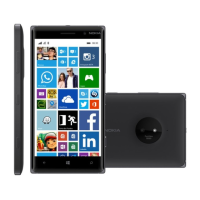
The Nokia Lumia XXX / Nokia Lumia XXX is equipped with standard mobile phone functionalities. It allows users to make and receive calls, send and receive messages, and access various applications. The device features an audio connector (AHJ 3.5 mm) for headphones, an earpiece for calls, and a loudspeaker for audio playback. Volume keys are provided for adjusting sound levels, and a power/lock key controls the device's on/off state and screen lock. A microphone is integrated for voice input during calls and recordings. The device also includes a camera for capturing photos and videos. For connectivity and charging, a micro-USB connector is present. The device supports micro-SIM cards for network access and memory cards for expanded storage. It operates on WCDMA and GSM networks, with specific frequency bands varying by model (RM-976/RM-978 on WCDMA 900, 2100; and GSM 850, 900, 1800, 1900 MHz networks; RM-977 on WCDMA 850, 900, 1900, 2100; and GSM 850, 900, 1800, 1900 MHz networks).
Getting Started: To begin using the phone, users must first remove the back cover. This is done by inserting an index finger into the seam between the screen frame and the back cover at the top corner, then pressing the middle of the back cover to bend it open and remove it. Sharp tools should be avoided to prevent damage. Once the back cover is off, the micro-SIM card(s) can be inserted into the designated SIM slot(s) with the metal contact area facing down. For RM-978 models, a second SIM card slot (SIM2) is available. If a memory card is used, it should be slid into the memory card slot. It is crucial to use only compatible micro-SIM cards and avoid adapters, as incompatible cards or adapters can damage the device or corrupt data. After inserting the cards, the battery should be placed back, aligning its contacts. The back cover is then replaced by pressing its bottom edge against the phone's bottom edge and snapping it into place. To power on the phone, the power key must be pressed and held.
Charging the Battery: The device is charged by plugging a compatible charger into a wall outlet and connecting the micro-USB end to the phone. Authentic Nokia USB chargers are recommended for optimal performance. The phone can also be charged via a USB cable connected to a computer. If the battery is completely discharged, it may require up to 20 minutes of charging before the phone can be used, and the charging indicator might not be immediately displayed.
Help and Tips: A user guide is pre-installed on the phone, accessible by swiping left on the start screen and tapping "Nokia Care." This app provides videos, answers to common questions, and helpful tips. New Windows Phone users can find specific guidance in the "New to Windows Phone?" section of the app. For more comprehensive online user guides, additional information, and troubleshooting assistance, users can visit www.nokia.com/support.
Troubleshooting (Phone Freezes): If the phone freezes and becomes unresponsive, it can be reset without losing data or settings by pressing and holding the power key for approximately 10 seconds. The phone will vibrate and restart.
Antenna Area: Users should avoid touching the antenna area while the antenna is in use. Contact with the antenna can affect communication quality and may reduce battery life due to increased power levels during operation.
SIM and Memory Card Handling: When inserting or removing SIM and memory cards, ensure the phone is switched off. Always handle cards carefully and avoid using sharp tools. Only use compatible micro-SIM cards and avoid SIM card adapters to prevent damage to the card or device and to avoid data corruption.
Battery Care: The device uses an original BL-5H rechargeable battery. Batteries should not be disposed of as household waste. For charging, use only authentic Nokia USB chargers or third-party chargers that comply with the IEC/EN 62684 standard and can connect to the device's micro-USB connector.
Software Updates: To ensure optimal performance and security, users should install the latest software updates publicly available for their product within a reasonable time of their release. Failure to do so may affect warranty validity.
Data Backup: It is strongly recommended to always back up all data and content stored on the product before taking it in for service, as service activities will erase all data from the device.
General Care: The device should be used in accordance with the user guide to prevent damage. Avoid exposing the product to moisture, dampness, extreme thermal or environmental conditions, rapid changes in such conditions, corrosion, oxidation, spillage of food or liquid, or influence from chemical products. Do not use the product with, or connect it to, any product, accessory, software, or service not manufactured or supplied by Nokia, as this can cause damage or errors.
Warranty Information: The product comes with a Manufacturer's Limited Warranty. The main device is warranted for twelve (12) months, accessories sold separately or included in the sales pack (excluding batteries, covers, cables, and chargers) for twelve (12) months, and all batteries, covers, cables, and chargers for six (6) months, unless otherwise specified. The warranty covers defects in materials and workmanship. Nokia will remedy defects free of charge by repairing or replacing the defective product or part. Repairs or replacements may use new or re-conditioned parts or products. The warranty period is not renewed or extended by repair or replacement. Original or replacement parts/products are covered for the remainder of the original warranty period or sixty (60) days, whichever is longer. The warranty does not cover user guides, third-party software/settings/content/data/links, normal wear and tear, reduced battery charging capacity from natural end of life, pixel defects within industry standards, SIM card/network issues, or errors/damage caused by misuse, unauthorized accessories, third-party products, hacking, viruses, or other acts beyond Nokia's control. The warranty is also void if the product has been opened, modified, or repaired without Nokia's authorization, repaired with unauthorized spare parts, if the serial number/IMEI is removed or illegible, or if the latest software updates have not been installed. Users must provide possession of the product for repair and investigation. Nokia reserves the right to charge for repairs or replacements not covered by the warranty, as well as a handling fee.
Safety Information: For important information on safe use and battery handling, users should refer to the "Safety" and "Product and safety info" sections in the device user guide and on www.nokia.com/support. Information on Nokia Service terms and Privacy policy is available at www.nokia.com/privacy. The device meets international guidelines for exposure to radio waves, with SAR values provided. When used against the head, the maximum SAR value is 1.46 W/kg over 10g (4-slot GPRS 900 and WLAN 2450). When operated at a separation distance of 1.5 centimeters (5/8 inch) from the body, the maximum SAR value is 1.52 W/kg over 10g (WCDMA 2100 and WLAN 2450). To reduce RF exposure, users can limit usage or use hands-free kits. The device is designed to meet FCC and Industry Canada SAR guidelines.
Accessibility Solutions: Nokia is committed to making mobile phones accessible for all individuals, including those with disabilities. More information can be found at www.nokiaaccessibility.com.
Hearing Safety: When using a headset, be aware that your ability to hear outside sounds may be affected. Avoid using the headset where it could endanger your safety. Some wireless devices may interfere with hearing aids.
Health Information: The U.S. Food and Drug Administration (FDA) and the U.S. Federal Communications Commission (FCC) provide information on cellular telephones and health. Nokia encourages users to visit www.fda.gov/Radiation-EmittingProducts/RadiationEmittingProductsandProcedures/HomeBusinessandEntertainment/CellPhones/default.htm and transition.fcc.gov/oet/rfsafety/rf-faqs.html for updated information. Additional health-related information is available from the World Health Organization (WHO) at www.who.int/mediacentre/factsheets/fs193/en/ and The National Cancer Institute ("NCI") at www.cancer.gov/ncicancerbulletin/NCI_Cancer_Bulletin_092308/page7.
Safety and Texting While Driving: Safety is paramount while driving. Drivers must obey all local laws regarding cellular phone use while driving. If legal, hands-free devices should be used, and calls should be suspended in heavy traffic or hazardous weather. Users should familiarize themselves with their phone's features before driving and avoid inputting data or text messaging while driving, as it can be a distraction. Further information and tips on safe use are available from the Cellular Telecommunications & Internet Association (CTIA) at www.ctia.org/consumer_info/safety.
 General
| Model | Nokia RM-976 |
|---|---|
| Device Type | Cell Phone |
| Operating System | Windows Phone 8.1 |
| Form Factor | Bar |
| Network Technology | GSM / HSPA / LTE |
| SIM Card Type | Micro-SIM |
| Display | IPS LCD |
| RAM | 1 GB |
| Internal Storage | 8 GB |
| Resolution | 720 x 1280 pixels |
| Talk time | Up to 13 h 20 min (2G) / Up to 13 h 20 min (3G) |


 To Next Page