1
2
3
4
5 6
7 8
9
10
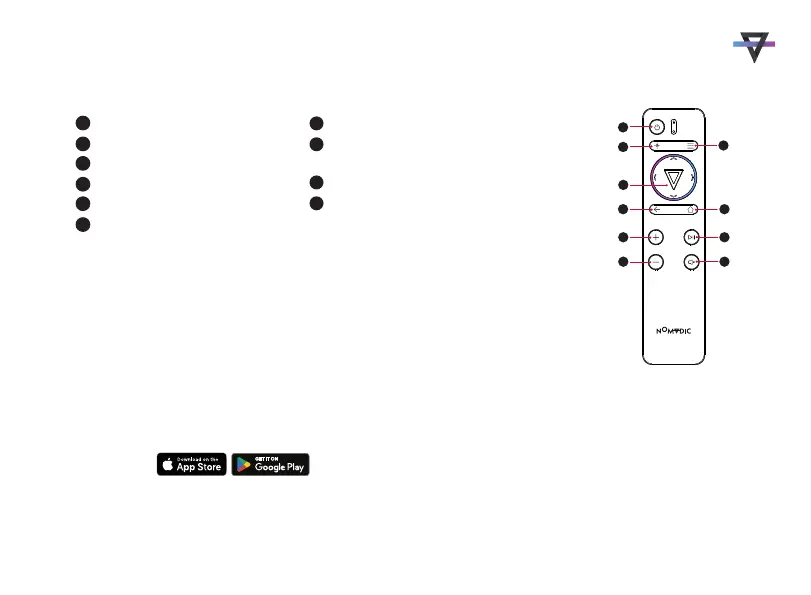
Remote Control
Power
Focus
Settings
OK/Up/Down/Left/Right
Return
Home
Increase
Play/Pause
(Only supports built-in media player.)
Decrease
Mute
The remote control uses an IR sensor. For more stable control, you can follow the
below instructions to pair the remote control via Bluetooth.
Step 1. Go to Apps Center > RC BT Pairing
Step 2. Press and hold the Return and Menu buttons simultaneously for 3 seconds
Step 3. The blue light on the remote control indicates Bluetooth pairing successful
Remote Control
Alternatively, you can follow the below instruction to use your smartphone to control the projector:
Step 1. Download the NOMVDIC Remote Control app onto your smartphone
Step 2. Connecting your phone and the projector to the same Wi-Fi Network
Step 3. Open the NOMVDIC Remote Control app and select the projector
(NOMVDIC XXXX)
NOMVDIC Remote Control App
1
2
7
3
8
4
9
10
5
6
4



 To Next Page