Nomadic Cooling Co 3 X Series AC Unit Operation Guide Version 1.0-100323
SERIES
DC-Powered Rooftop AC Units
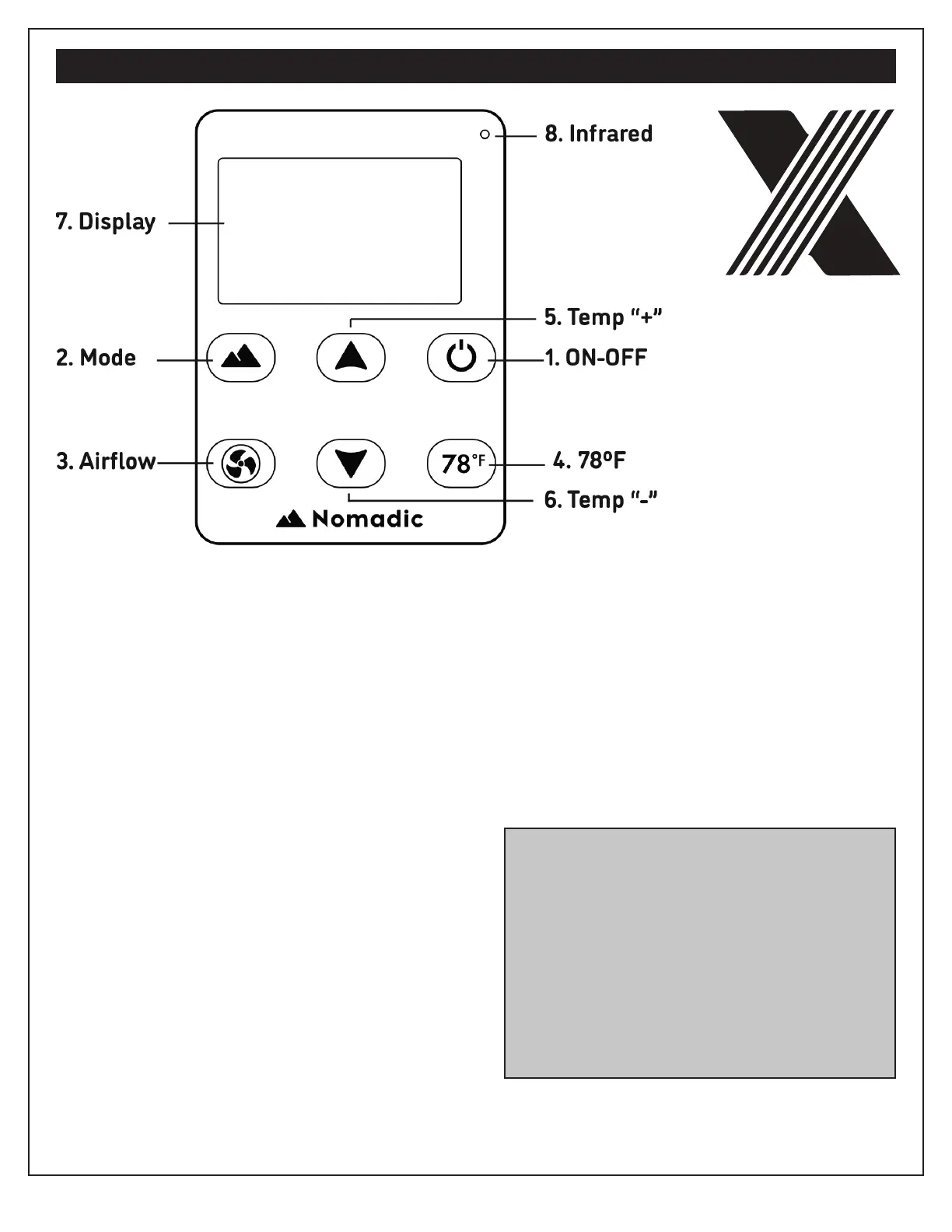
CONTROL PANEL LEGEND
1. ON-OFF: Press to switch the device
ON or OFF.
2. Mode: Tap the mode button to switch
between modes: Auto, Power (MAX),
ECO, Fan, Sun (same as Auto).
Press and Hold the mode button to cycle
through the following settings:
A. Low Voltage Cutoff
B. High Voltage Cuttoff
C. Maximum Voltage
D. Temp In
E. Temp Out
F. Error Codes
3. Airflow: Each push on this button
corresponds to a cycle through 5
different airflow levels.
4. 78ºF: Pressing this button enables auto-
matic management towards 78ºF (Auto).
5. Temperature “+”: Each push of this
button corresponds to the increase of
1ºF of temperature.
6. Temperature “-”: Each push of this but-
ton corresponds to the decrease of 1ºF
of temperature.
7. Dispay Window: Dispay temperature,
airflow, voltage, error codes and
ambient temperature.
8. Infrared Signal: Acceptance of infrared
signal from remote controller by users.
Low-Voltage Protection Function
Settings: Press and hold on “78ºF” button until
screen starts blinking to adjust low-voltage
cutoff value via Temp “+” or “-” button. The
default value is 11.4V, and can range between
9-11.5V. Long press on “78ºF” button again for
5 seconds to set.
In order to ensure the usage time, it is recom-
mended to use the battery after it is fully charged.


 To Next Page