6
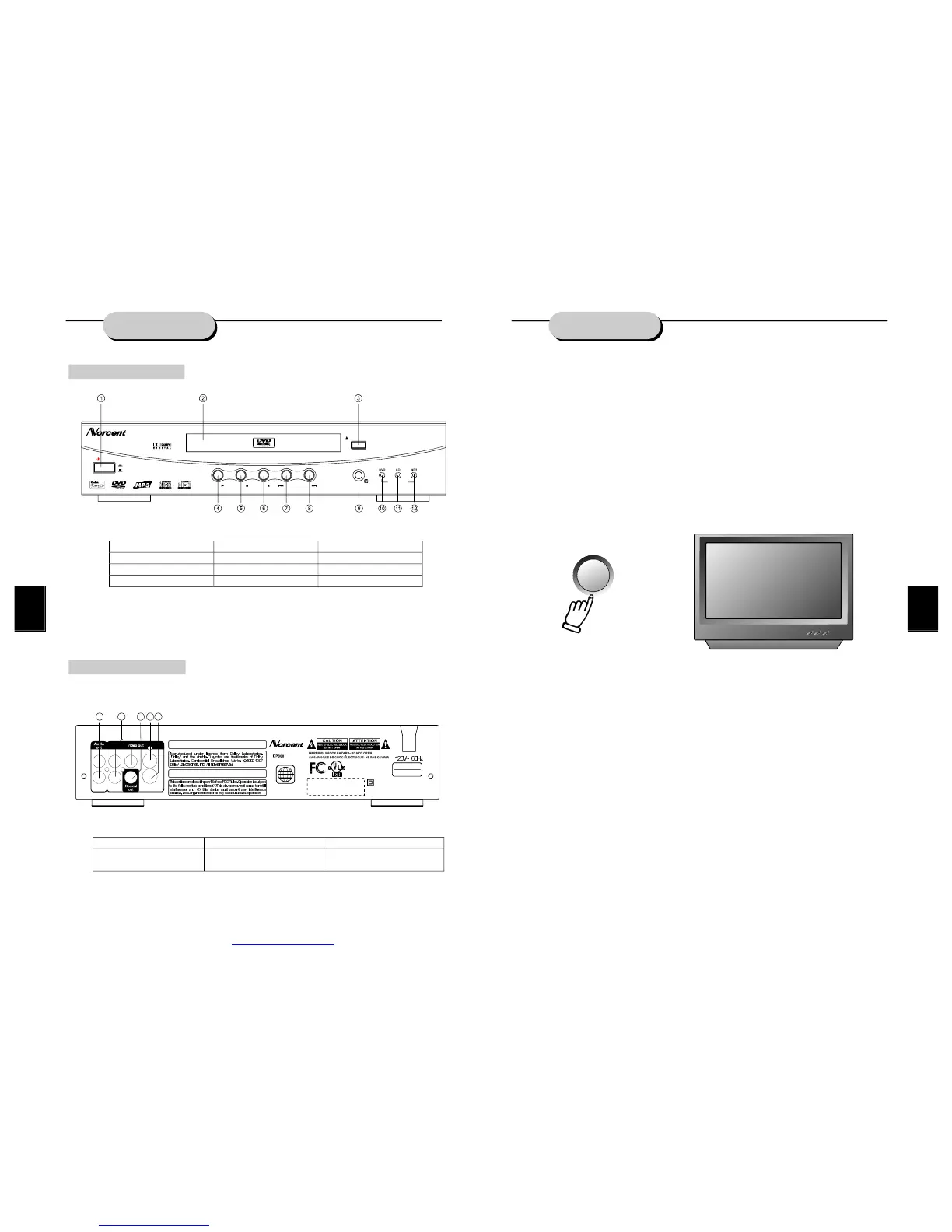
Frontpanelfunction:
Backpanelfunction:
controls
Audio/VideoApparatus
E
221338
58WJ
CLASS1LASER
PRODUCTTOIEC825
LASERKLASSE1
NACHIEC825
DOUBLEINSULATION-
WHENSERVICINGUSEONLY
IDENTICALREPLACEMENTPARTS.
HongPuInternationalDevelopment(Shanghai)Co.,Ltd.
Plant25,No.30FuTeDongSanRD
WaiGaoQiaoFreeTradeZonePuDongShanghai.P.R.C.
THISPRODUCTCOMPLIESWITHFDARADIATIONPERFORMANCE
STANDARDS21CFRSUBCHAPTERJ.
C
ApparatusClaimsofU.S.PatentNos.4,631,603.4,577,216.4,819,098
and4,907,093licensedforlimitedviewingusesonly.
1
UsedbyNorth
Americaonly!
ModelNo.:
MADEINCHINA
OPEN/CLOSE
DVD/CD/MP3/CD-R/CD-RWPLAYER
POWER
ON
OFF
DP300
PLAY STOPPAUSE PREV NEXT
PILOTLAMP
R
L
Cr
Cb Y
Video
S-Video
13
14 15
16
17
1. POWER 5. PAUSE 9. SENSOR
2. CABINDOOR 6. STOP 10.DVDPILOTLAMP
3. OPEN/CLOSE 7. PREV 11.CD PILOT LAMP
4. PLAY 8. NEXT 12.MP3 PILOT LAMP
13. AUDIOOUTPUT JACK 15. COAXIALOUTPUTJACK 17.S-VIDEOOUTPUTJACK
14. COMPONENTVIDEO
OUTPUTJACK
16. VIDEOOUTPUT JACK
15
LOCATINGATITLE
DVDdiscsarenormallydividedintotitles,whicharethensub-dividedintochapters.Aspecific
titlecanbeeasilyfoundwiththisunit.
FINDINGATITLE
WiththisNorcentDVDplayer,specifictitlescanbefoundusingeitherthetitlemenufunction,
iftheDVDdisccontainsatitlemenu,orthroughitsuniquetitlenumber.
TitleMenuFunction
1.PresstheTITLE/RETURNkey.ThetitlemenuwillappearontheTVscreen.
2.Presstheappropriatescrollkeytoselectthedesiredtitle.Atitlemayalsobelocatedby
pressingitsassignednumberwiththenumberbuttons.
3.PresstheTITLE/RETURNkeyagain.Thiswillstartplaybackfromchapter1oftheselected
title.
Somediscsdonotrespondtothisfunction.
IfdifferentinstructionsappearontheTVscreen,followthoseinstructions.Theinstructions
givenheredescribethebasicprocedure.Proceduresmayvarydependingonthecontentof
theDVDdisc.
TitleNumber
1.Presstheappropriatenumbersinthenumbersectionoftheremotecontrol.Forexample,
fortitle15,pressthe10andthe5keys;fortitle25,pressthe10,10,5keys.
REPEATPLAY
ThisDVDplayerallowsrepeatedplaybackofspecifictitles,chapters/tracks,orsegment.It
evenallowsswitchingbetweentwoitemsthatarebeingrepeated.
1.Selecttheitemtorepeat.
2.PresstheREPEATkey.
TherepeatmodechangeseachtimetheREPEATkeyispressed(i.e.,fromtitlerepeatto
chapterrepeat,etc.)
ZOOMFUNCTION
Apicturemaybeenlargeduptofourtimesduringeitherplaybackorslowmotionthroughthe
unit'szoomfunction.PresstheZOOMkeyonceanditenlargestheimage1.5x;pressasecond
timeandtheimageenlarges2x;whileathirdpressingenlargestheimage4x.Toreturnto
normal-sizeplayback,presstheZOOMkeyafourthtime.Enlargementtakesplaceinthecenter
ofthepicture.
PBC
DISK
TOTALTITLES:12
PLAYENTRIES:21
PLAYTIME:01:16:35
AUDIOSTREAMS:08
SUBPICSTREAMS:08
MPG2.NTSC4:3/16:9LB/PS
AC3-2AC3-5.1
PDF created with FinePrint pdfFactory trial version http://www.fineprint.com


 To Next Page