Descriptionof
UsingtheRemoteControl
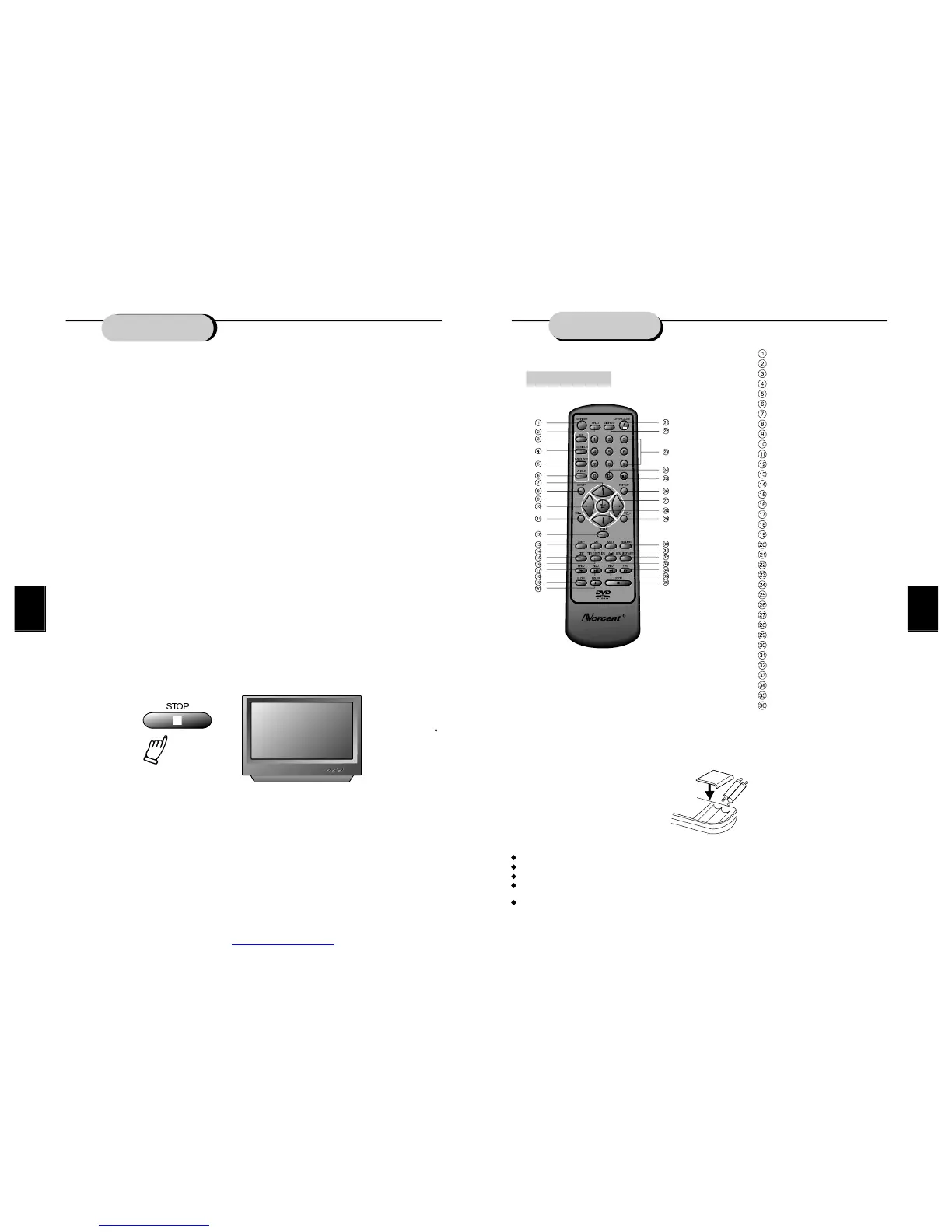
Pointtheremotecontrolattheremotesensorinorderfortheplayertofunctioncorrectly.The
remotewillfunctiontoapproximately21'fromtheremotesensoratanangleofapproximately
30eachdirection.
Note:Directingtheremotesensortowardanylightsource,suchasdirectsunlight,maycause
theunittomalfunction.Donotspillwaterorputwetitemsontheremotecontrol.Never
disassembleremotecontrol.
RemoteControl
STANDBY
PROGRAM
PLAYMODE
SUBTITLE
LANGUAGE
ANGLE
L/RCHANNEL
TITLE/RETURN
SETUP
UP
LEFT
VOLUME-
PBC
PREVIOUS
NEXT
ZOOM
STEP
PLAY
REPEAT
FASTRETURN
FASTFORWARD
PAUSE
DOWN
SLOW
OPEN/CLOSE
DISPLAY
0-9NUMBERKEY
10+KEY
TIME
RESUME
MENU/BROWSE
A-BREPEAT
RIGHT
STOP
VOLUME+
MUTE
BATTERIES
INCORRECTUSEOFBATTERIESMAYCAUSETHEMTOLEAK,CORRODEOREXPLODE.
Besuretoplacethebatteriesinthecorrectdirection.
Itisdangeroustocharge/heat/openorshort-circuitthebatteries.
Donotleavedeadorexpiredbatteriesormixold/newbatteries.
Whennotusingtheremotecontrolforalongdurationoftime,removethebatteries.When
operatingrangebecomesreduced,replaceallbatterieswithnew,freshones.
Ifleakagefromthebatteryoccurs,wipethebatteryliquidfromthebatterycompartment,then
replace.
PLAY
FUNCTIONS
FASTFORWARD/REVERSEPLAYBACK
Theunitfeaturesbothfastforwardandfastreverseplayback.Eithermodewillspeedup:DVD
discplaying2x,4x,8x,or20xnormalplayspeed;MP3discplaying2x,4x,6x,8xnormal
playspeed;andotherdiscplaying1x,2x,3x,or4xnormalplayspeed.
Toactivateeitherfunction,simplypresstheFWDkeyorREVkeyontheremotecontrol.The
speedchangeseachtimethekeyispressed.Toresumenormalplayback,pressthePLAYkey.
SLOWMOTION
ThisNorcentDVDplayeralsohastheabilitytoplaydiscsinslowmotionineitherforwardor
reversedirection.Eachtimethe SLOWkeyispressed,thespeedwillslowfrom1/2,to1/4,to
1/8normalspeed.Toresumenormalplayback,pressthePLAYkey.
FRAME-BY-FRAMEPLAYBACK
Frame-by-frameadvanceallowsviewertostudyamovievirtuallyoneframeatatime.
1.PresstheSTEPkey.Theactionfreezesonscreen,whiletheaudioismuted.
2.EachtimetheSTEPkeyispressed,thepictureadvancesoneframe.
3.Tocancelframe-by-frameplayback,pressthePLAYkeyandthemoviereturnstonormal
speedwithaudio.
PAUSEDURINGPLAYBACK
Tomomentarilystopplaybackatanytime,pressthePAUSEkey.PressPAUSEagainto
resume normalplayback.
STOPPLAYBACK
Tostopplaybackanytimebeforethecompletionofamovie,presstheSTOPkey.Pressthe
PLAYkeytoplaythediscagainfromthebeginning.
RESUMEPLAYBACKATLATERTIME
Thisunitallowstheviewertostopplayback,thenlatercontinueplaybackfromthatexactdisc
location.PresstheSTOPkeytohaltplayback.Theunitthenwillmemorizethelocationwhere
playbackwasstopped.Toresumewatching,pressthePLAYkeyandtheunitwillresume
playbackfromtheexactlocationwhereplaybackwasstopped.
Warning:ThefollowingactionswillcanceltheRESUMEfunction:
UnpluggingtheDVDplayerafterplaybackisstopped.
Ejectingthedisc.
Adjusting/changingtheparentallockorselectingadifferentlanguagesetting.
Note:ThisfeatureisnotavailableinMP3andCDmodes.
REMOVINGDISC
Toremoveadiscforanyreason,presstheOPEN/CLOSEkey,waituntilthedisctrayis
completelyopen,thenremovethedisc.Oncethediscisremoved,presstheOPEN/CLOSE
buttontoclosethedisctray.
STOP
PDF created with FinePrint pdfFactory trial version http://www.fineprint.com


 To Next Page