SETUP
Accessories
Checktomakesurethefollowingaccessoriesareincludedintheunitcarton.
Remotecontrol
A/Vcable
User'smanual
Warrantycard
Remotecontrolbatteries
Quickinstallationguide
Ifanyitemisdamagedormissing,pleaseinformyourdealerimmediately.
InstallingBatteriesinRemoteControl
InsertthetwoAAAbatteriesintothebatterycompartmentoftheremotecontrol,makingsure
the+and-signsonthebatteriesandinsidethebatterycompartmentmatchup.
(Seepreviouspage.)
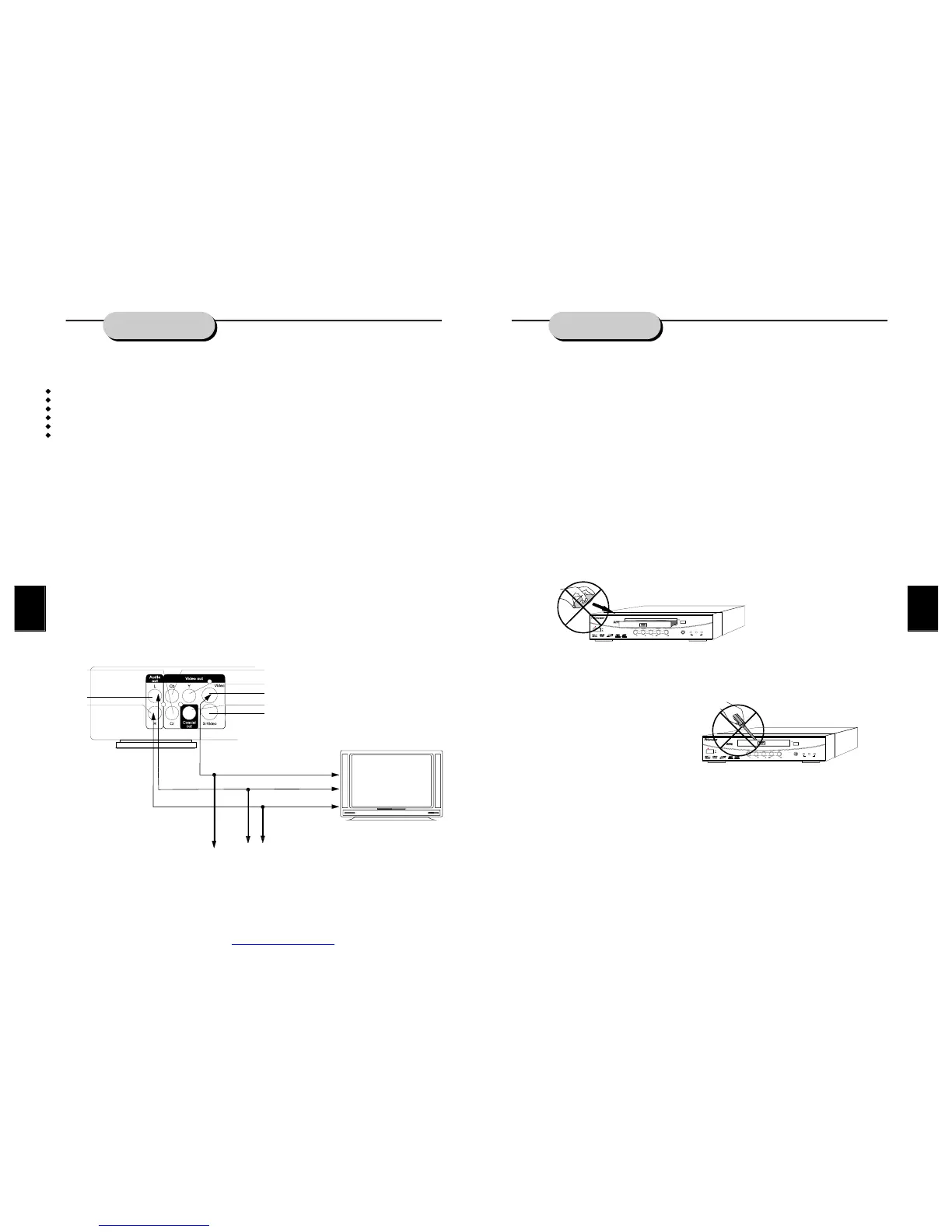
SystemConnection
Makesuretheunit'spoweristurnedoffpriortoconnectingtheunittoany othercomponent.
Audio/videocablesarecolorcodedforeasyinstallation.Besureconnectionsarefittedfirmly.
Yellow=videoterminals
White=audioterminals
Red=audioterminals
Shownbelowisaschematicforconnectingcomponents.
YELLOW
BLACK
WHITE
RED
BLUE
GREEN
RED
ORANGE
RED
WHITE
YELLOW
TVVideoinput
TVAudioinput
13
PLAYINGADISC
Oncetheunitisconnectedtoatelevisionsetandanyotheraccessoryequipment,youare
readytoenjoytheexcitementofDVDvideosoryourfavoriteCDsandMP3files.
ToplayaDVDvideodisc:
TurnontheTVandselecttheA/Vmode.IfthesetfeaturesaS-Videoconnection,besurethe
S-VideomodeisselectedfromtheTVmenu.Turnonamplifier,ifconnected.SelectAC-3or
DVDmode.
Toplayanaudiodisc:
TurnontheaudiosystemandchoosetheinputsourcethatisconnectedtotheDVDplayer.
SettheAUDIOOUTPUTtoDIGITALOUTPUTOFFfromtheSETUPMENUdisplayifyoudon't
havetheproperequipmentforDolbyDigitalorDTSsurroundsound.
1.PressthePOWERkeyonfrontpanel.DISCLOADINGappearsonscreen.
2.PresstheOPEN/CLOSEkey.Thedisctraywillopen.
3.Placethedisconthedisctray.Besureplaysideisfacedownonthetray.
4.PressOPEN/CLOSEkeytoclosetray.Thedisctraywillclose.Thedisctypewillappearin
theupper-left-handcornerofthescreen.
Onceithasreadthedisc,theunitautomaticallywillbeginplayback.WhenplayingaDVD,the
DVDortitlemenuwillappear.CDtracksareplayedinsequence.
Itispossibletodamageadiscifitisnotplacedcorrectlyontheguidesinthedisctray.This
mayalsocausetheDVDplayertomalfunction.Donotforceorplaceanythingotherthana5
inchDVDorCDontothedisctray.
(EXCLAMATIONPOINTINTRIANGLEGRAPHIC)
NevermovingtheDVDplayerduringplayback,asthismaycausedamagetothediscaswell
astheplayer.Toopenandclosethedisctray,onlyusetheOPEN/CLOSEkeyfoundonboth
theremotecontrolandortheunit'sfrontpanel.
OPEN/CLOSE
DVD/CD/MP3/CD-R/CD-RWPLAYER
POWER
ON
OFF
DP300
PLAY STOPPAUSE PREV NEXT
DVD MP3CD
PILOTLAMP
OPEN/CLOSE
DVD/CD/MP3/CD-R/CD-RWPLAYER
POWER
ON
OFF
DP300
PLAY STOPPAUSE PREV NEXT
DVD MP3CD
PILOTLAMP
PDF created with FinePrint pdfFactory trial version http://www.fineprint.com


 To Next Page