EMB-2510 User's Manual
a,Firstly,download“populate_sdk.tar.bz2”file,from http://norcord.com:8070/f/a012a6fbacce4064
903b/ unzip to get:
fsl-imx-xwayland-glibc-x86_64-fsl-image-qt5-validation-imx-aarch64-toolchain-4.9.51-mx8-ga.sh
b,Run:
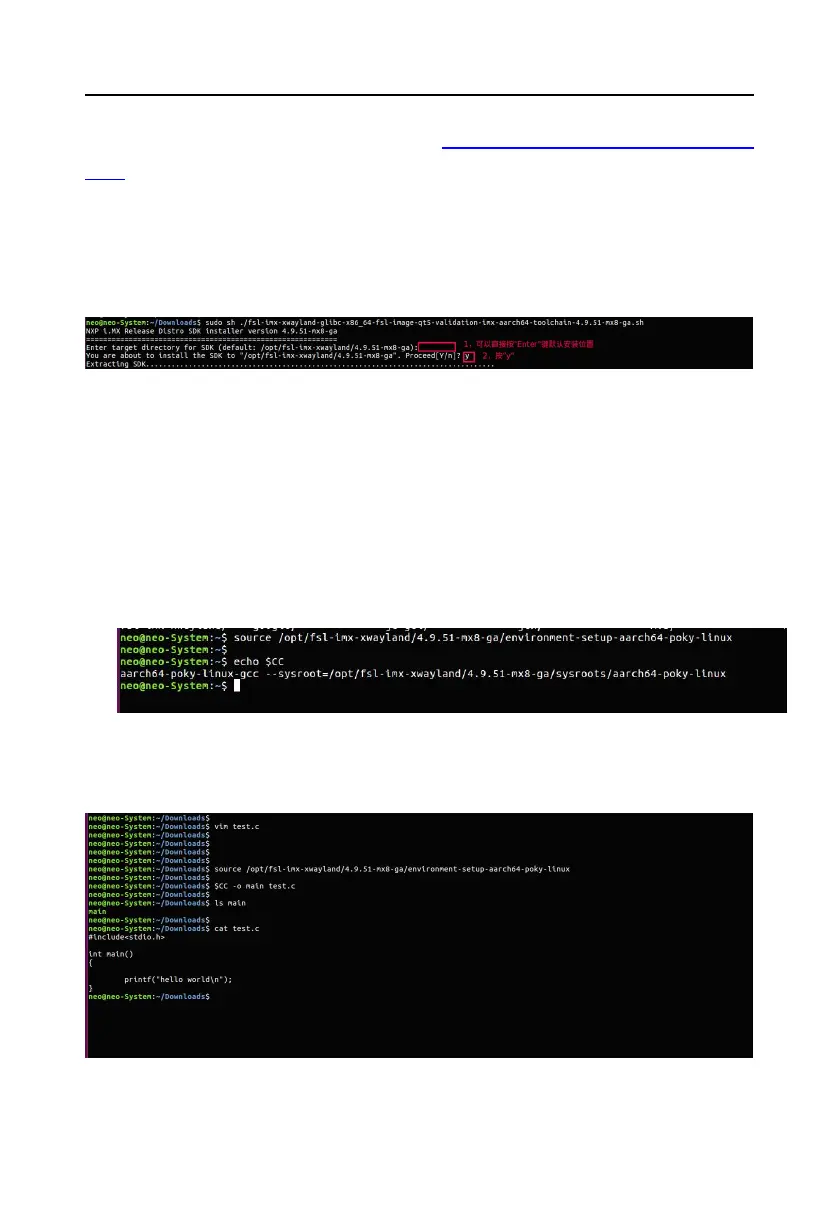
sudo sh ./fsl-imx-xwayland-glibc-x86_64-fsl-image-qt5-validation-imx-aarch64-toolchain-4.9.51-mx8-ga.sh
C, After completing step b , he cross-compiler tool chain is installed in the
“/opt/fsl-imx-xwayland/4.9.51-mx8-ga”directory (custom installation directory can be viewed
in the corresponding directory),and a new shell terminal (Ctrl+Alt+t) is opened,to use the
newly installed cross-compiler tool chain, run :
source /opt/fsl-imx-xwayland/4.9.51-mx8-ga/environment-setup-aarch64-poky-linux
In this way, by checking the environment variables, you can see that you can cross-compile
your own application directly using CC.
Note : The Source command above needs to be re-executed every time a shell terminal is
opened
Use Case :
3.2.14 Construction of QT development environment
1, Before the QT development environment is built, the sdk of the QT environment needs to be



 To Next Page