41
Outdoor Temperature
Reset Mode
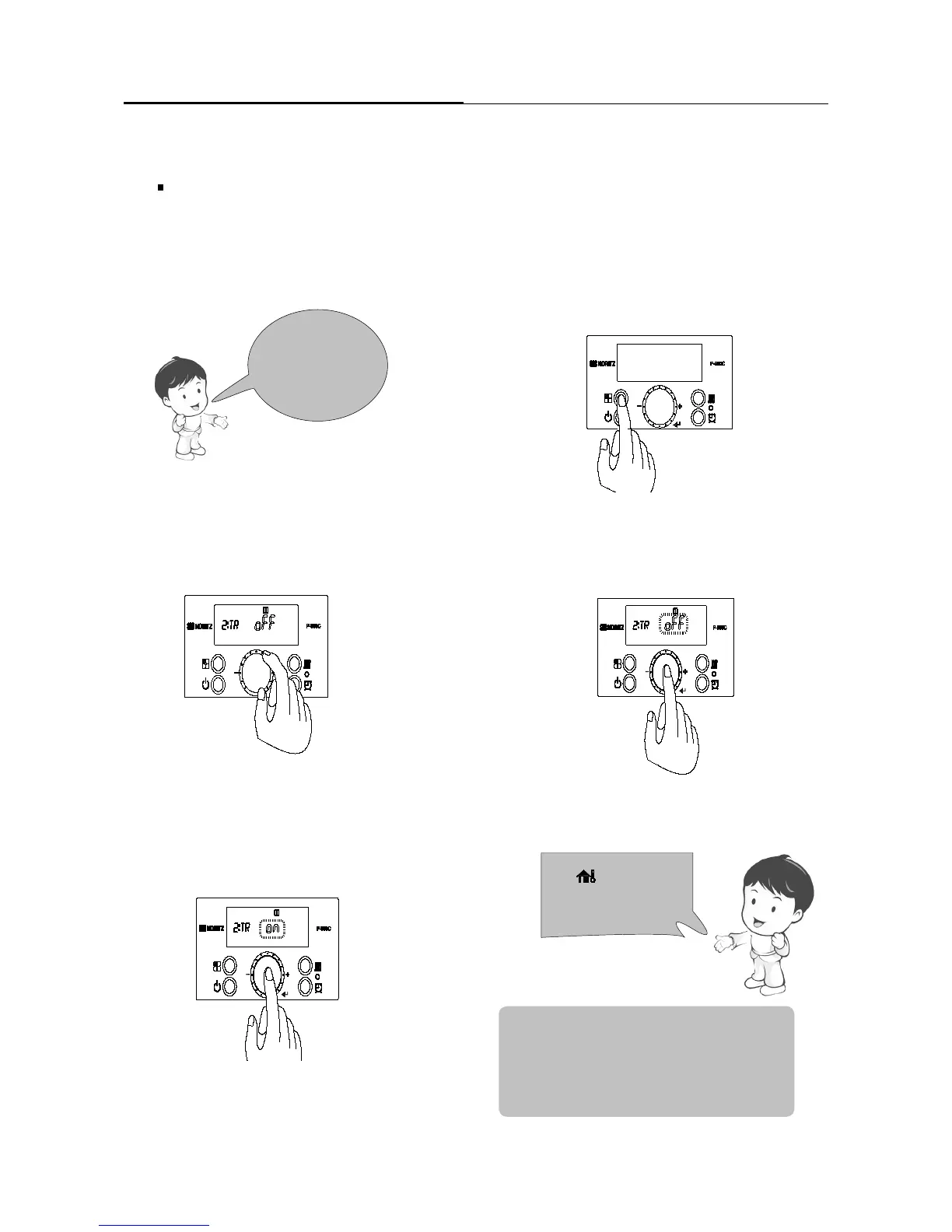
2. Turn off the power to control panel. Press and hold the
‘Function Button’ for approximately 5 seconds to enter
the ‘Installer Mode’.
1. Connect outdoor sensor to terminal.
(Refer to page 45 of the Installation Manual for
additional detail)
3. Turn the ‘Dial Button’ clockwise
until ‘[2:TR]’ is displayed.
Outdoor Temperature Reset
Chapter5.–Setting
NOTE:
• Installer Mode 2:TR : Outdoor Temperature Reset.
• Installer Mode 3:TY : Type of Heating System.
• Installer Mode 4:Od : Outdoor Temp.
•
Installer Mode 5.bS : Boost Timing.
The icon will ash
if the outdoor sensor is
not detected
4. Press the ‘Dial Button’. OFF will begin blinking.
Turn the ‘Dial Button’ from OFF to ON.
Setting the ‘Outdoor Temperature Reset Mode’. [2:TR]
5. Press the ‘Dial Button’ to save the setting.
Additional menu items will become available to
adjust.


 To Next Page