EasyManua.ls Logo

Norsonic nor140 - User Manual

Norsonic nor140
19 pages
Print Icon
To Next Page IconTo Next Page
Loading...
Norsonic Nor140
Reference Tone
Used to reference the correct audio playback level for the listener.

Other manuals for Norsonic nor140

Question and Answer IconNeed help?

Do you have a question about the Norsonic nor140 and is the answer not in the manual?

Summary

Reference Tone

Understanding Reference Tone Purpose

Explains the reference tone is a sound recording for setting correct audio playback levels.

Pink Noise and Level Setting

Illustrates adjusting speaker volume to achieve a 70dB pink noise reference level.

Device Configuration for Reference Tone

Accessing Device Settings Menu

Steps to navigate the Nor140 device settings, starting with the 'SETUP' button.

Selecting Reference Tone Option

Choosing the "Reference Tone" function from the Instrument menu via button 8.

Setting Reference Tone Parameters

Configuring reference tone settings like type (PINK), gain, and duration.

Initiating Reference Tone Generation

Activating the reference tone by pressing the .CAL button, noting its automatic end.

Playback and Verification of Reference Tone

Playing Back in NorReview Software

Locating and playing the recorded reference tone audio file using NorReview.

Adjusting Playback Volume

Positioning a sound level meter and adjusting speaker volume to match a previously noted level.

Achieving Accurate Playback Levels

Guidance on ensuring the sound level meter reading is as close as possible to the target without background noise.

Summary

Reference Tone

Understanding Reference Tone Purpose

Explains the reference tone is a sound recording for setting correct audio playback levels.

Pink Noise and Level Setting

Illustrates adjusting speaker volume to achieve a 70dB pink noise reference level.

Device Configuration for Reference Tone

Accessing Device Settings Menu

Steps to navigate the Nor140 device settings, starting with the 'SETUP' button.

Selecting Reference Tone Option

Choosing the "Reference Tone" function from the Instrument menu via button 8.

Setting Reference Tone Parameters

Configuring reference tone settings like type (PINK), gain, and duration.

Initiating Reference Tone Generation

Activating the reference tone by pressing the .CAL button, noting its automatic end.

Playback and Verification of Reference Tone

Playing Back in NorReview Software

Locating and playing the recorded reference tone audio file using NorReview.

Adjusting Playback Volume

Positioning a sound level meter and adjusting speaker volume to match a previously noted level.

Achieving Accurate Playback Levels

Guidance on ensuring the sound level meter reading is as close as possible to the target without background noise.

Overview

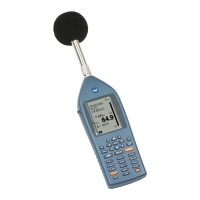
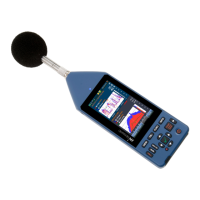
The Norsonic Nor140 is a precision sound analyzer designed for sound, vibration, and air solutions, often used in conjunction with Campbell Associates. This device serves as a reference tone generator and a sound level meter, crucial for establishing accurate audio playback levels and performing sound measurements.

Function Description:

The primary function of the Norsonic Nor140, as highlighted in the provided manual, is to generate a reference tone for calibrating audio playback levels. This reference tone is an internal sound recording, specifically pink noise, generated by pressing the "CAL" button on the device. Pink noise is a random signal with equal energy per octave, often described as sounding similar to radio static when tuning. The device is capable of generating this pink noise at a continuous sound level of approximately 70dB. This feature is vital for ensuring that audio recordings are played back at a consistent and accurate level, allowing listeners to perceive the loudness or quietness of a recording in the correct context, especially when evaluating noise complaints.

Beyond reference tone generation, the Nor140 functions as a comprehensive sound level meter. It can measure and display sound levels, allowing users to verify the output level of speakers or headphones. This is critical for setting up a listening environment where the playback level matches the intended reference, thereby standardizing the perception of sound. The device also supports recording measurements, which can then be downloaded and analyzed using software like NorReview or played back through standard media players.

Important Technical Specifications:

While the manual does not explicitly list all technical specifications, several key parameters for the reference tone are provided:

  • Reference Tone Type: Pink noise. This type of noise is commonly used in acoustics for calibration due to its balanced frequency distribution.
  • Gain Volume: -48 dB. This setting likely refers to the internal gain applied to the generated pink noise, contributing to its output level.
  • Excitation Time: 30 seconds. The pink noise reference tone is generated for a fixed duration of 30 seconds, after which it automatically ceases.
  • Frequency: 1.0 kHz. This indicates a specific frequency component or a central frequency for the generated pink noise, though pink noise itself spans a wide frequency range.
  • Reference Sound Level: Approximately 70 dB. This is the target sound level for the pink noise when played back, used for calibrating listening environments. The manual notes that the actual output level when played back through software might be slightly different (e.g., 68.5 dB), requiring adjustment of external playback volume.

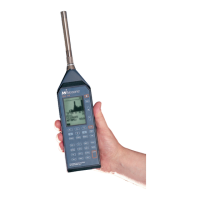
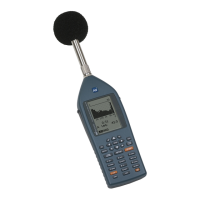
The device itself is a handheld precision sound analyzer, as indicated by its display and button layout. It features a microphone for sound capture, a display screen for showing measurement data and menu options, and a keypad for navigation and control. The display shows various measurement parameters, including SPL (Sound Pressure Level), and can present data in a "Level vs Time" graph, allowing for visual analysis of sound level fluctuations over time.

Usage Features:

The Norsonic Nor140 is designed for user-friendly operation, with a clear menu structure and dedicated buttons for various functions:

  • Reference Tone Generation: Activated by navigating through the "SETUP" menu, selecting "1:Instrument menu," then "8:Reference tone," and ensuring "Ref. tone: ON" and "Type: PINK" are selected. The tone is then activated by pressing the ".CAL" button from the measurement screen. This process ensures that the device generates the standard pink noise for calibration.
  • Sound Level Measurement: The device continuously measures sound levels, displaying them on the screen. This allows users to monitor the output of speakers or headphones and adjust their volume until the desired reference level (e.g., 70 dB or the noted playback level) is achieved at the listening point.
  • Navigation and Control: The device features a keypad with directional arrows (DEC, INC, DEL, ENTER), function buttons (SETUP, START, RECALL, STORE, PRINT, MODE, CAL, BATT, LIGHT, EXIT), and numeric buttons (0-9). This comprehensive control scheme allows users to access different menus, adjust settings, start/stop measurements, and manage data.
  • Data Recording and Playback: The Nor140 can record sound measurements. These recordings can be downloaded to a computer and played back using specialized software like NorReview or standard media players. This feature is crucial for post-analysis and for sharing sound data.
  • Measurement Screen: The device displays real-time measurement data, including time, date, F SPL (Fast Sound Pressure Level), and A-weighted sound levels. It also provides a graphical representation of sound levels over time, which can be accessed by pressing the "START" key and then "Button 6" for "Level vs Time."

Maintenance Features:

While the manual does not detail specific maintenance procedures, the design of the Norsonic Nor140 suggests several inherent maintenance considerations common to precision electronic instruments:

  • Battery Management: The presence of a "BATT" button indicates battery status monitoring, essential for ensuring the device is powered during measurements. Regular charging or battery replacement would be a standard maintenance task.
  • Calibration: The "CAL" button and the reference tone generation feature are integral to the device's self-calibration or field calibration capabilities. Regular calibration against known standards is crucial for maintaining measurement accuracy.
  • Software Updates: As with many digital instruments, periodic software or firmware updates might be available to improve functionality, fix bugs, or enhance performance.
  • Physical Care: The device appears robust, housed in a protective casing, and is often transported in a dedicated carrying case. Protecting the microphone from dust, moisture, and physical impact would be vital for its longevity and accuracy.
  • Data Management: The ability to store and download data implies the need for regular data backup and management to prevent loss and ensure efficient use of storage space.

In summary, the Norsonic Nor140 is a specialized sound analyzer that excels in generating a calibrated reference tone (pink noise) for setting up accurate audio playback environments. Its capabilities as a sound level meter, combined with its user-friendly interface and data management features, make it an indispensable tool for professionals in acoustics, vibration, and air quality assessment, particularly when dealing with sound perception and noise complaints.

Norsonic nor140 Specifications

General IconGeneral
BrandNorsonic
Modelnor140
CategoryMeasuring Instruments
LanguageEnglish

Related product manuals