14
15
Alterations which serve the technological progress as well as errors excepted! ORIGINAL MANUAL NORSUPWWW.NORSUP.EU Alterations which serve the technological progress as well as errors excepted!
EN
FR
DE
ROBOTIC POOL CLEANER TYPE CYCLONEROBOTIC POOL CLEANER TYPE CYCLONE
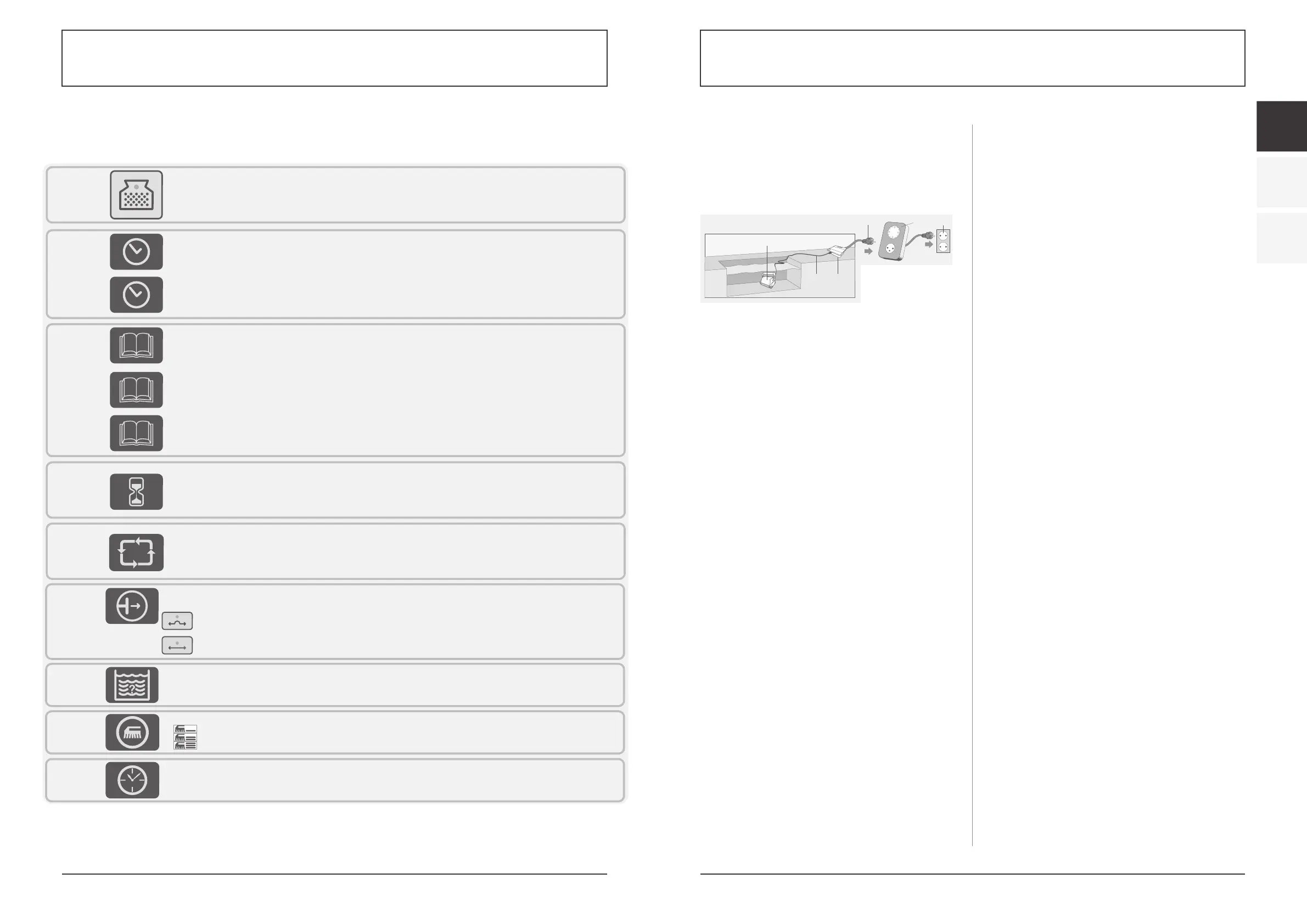
8.3. USING AN EXTERNAL TIMER
(Optional, should be purchased separately)
An external timer can be used to automatically
activate the Cleaner on pre-set time. The external
timer should be connected between the wall socket
and the Power and Control unit
1. Unit
2. Cable
3. Power supply
4. Power supply plug
5. External timer (purchased separately)
6. Outlet
9. TROUBLESHOOTING
CLEANER DOES NOT TURN ON.
There is no electricity in the wall socket.
1. Disconnect cleaner from the power and control
unit.
2. Disconnect power supply from the wall socket,
wait 30 seconds and reconnect.
3. Turn power ON. If not activated, connect the unit
to a different wall socket.
Floating cable not connected properly to the power
and control unit.
Reconnect the floating cable to the power and
control unit.
Obstacle in the drive system of the cleaner unit.
1. Turn the cleaner unit carefully to view the underside.
2. Rotate the tracks and scrubbing brushes by hand.
It should rotate but it should not rotate freely.
3. Clean and remove obstacles and debris if necessary.
Propeller is seized due to accumulation of hair.
Check if the propeller is broken or needs to be
cleaned (see “Checking Water Outlet Propeller”).
CLEANER MOVES BUT DOES NOT PUMP WATER.
Filters are dirty.
1. Remove the filters
2. Run the robotic cleaner in the pool without the
filters. If working properly, clean the filters well or
replace the filters.
Propeller is broken or seized due to accumulation
of hair.
Check if the propeller is broken or needs cleaning
(see “Checking Water Outlet Propeller”).
CLEANER PUMPS WATER BUT DOES NOT MOVE.
Obstacle in the drive system of the cleaner unit.
1. Turn the cleaner unit carefully to view the underside.
2. Rotate the tracks and scrubbing brushes by hand.
It should rotate but it should not rotate freely.
3. Clean and remove obstacles and debris if
necessary.
CLEANER STARTS AND SHUTS OFF AFTER A SHORT
TIME.
Filters are dirty.
1. Remove the filters.
2. Run the robotic cleaner without the filters. If
working properly, clean the filters well or replace
the filters.
Propeller is broken or seized due to accumulation
of hair.
1. Remove the top screws on the top outlet.
2. Check if the propeller is broken or needs to be
cleaned.
Obstacle in the drive system of the cleaner unit.
1. Turn the cleaner unit carefully to view the underside.
2. Rotate the tracks and scrubbing brushes by hand.
It should rotate but it should not rotate freely.
3. Clean and remove obstacles and debris if necessary.
CLEANER DOES NOT PICK UP DIRT.
Filters are dirty or have holes.
Clean as needed and verify that there no holes in the
filters.
Propeller is broken or seized due to accumulation
of hair.
Check if the propeller is broken or needs cleaning
(see “Checking Water Outlet Propeller”).
The suction inlet is not close enough to the pool
floor.
Move the suction inlet OUT (see “Adjusting Suction
Height”).
DIRT COMES OUT OF THE CLEANER WHEN
REMOVING IT FROM POOL.
Filter shutter is broken or missing.
Open the filters and verify that the filter shutter is
not broken and functions properly (see “Cleaning
Filters”)
Holes in the filters.
Open the filters and verify that there are no holes in
the filter screens (see “Cleaning Filters”)
Bottom lid is not properly closed.
Make sure that the bottom lid is properly closed.
Overlay buttonsModel
Cleaning level – Change the cleaning performance
Quick: Choose if your pool has small amount of dirt
Regular: Choose for daily maintenance
Thorough: Choose if your pool has large amount of dirt
Delay
When this option is On, the robot will start to work after 2 hours of delay.
This feature is used to let debris and dust sink on the floor before starting the robot's cleaning.
500
500
Pool shape:
Allows the robot to calculate the most efficient cleaning pattern for the pool shape chosen. Press the button to select the drawing most suitable to the
shape of the pool. A red light will indicate your selection.
400/500
External Timer
Auto-Detect - OFF. Choose this option if your pool has obstacles on the floor such as high drain. This will prevent the unit from changing direction
upon hitting the obstacle.
Auto-Detect - ON. Choose this option if the pool floor is free of obstacles.
Auto detect: this feature prevents the robot from getting stuck on obstacles in the pool such as main drains, steps, ladders etc. Press this button to
choose one of the following options:
400/500
Using External Timer
(Optional, should be purchased
separately)
An external timer can be used to
automatically activate the Cleaner
on pre-set time.
The external timer should be
connected between the wall socket
and the Power and Control unit
1. Unit
2. Cable
3. Power supply
4. Power supply plug
5. External timer (purchased separately)
6. Outlet
1
2 3
Overlay buttonsModel
Cleaning level – Change the cleaning performance
Quick: Choose if your pool has small amount of dirt
Regular: Choose for daily maintenance
Thorough: Choose if your pool has large amount of dirt
Delay
When this option is On, the robot will start to work after 2 hours of delay.
This feature is used to let debris and dust sink on the floor before starting the robot's cleaning.
500
500
Pool shape:
Allows the robot to calculate the most efficient cleaning pattern for the pool shape chosen. Press the button to select the drawing most suitable to the
shape of the pool. A red light will indicate your selection.
400/500
External Timer
Auto-Detect - OFF. Choose this option if your pool has obstacles on the floor such as high drain. This will prevent the unit from changing direction
upon hitting the obstacle.
Auto-Detect - ON. Choose this option if the pool floor is free of obstacles.
Auto detect: this feature prevents the robot from getting stuck on obstacles in the pool such as main drains, steps, ladders etc. Press this button to
choose one of the following options:
400/500
Using External Timer
(Optional, should be purchased
separately)
An external timer can be used to
automatically activate the Cleaner
on pre-set time.
The external timer should be
connected between the wall socket
and the Power and Control unit
1. Unit
2. Cable
3. Power supply
4. Power supply plug
5. External timer (purchased separately)
6. Outlet
1
2 3
4
5
6
8.2. OVERLAY BUTTONS
Cleaning time
- time duration spent cleaning the pool.
Press the button to select the desired time. A red light will indicate your selection.
This feature can only be selected when the Power supply is in standby mode
Overlay buttons
Check filter
- Illuminated light means the filter bag must be removed, cleaned and properly installed back into the robot to work efficiently.
In Models 300, 400, 500 - the robotic cleaner will stop climbing on the walls once the Check Filter is illuminated
Cleaning program selection:
Program 01 – 1 hour floor and wall cleaning
Program 02 – 1.5 hour floor and wall cleaning.
Program 03 – 2 hour floor and wall cleaning.
Internal timer - Automatic operation option:
Every 48 hours
Every 72 hours
Every 96 hours
External timer
This feature gives the option to the end user to program the cleaning schedule through an external timer (sold separately). Pressing this button enables
and disables this feature.
Swivel – adjust the robots rate of turns in the pool.
Normal – Standard operation
High – Different rate of turns
100/200
300/400
500
100
200/300
200
300/400
200
300/400
300/400
500
Cleaning program selection:
Program 01 – 1.5 hour floor only cleaning program
Program 02 – 2 hour floor and wall cleaning.
Program 03 – 2.5 hour floor and wall cleaning.
Model
400
500
Cleaning program selection.
Program 01 – 2 hour floor only cleaning program
Program 02 – 4 hour floor and wall cleaning. (on certain models wall cleaning feature is not available)
Program 03 – 5 hour floor and wall cleaning. (on certain models wall cleaning feature is not available)
10
Overlay buttonsModel
Cleaning level – Change the cleaning performance
Quick: Choose if your pool has small amount of dirt
Regular: Choose for daily maintenance
Thorough: Choose if your pool has large amount of dirt
Delay
When this option is On, the robot will start to work after 2 hours of delay.
This feature is used to let debris and dust sink on the floor before starting the robot's cleaning.
500
500
Pool shape:
Allows the robot to calculate the most efficient cleaning pattern for the pool shape chosen. Press the button to select the drawing most suitable to the
shape of the pool. A red light will indicate your selection.
400/500
External Timer
Auto-Detect - OFF. Choose this option if your pool has obstacles on the floor such as high drain. This will prevent the unit from changing direction
upon hitting the obstacle.
Auto-Detect - ON. Choose this option if the pool floor is free of obstacles.
Auto detect: this feature prevents the robot from getting stuck on obstacles in the pool such as main drains, steps, ladders etc. Press this button to
choose one of the following options:
400/500
Using External Timer
(Optional, should be purchased
separately)
An external timer can be used to
automatically activate the Cleaner
on pre-set time.
The external timer should be
connected between the wall socket
and the Power and Control unit
1. Unit
2. Cable
3. Power supply
4. Power supply plug
5. External timer (purchased separately)
6. Outlet
1
2 3
4
5
6
11
MODEL


 To Next Page
 Loading...