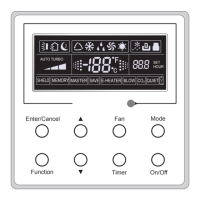
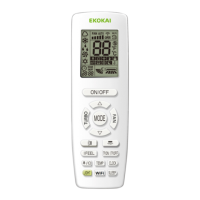
The NORTEK GLOBAL HVAC, LLC manual describes two remote controllers for commercial air conditioners: the Wired Remote Controller WRC3 and the Wireless Remote Controller WLRC3.
Wired Remote Controller WRC3
Function Description:
The WRC3 is a wired remote controller designed for commercial air conditioners, providing comprehensive control over various operational parameters. It allows users to turn the unit on/off, select operating modes (Auto, Cooling, Dry, Fan, Heating), adjust temperature, set fan speed (High, Middle, Low, Auto), and configure timer settings (0.5-24 hours). Additionally, it offers advanced functions such as Swing, Sleep, Turbo, E-heater (auxiliary electric heating), and Blow. The controller features an LCD display that shows current settings, ambient/preset temperature, timing values, and various status indicators. It also includes memory function to resume previous settings after power failure, and a lock function to prevent unintended changes.
Important Technical Specifications:
- Temperature Setting Range: 16℃ ~ 30℃ (Cooling, Dry, Fan, Heating modes). Auto mode temperature is not adjustable.
- Timer Setting Range: 0.5-24 hours, adjustable in 0.5-hour increments.
- Communication Distance: Up to 20 meters between the main board and the wired remote controller (standard distance is 8 meters).
- Temperature Sensor Options:
- Indoor ambient temperature sensed by the return air temperature sensor (01).
- Indoor ambient temperature sensed by the wired controller (02).
- Return air temperature sensor for cooling, dry, or fan modes; wired controller sensor for heating or auto modes (03).
- Wired controller sensor for cooling, dry, or fan modes; return air temperature sensor for heating or auto modes (04).
- Factory defaulted setting is option 3.
- Fan Speed Options: Three low levels (01) or three high levels (02).
Usage Features:
- On/Off: Simple press of the On/Off button.
- Mode Setting: Circular selection through Auto-Cooling-Dry-Fan-Heating modes using the Mode button.
- Temperature Setting: Use ▲ or ▼ buttons to increase/decrease temperature by 1°C every 0.5s when held.
- Fan Setting: Circular selection through Auto-Low-Middle-High fan speeds using the Fan button.
- Timer Setting: Press Timer to activate, use ▲ or ▼ to adjust time, and Enter/Cancel to confirm. Press Timer again to cancel.
- Swing Setting: Press Function to activate/deactivate, then Enter/Cancel to confirm.
- Sleep Setting: Press Function to activate/deactivate, then Enter/Cancel to confirm. In Cooling/Dry, temperature increases by 1°C after 1hr, then another 1°C after another 1hr. In Heating, temperature decreases similarly.
- Turbo Setting: Press Function to activate/deactivate, then Enter/Cancel to confirm. Runs at high fan speed for rapid heating/cooling.
- E-heater Setting: Automatically turns on in Heating mode. Press Function to enter interface, then Enter/Cancel to cancel/activate.
- Blow Setting: Press Function to enter interface, then Enter/Cancel to activate/cancel. After unit cycles off, blower runs for 2 minutes at low fan speed to dry indoor coil. Unavailable in Fan or Heating mode.
- Lock Function: Press ▲ and ▼ simultaneously for 5s to lock/unlock.
- Memory Function: Press Mode and ▲ simultaneously for 5s (under OFF state) to switch memory on/off. Unit resumes original settings after power failure if memory is on.
- Celsius/Fahrenheit Switch: Press Mode and ▼ simultaneously for 5s (under OFF state).
- Commissioning Status: Press Function and Timer simultaneously for 5s (under OFF state) to access temperature sensor and fan speed settings.
Maintenance Features:
- Error Display: The LCD displays error codes (e.g., "F0") if a system error occurs. Multiple errors are displayed circularly. Users are advised to turn off the unit and contact professional personnel in case of an error.
- Installation: Involves connecting the signal line to the indoor unit's PCB, securing the soleplate to the wall, inserting the twisted pair line, and buckling the front panel. Specific screws (M4X25, ST2.9X6) are used for mounting.
- Dismantlement: Reverse of installation steps.
- Electromagnetic Interference Prevention: Signal and communication lines should be separated from power cords by at least 20cm. Shielded lines are recommended if the unit is installed in an area prone to electromagnetic interference.
Wireless Remote Controller WLRC3
Function Description:
The WLRC3 is a general-use wireless remote controller that provides basic and optional operational control for commercial air conditioners. It allows users to turn the unit on/off, select operating modes (Auto, Cool, Dry, Fan, Heat), adjust temperature, set fan speed (Auto, Low, Medium, High), and control swing angle. It also includes functions for Sleep, Clock, Light, Turbo, X-FAN, and I FEEL.
Important Technical Specifications:
- Temperature Setting Range: 16-30°C (61-86°F). Not adjustable in Auto mode.
- Default Settings:
- Sleep: Off
- Fan Speed: Auto
- Clock: 12:00
- Light: On
- X-FAN: Off
- Health: On
Usage Features:
- On/Off: Press the ON/OFF button. Cancels sleep function but retains preset time.
- Mode Selection: Circularly select Auto, Cool, Dry, Fan, Heat modes using the MODE button. Auto mode is default; temperature not displayed. Initial temperature is 28°C (82°F) in Heat mode, 25°C (77°F) in other modes.
- Temperature Adjustment: Use + or - buttons to increase/decrease temperature. Holding the button changes temperature quickly.
- Fan Speed: Circularly select Auto, Low, Medium, High fan speeds using the FAN button. Only Low fan speed is available in Dehumidifying mode.
- Swing Angle: Press the SWING UP/DOWN button to select different swing angles.
- Sleep Function: Press the SLEEP button to activate/deactivate. Symbol displayed when active. Timer can be adjusted. Not available in Fan and Auto modes.
- Clock Setting: Press CLOCK, then use + or - to adjust time within 5 seconds. Holding the button changes time quickly.
- Light Control: Press LIGHT to turn unit display light on/off.
- Turbo Function: Press TURBO in Cool or Heat mode to activate/deactivate for rapid cooling/heating. Automatically canceled if mode or fan speed changes.
- X-FAN Function: Press X-FAN in COOL or DRY mode. Indoor fan continues for 10 minutes after unit turns off to dry the indoor unit. Not available in AUTO, FAN, or HEAT mode.
- AFTERHEAT X-FAN (Heat/Auto Heat mode): Compressor and outdoor fan stop immediately, guide board rotates to horizontal, indoor fan runs at low speed for 10 seconds, then unit stops completely.
- AUTO RUN: Unit automatically chooses suitable running mode based on room temperature. Setting temperature not displayed.
- TIMER ON/OFF: Press TIMER ON/OFF to activate/deactivate. Adjust time with + or - within 5 seconds.
- HEALTH Function: Press HEALTH to activate/deactivate. Default is ON.
- I FEEL Function: Press I FEEL to activate/deactivate. Controller sends temperature information to the main controller every 10 minutes.
Maintenance Features:
- General Use: This is a general-use remote controller. If a button for an unavailable function is pressed, the unit will maintain its original running status.
- Remote Controller Care: Do not drop or throw the remote controller. Avoid liquid exposure or direct sunlight/extreme heat. Ensure no obstructions between receiver and remote controller.

 Need help?
 General

 To Next Page