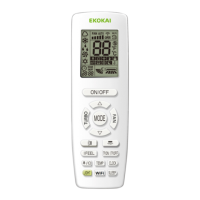
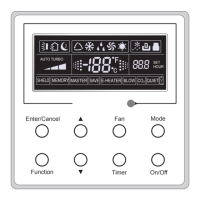
This document is an owner's manual for remote controllers used with Nortek Global HVAC systems. It provides installation instructions and operational details for three models: RC (YAP1F), YV1L1, and YAD1F.
Function Description
The remote controllers are designed to operate air conditioning units, allowing users to control various functions such as power, operating mode, temperature, fan speed, and special features. They act as the primary interface between the user and the HVAC system.
Important Technical Specifications
- Models Covered: RC (YAP1F), YV1L1, YAD1F
- Battery Type: Two 7# (AAA 1.5V) dry batteries for all models.
- Temperature Range (RC model): 16°C to 30°C (or equivalent in °F).
- Signal Transmission: Infrared (IR) signal, indicated by a blinking icon on the remote controller.
- Receiving Range: Operation should be performed within the unit's receiving range.
- Placement: Remote controller should be placed at least 1m away from TV or stereo sound sets.
Usage Features
General Operation (Applicable to all models with slight variations):
- ON/OFF: Turns the unit on or off.
- Mode Selection: Allows selection of various operating modes (e.g., Auto, Cool, Dry, Fan, Heat). Specific modes like "Floor heating," "Quick heating," and "Heat supply" are available with specialized remote controllers (YV1L1).
- Temperature Adjustment: Increases or decreases the set temperature. The RC model has a range of 16°C to 30°C. Temperature adjustment is not needed in auto mode and is invalid when absence function is on (YV1L1).
- Fan Speed Adjustment: Adjusts the fan speed (e.g., Auto, Low, Medium, High). In dry mode, fan speed is low and cannot be adjusted.
- Swing Function: Controls the left/right and up/down swing of the air deflector. Users can select simple swing or fixed-angle swing. Continuous operation of the swing button for 2 seconds can change swing states.
- Timer Function: Sets the unit to turn on (TIMER ON) or turn off (TIMER OFF) at a specified time. Both timer on and timer off can be set in combination. The system time must be set correctly for this function.
- Clock Setting: Sets the current time for the system. The clock icon blinks during setting and stops when confirmed.
- Temperature Display Switch (TEMP button): Switches between displaying the setting temperature, indoor ambient temperature, and outdoor ambient temperature on the unit's display. The remote controller itself always displays the setting temperature.
Special Features (Variations across models):
- TURBO Function: Activates super high-speed operation for quick cooling or heating. Available in cool or heat mode. Invalid in auto, dry, fan modes, or when quiet function is on (YV1L1).
- LIGHT Function: Turns the light on the receiver light board on or off, which indicates the present operation status.
- X-FAN Function: Dries the evaporator coil by blowing away water after the unit is turned off, preventing mildew. Available in cool or dry mode.
- HEALTH Function: Activates an anion generator (if equipped) to adsorb dust and kill bacteria in the room.
- AIR Function: Controls the connection of a fresh air valve (if equipped) to improve indoor air quality by controlling fresh air volume.
- SLEEP Function: Operates the unit according to preset sleep curves for enhanced comfort during sleep. Not available in auto and fan modes (RC) or auto, fan, and floor heating modes (YV1L1). Automatically cancels when the unit is turned off or mode is switched.
- I FEEL Function: Adjusts the temperature based on the temperature detected by the remote controller itself, optimizing air-conditioning effect. The remote controller must be within the valid receiving range for this function.
- Child Lock Function: Locks the buttons on the remote controller to prevent accidental operation. Activated by pressing specific buttons simultaneously (e.g., ▲ and ▼ for RC and YV1L1, ▲ and ▼ for YAD1F). A blinking lock icon indicates activation.
- Energy-Saving Function (RC & YV1L1): Available in cooling mode (RC) or cool/dry mode (YV1L1). Sets a limiting value for temperature adjustment to save energy. Exited when switching mode or setting sleep function.
- Absence Function (RC & YV1L1): Available in heating mode. Maintains the indoor ambient temperature above 0°C to prevent freezing in winter. Exited when switching mode or setting sleep function.
- Low-Temperature Dehumidifying (YV1L1): In dry mode, if the set temperature is 16°C, pressing the ▼ button twice activates this function, setting the temperature to 12°C. Exiting this function returns the temperature to 16°C. Invalid if energy-saving function is on.
- Master Mode Indoor Unit Setting (YV1L1 & YAD1F): In fan mode, allows setting a master mode indoor unit by adjusting the set temperature to 30°C and pressing specific buttons repeatedly. "UC" and "MASTER" icons indicate activation.
- Temperature Scale Switching: Switches the temperature display between Celsius (°C) and Fahrenheit (°F) when the unit is off by pressing specific buttons simultaneously (e.g., MODE and ▼ for RC, MODE and ▼ for YV1L1 and YAD1F).
- Quiet Function (YV1L1): Decreases the indoor unit's fan speed to the lowest setting to reduce noise. Not available in dry, fan, and floor heating modes. Exited automatically when changing fan speed or when turbo function is set.
Maintenance Features
- Battery Replacement: Instructions are provided for replacing the two 7# (AAA 1.5V) dry batteries. Users are advised to ensure correct polarity (+ and -) and to avoid mixing old and new batteries or different types of batteries to prevent malfunction.
- Long-Term Storage: If the remote controller will not be used for an extended period, the batteries should be removed.
- Troubleshooting: If the remote controller does not operate normally, users are instructed to remove and reinsert the batteries after 30 seconds. If the issue persists, replace the batteries.
- Signal Reception: For optimal control, the remote controller should be pointed at the main unit's signal receiving window to improve sensitivity. A sound from the main unit confirms a valid signal reception.

 Need help?
 General

 To Next Page