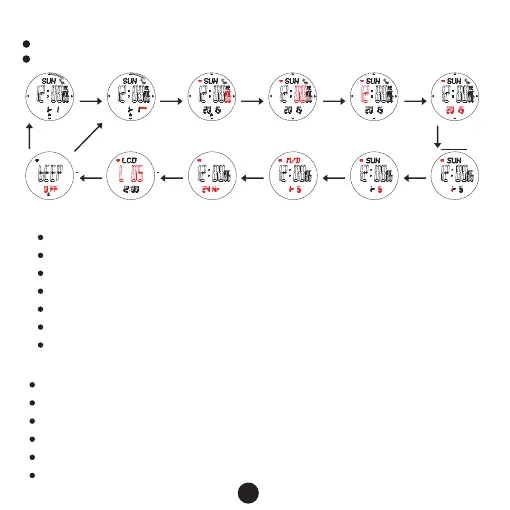
1.Time and date setting
In timekeeping mode, keep pressing button B for 2s,the Second flashes, entering setting mode.
Press button B to set the flashing items.
Timekeeping
mode
“HOLD”Flash
B
Set Second
Set Minute
Set Hour
Set Year
Set MonthSet Date
Set M/D format
Set 12/24H
Set LCD resolution
BEEP on/off
B B B B
B
BBBBB
B
Press E to increase the value, press and hold E to advance quickly.
Press C to decrease the value, press and hold C to decrease quickly.
When the Second flashes, press E OR C to reset
Press E/C to shift between 12/24 hours format
Resolution level:1-10,press E /C to increase or decrease
Keep pressing B for 2s to exit.
It will exit setting mode when no any key pressing for 1 minute.
2.Pedometer Mode
range : 0 ~ 999999 Step
calories:0.0 ~ 99999.9 Kcal
mileage:0.00 ~ 9999.99 KM or 0.00 ~ 9999.99 Mile
exercise time: 0 ~ 24H
in the pedometer mode, keep pressing C for 2s to turn on/off the pedometer
The pedometer symbol will display when the meter is on
3
Keep pressing
button B for 2s



 To Next Page