- 16 -
Compass
Measurement
Press D or C key
to adjust deviation
Digital Correction Mode
Complete calibration
Hold A
key
for 2s
1 minute
B key
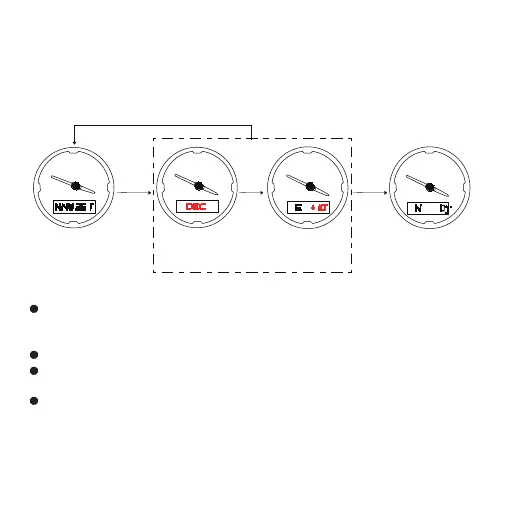
Digital Correction Mode (DEC)
After the above (OFF CAL) correction, if there is still a deviation,
you can follow the below method for digital correction
In compass mode, press A key for 2s to enter (DEC) digital
calibration mode, press D key to make the setting value plus 1,
press C key to make the setting value minus 1.
Maximum correction angle range ±90°(" W ""E "±90°)
Hold B key to confirm calibration value and return to
measurement mode.。
In digital correction mode, if no any key operation in 1 minute,
it will exit automatically and return to measurement mode
Note: When battery power is low, the system prohibits compass
function. If enter compass mode, pressing A key, low power icon
L level flash for 5s and can’t enter calibration mode.
N
S
W
E
N
S
W
E
N
S
W
E
N
S
W
E



 To Next Page