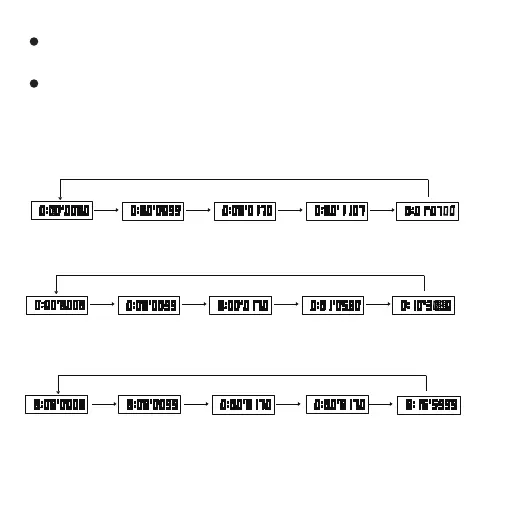
D key D key D key D key
Press C key
to clear “0”
Clear “0” Start Stop Recovery Stop
- 7 -
Split time: When stopwatch is running, press C key to enter split time,
press D key to stop and display total time, then press C key to clear “0”.
Two players’ completion time: When stopwatch is running, press C key
to display completion time of player 1, press D key to start measurement
of completion time of player 2, then press C key to display completion
time of player 2, press C key to clear “0”.
D key C key C key D key
Press C key
to clear “0”
Clear “0” Start Midway
measurement
Release of Midway
Measurement
Stop
D key C key D key C key
Press C key
to clear “0”
Clear “0” Start The first player
measured
Showing player 1
completion time
Keep showing player 1
completion time
Measuring
second player
Show second player
completion time
Split timing
Stopwatch mode
Completion time of two players



 To Next Page