EasyManua.ls Logo

NOVOFLEX VR-System PRO II User Manual

NOVOFLEX VR-System PRO II
8 pages
To Next Page IconTo Next Page
Page #1 background imageLoading...
Page #1 background image
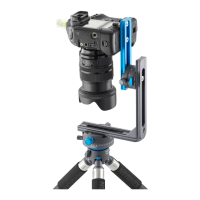
VR-System PRO II
USER MANUAL
Information
For more information, advice and tips concerning our products contact your photo dealer,
the distributor of NOVOFLEX products in your country (have a look at Where to buy“
section at our website to find your distributor) or visit our website: http://www.novoflex.com
For personal advice about possible accessories which is suitable for your NOVOFLEX
product please contact the following phone number or send us an E-mail.
NOVOFLEX Phone: +49 8331 88888
NOVOFLEX E-Mail: mail@novoflex.com
© NOVOFLEX Präzisionstechnik GmbH
Brahmsstraße 7
D-87700 Memmingen
Phone +49 8331 88888, Fax +49 8331 47174
Email mail@novoflex.com, Internet www.novoflex.com
Tip
The interactive presentation of the cubical panorama on the front page of this manual can
be seen in the internet at www.pixelmagazin.de/audi-tt-2016
Question and Answer IconNeed help?

Do you have a question about the NOVOFLEX VR-System PRO II and is the answer not in the manual?

NOVOFLEX VR-System PRO II Specifications

General IconGeneral
CategoryCamera Accessories
MaterialAluminum
Rotation Range360 degrees
TypeVR System
ApplicationPanoramic photography, virtual reality photography
CompatibilityCameras with 1/4" or 3/8" tripod socket
FeaturesAdjustable
Mounting1/4" and 3/8" tripod sockets
DimensionsUnspecified

Summary

Optimizing the system for panoramas

Safety notes

Last checkup in front of the scene

Final checks before taking panorama shots.

Fine adjustment

Instructions for optimizing system stability and height.

Field use

Basic assembly

Guide values for focal lengths and cameras

Preparatory steps - finding the nodal point

Preparatory step 1 Assemble all components

Assembling the system components and ensuring a safe stand.

Preparatory step 2 Side-to-side adjustment

Adjusting the camera's pivot axis using the L-bracket.

Preparatory step 3 Forward-Backward Adjustment

Testing lens position for parallax-free panning.

Related product manuals