Need help?
Do you have a question about the NPLAY AIM 2.0 and is the answer not in the manual?
Ensure mains voltage compatibility with appliance voltage. Consult vendor if incompatible.
Turn off when not in use. Avoid pulling cord or using it to twine. Keep away from warm surfaces.
Do not use in humid places or expose to water to avoid fire hazard or electric shock.
Switch off, unplug, and let cool before cleaning with a soft, dry cloth.
Follow manual instructions, read all instructions before use, and ensure authorized servicing.
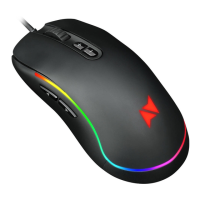
Designed for right-handers, adhering to ergonomic principles for comfort and durability.
Buttons merged with shell via grinding process for comfortable handling and 5 million clicks.
Enhance gaming accuracy with software for key binding, speed regulation, and macro editing.
Follow procedures to determine cause; contact seller or manufacturer if problem persists.
2-year warranty for manufacturing defects; voided by unauthorized repairs or incorrect use.
 General
| Sensor Type | Optical |
|---|---|
| Interface | USB |
| Buttons | 6 |
| Scroll Wheel | Yes |
| Weight | 85 g |
| Color | Black |
| Cable Length | 1.8 m |

 To Next Page