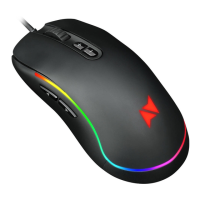
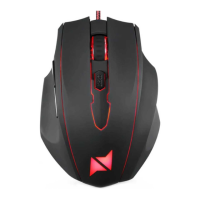
The NPLAY AIM 4.0 Gaming Mouse is a high-performance peripheral designed for an enhanced gaming experience, offering precision, comfort, and customizable features.
Function Description:
The NPLAY AIM 4.0 is a wired gaming mouse equipped with 7 programmable buttons, including a left button, right button, forward button, backward button, a large anti-skid roller, and an adjustable DPI key. It connects to a PC via a reinforced USB connector. The mouse is designed to provide accurate tracking and quick response times, making it suitable for various game types such as FPS, MMORPG, MOBA, and RTS. Its ergonomic design caters specifically to right-handed users, ensuring comfortable use during extended gaming sessions. The integrated buttons with a surface grinding process contribute to a comfortable handling and easy control, while the Omron switches provide a sharp and satisfying click sensation.
Important Technical Specifications:
- Product Name: AIM 4.0
- Switching: OMRON Gaming Switch
- Sensor: Avago 3050
- Frame Rate: 6400 FPS (Frames Per Second)
- Resolution: 4000 DPI (Dots Per Inch)
- DPI Settings: Four independent settings: 500/1500/2500/4000
- Maximum Tracking Speed: 160 IPS (Inches Per Second)
- Buttons: 7 keys
- SPI Sampling Time: 1 ms
- Game Type Compatibility: FPS / MMORPG / MOBA / RTS
- Maximum Acceleration: 20 G
- Polling Rate: 1000 HZ / 1 ms
- Interface: Golden Plate USB Plug
- Mat: Teflon Mat
- Dimensions: 131 x 84 x 39 mm
- Cable Length: 1.8 m, braided
- Weight: 155 ± 10 g
- Switch Durability: Professional Omron micro switches withstand 5 million clicks.
- Image Processing Speed: 4500 FPS
- Travelling Speed: Almost 30 inches/second
Usage Features:
The NPLAY AIM 4.0 Gaming Mouse is designed for ease of use and customization. Users can download dedicated NPLAY mouse control software from http://www.suporteworten.pt to unlock advanced features. This software allows for:
- Key Binding Allocation: Customize the function of each of the 7 buttons to suit individual gaming styles and preferences.
- Speed Regulation: Adjust the mouse's tracking speed for optimal performance in different scenarios.
- Macro Recording and Editing: Create and edit complex macros to execute multiple commands with a single click, providing a competitive edge in games.
- DPI Settings Selection: Easily switch between the four independent DPI settings (500/1500/2500/4000) to match the sensitivity required for various in-game situations or tasks.
- Lighting Control: Personalize the mouse's aesthetic with customizable lighting options, enhancing the gaming setup's visual appeal.
- Ergonomic Design: Specifically crafted for right-handed users, with special positioning for the ring finger and little finger to ensure maximum comfort during prolonged use.
- Plug-and-Play: The device is generally plug-and-play, but the software enhances its capabilities.
- Durability: Features a reinforced USB connector and Omron micro switches for long-lasting performance.
Maintenance Features:
To ensure the longevity and proper functioning of the NPLAY AIM 4.0 Gaming Mouse, certain maintenance practices are recommended:
- Cleaning: Before cleaning, always switch off the appliance and disconnect the USB plug from the power supply. Allow the unit to cool down if it has been in use. Use only a soft and dry cloth to clean the exterior enclosure of the product. Avoid using water or other liquids directly on the mouse to prevent damage and electric shock.
- Cable Care: Do not roll up or pull the braided cable to disconnect the appliance. Keep the cord away from warm surfaces. Inspect the cable and connector regularly for any signs of damage. If the cable or socket is damaged, or if the appliance is not working properly, do not use it and seek technical assistance for replacement.
- Storage: Turn off the device when not in use. Store it in a safe, dry place, away from humidity and water.
- General Precautions:
- Do not open the appliance to attempt repairs, as this poses a risk of electric shock and voids the warranty. Internal components are not user-serviceable.
- Avoid using the appliance if it has fallen, shows signs of damage, or exhibits any operational anomalies.
- The mouse should only be used for its intended purpose (gaming and general computer use). Any use outside this scope, incorrect use, or manual modifications will void the warranty.
- Children aged 8 and above, as well as individuals with reduced physical, sensory, or mental capabilities or lack of experience, can use the appliance if supervised and instructed on safe use, and if they understand the associated risks.
- Assistance: In case of malfunction or problems that cannot be resolved by following the manual's suggestions, contact the customer support service or an authorized dealer for assistance. Repairs should only be carried out by qualified technicians using appropriate tools to prevent further complications and ensure safety.
- Environmental Protection: The product's packaging is designed to be easily sorted into three recyclable materials: cardboard, paper, and plastic. The appliance itself is manufactured using recyclable materials and should be disassembled by a specialized company at the end of its life, adhering to local recycling regulations.

 Need help?

 To Next Page
 General