5
®
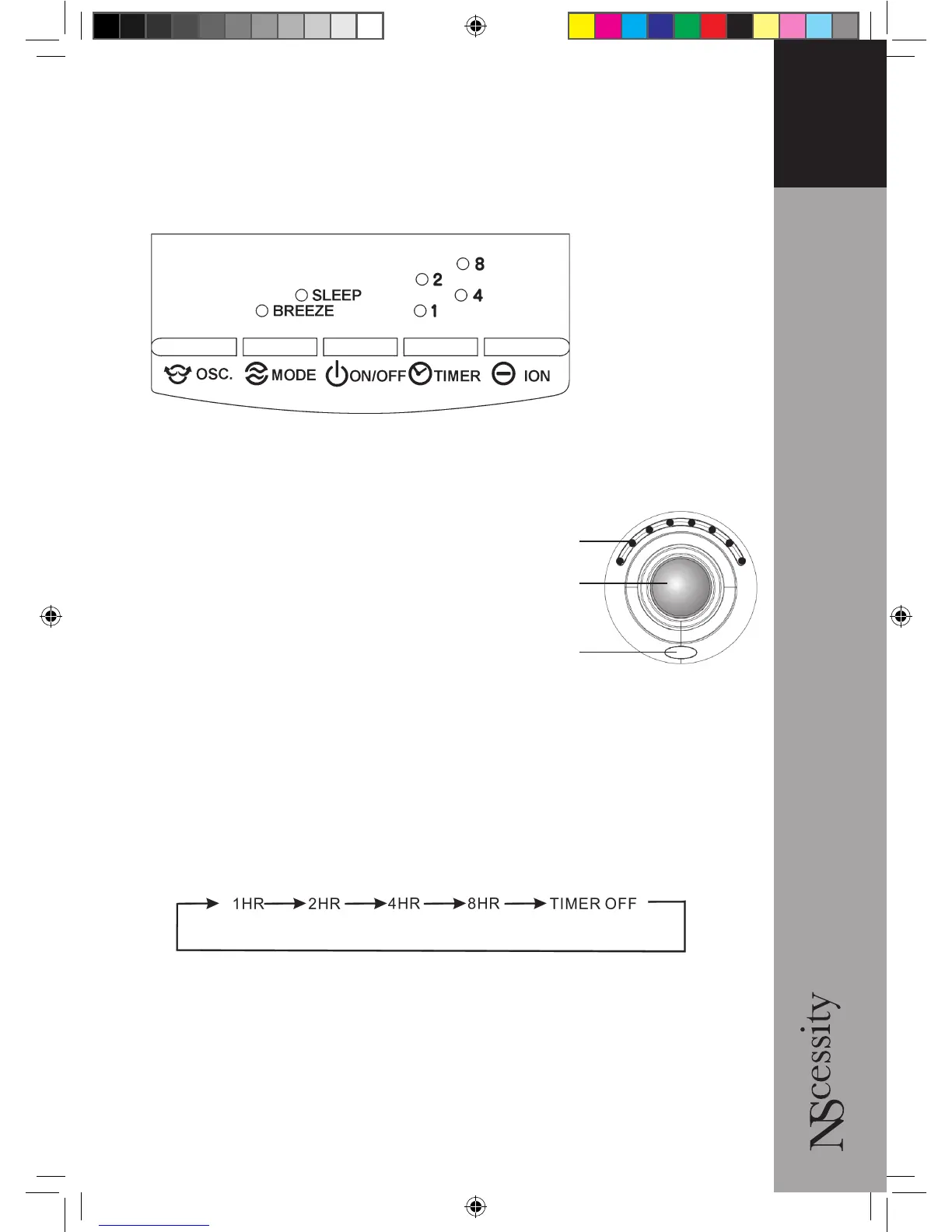
Press the ON/OFF button once to turn on the power and press again to stop.
SPEED When the fan is switched on, turn the speed control knob in a clockwise
direction to increase the fan speed.
Turn it anticlockwise to reduce the speed.
The LEDs will light up to indicate the volocity.
Press the OSC button to make the fan
oscillate in a horizontal direction. Press again
to switch off this function.
MODE Press once to choose ‘breeze’ effect;
press twice to select ‘sleep’ mode; press a
third time to turn off wind effects. Breeze mode simulates a natural wind cycle of
rising and falling wind velocity which will vary according to the fan speed selected
by the rotary speed control. Sleep mode is similar to Breeze mode and will include
periods when the fan is off.
TIMER Press the button to select the required operating time ~ 1, 2, 4 or 8 hours. The
LED lights will indicate the chosen time. For continuous operation, do not select
Timer or press the Timer button a fifth time according to the following diagram.
ION When the appliance is switched on, press the ION button to set the ioniser
function. The appliance will release negative ions into the air to assist in restoring a
natural balance. A blue light will indicate that the ION function is selected. Press the
ION button once more to turn off the ION function.
NOTE: when ‘breeze’ or ‘sleep’ mode is selected, the fan will continually cycle
through Low, Medium and High setting as appropriate to the desired speed.
Operating Instructions
LEDs
Speed
control
ION



 To Next Page