Gettingstarted
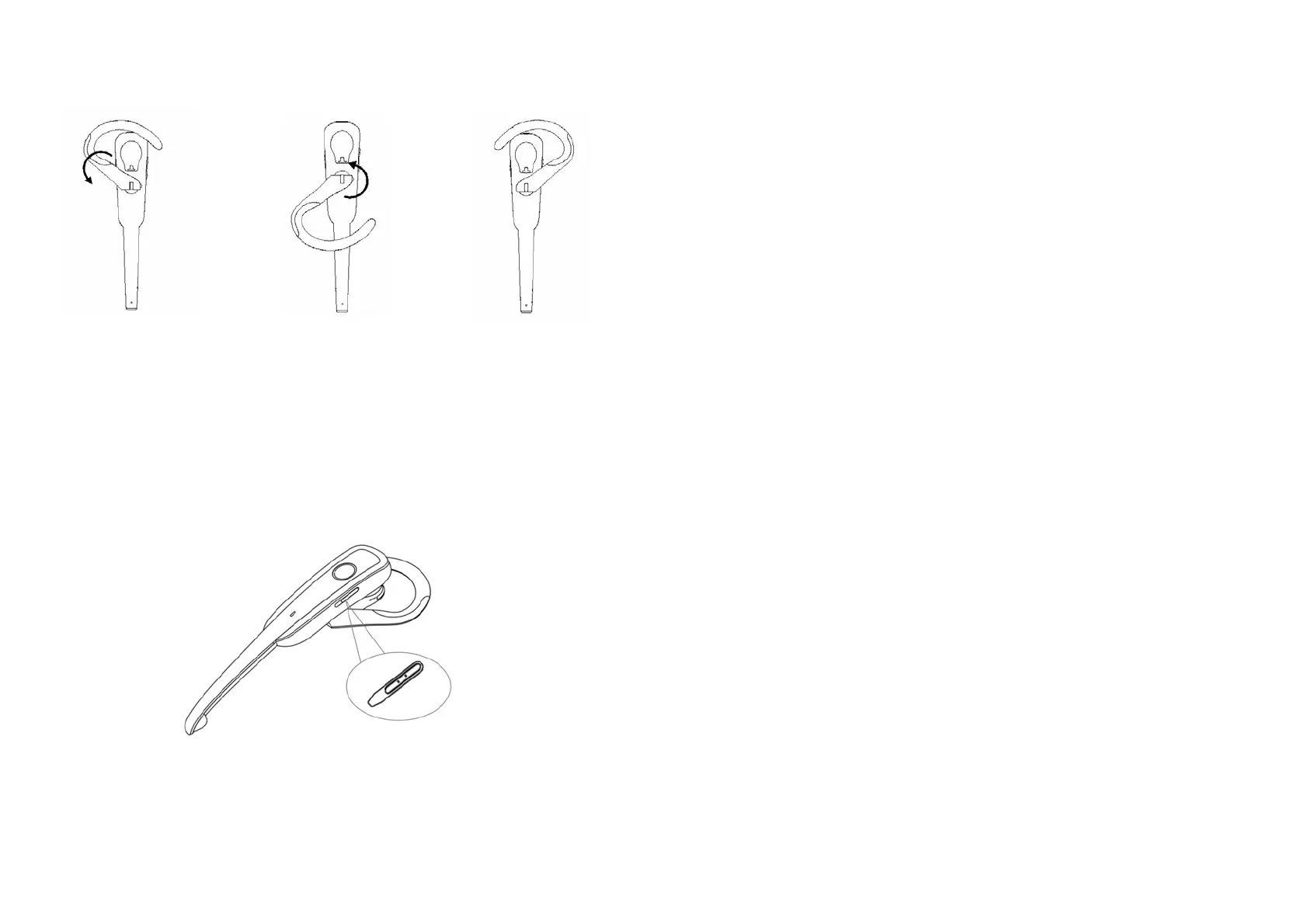
1.Wearingtheheadset
a.Rotatetheearhookasfollowingshowntogetbett erwearing.
ForrightearForleftear
b. After putting on the headset, align the microphone towards the user’s
mouthtogetthebes tconversationquality.
2.
Turningon/off
BTE038
Turningon:puttheswitchtotheupside,blueLEDwillon.
Turningoff:puttheswitchtothedownside,redLEDwillon.
3
BTT004B
Turning on: open the slide coverand plug it into the USB jackof PC, blue
LEDflashquickly,itwillturnonautomatically.
Turningoff:pullitoutfromthePC.
3.Pairing/connecting
Please pair and connect BTE038 and BTT004B, you can mak e a call
and
listenmusic,pairingstepsasfollows:
1) TurnontheBTE038andlongpressMFBbuttonabout3secondstoenter
intopairingmode(blueandredLEDofBTE038flashalternately);
2) PlugBTT004BintoUSBjackofPC,blueLEDflashtwiceevery3 seconds
anditenter
pairingmode;
3) BTT004B and BTE038 will pair and connect with each other, after
connectsuccessfully,blueLEDofBTE038willflashtwiceevery4seconds,
blueLEDofBTT004Bwillon.
Remarks:
PleasedonotlongpressMFBbuttontoenterpairingmodeuntilyousee
theblueLEDonwhenyouturnontheBT E038.
ThepairingmodeofBTE038willlast2minutes,theheadsetwillbackto
standbymodeifitcannotpairwithBTT004Bover2minutes.
The pairing mode ofBTT004B will last 30 seconds, if failto pair, please
plugBTT004Bagain.
After paired, BTE038 and BTT004B will remember each other, it will
connectedwitheachotherautomaticallynexttime.
When BTE038 is turnedoff or over available range, BTT004B will enter
sleeping mode and LED off. When BTE038 is turned on or back to
available range, it will connect with BTT004B automatically, LED of
B TT004Bison.
4


 To Next Page