3)Makingacall
a.ShortpressMFBbuttononBTE038,blueLEDofBTT004Bflashslowlyand
entercon versationmode,youcanmak eaVoIPcallnow.
b. B TT004B support Skype, Google Talk and other common internet
communication software.Pleasesetupaudiodeviceas thisdongle on the
communication
software,followstakeSkypeforexample:
c.Shortorlongpressvolumeup/downbuttononBTE038toadjustvolume.
5.Switchbetweenmusicandconversationmode
ShortpressMFBbuttononBTE038toswitchmusicandconversationmode.
7
6.LEDindicator
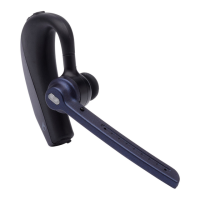
BTE038
LEDindicator Statusofheadset
Red and blue LED flashes
alternately
Pairingmode
Blue LED flashes once every 2
seconds
Notconne ct edtodevice
Blue LED flashes twice every 4
seconds
Connectedtodevice
Red LED flashes instead of blue
LED
Lowbattery
BTT004B
LEDindicator Statusofheadset
BlueLEDflashes quickly Standby to connect last connected
device
Blue LED flash twice every 3
seconds
Searchnewdevicetopair
BlueLEDon Musicmode
BlueLEDflashes slowly Conversationmode
NoLEDindicator Sleeping mode, available
connected
7.FactoryResetofBTE038
Inthestatus of turningon and not connectedwithdevice, press MFB and
volumedownbutton about4secondsandreleaseituntiltheredandblue
LEDonsimultaneously.
Remarks:
Afterfactoryreset,thepairedlistofheadsetwillbedeleted.Afterturnit
on
again, the headsetwill enter pairing mode automatically, and you need to
re‐pairandconnectwithBluetoothdevices.
Careandmaintenance
Read the following recommendations carefully before using this product.
Followingtheseyouwillbeabletoenjoythisproductformanyyears.
Keep it dry and don’t put it in the dump place to avoid the product’s
internalcircuitbeingaffected.
8


 To Next Page