10
NuForce DAC80 Digital to Analog Converter
Adjust USB192 Software
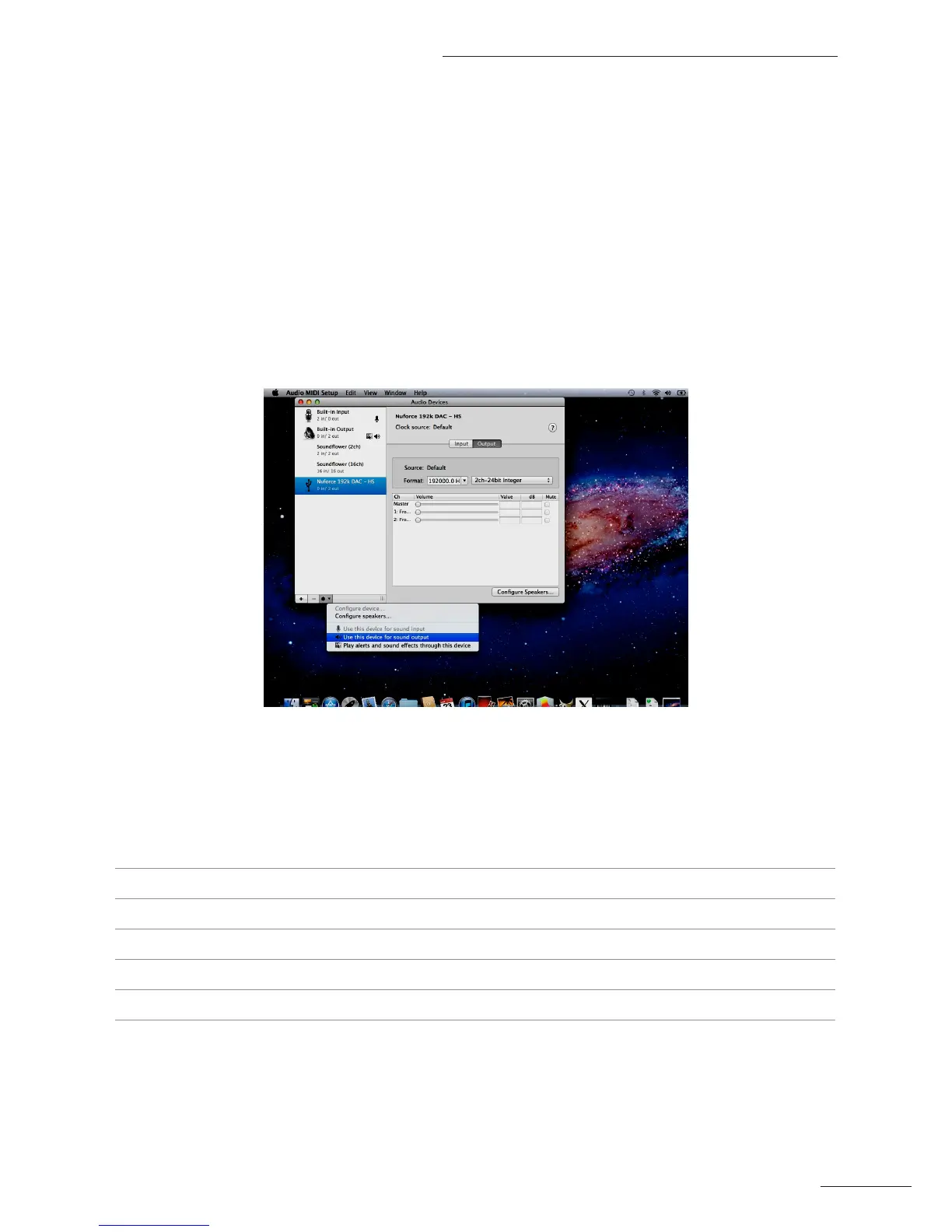
Installation of the USB192 software on Apple Mac systems is straightforward and simple:
1. On the Desktop, select Launchpad.
2. Under Launchpad, select Utilities.
3. Under Utilities, select Audio/Midi Setup.
4. Under Audio/Midi Setup, select NuForce DAC80 as the default audio device.
5. In the Format drop-down menu, select the desired sample rate and bit resolution.
6. The color (Blue or White) of the LED on the DAC80 will indicate the selected sample rate.
7. Begin using the DAC80 by playing music iles via your media software.
USB192 Software Speciications
Applicable NuForce models DAC9, DAC80, LPS192K, U192S
Supported Operating Systems Windows XP, Windows 7 (32-bit and 64-bit), Mac OSX
Digital Input USBB
Supported Sample Rates 44.1, 48, 88.2, 96, 176.4 and 192 kHz
USB Asynchronous up to 192kHz/24-bit
Bit Resolution 16 or 24 bit


 To Previous Page