2
NuForce DAC80 Digital to Analog Converter
QUICK START GUIDE
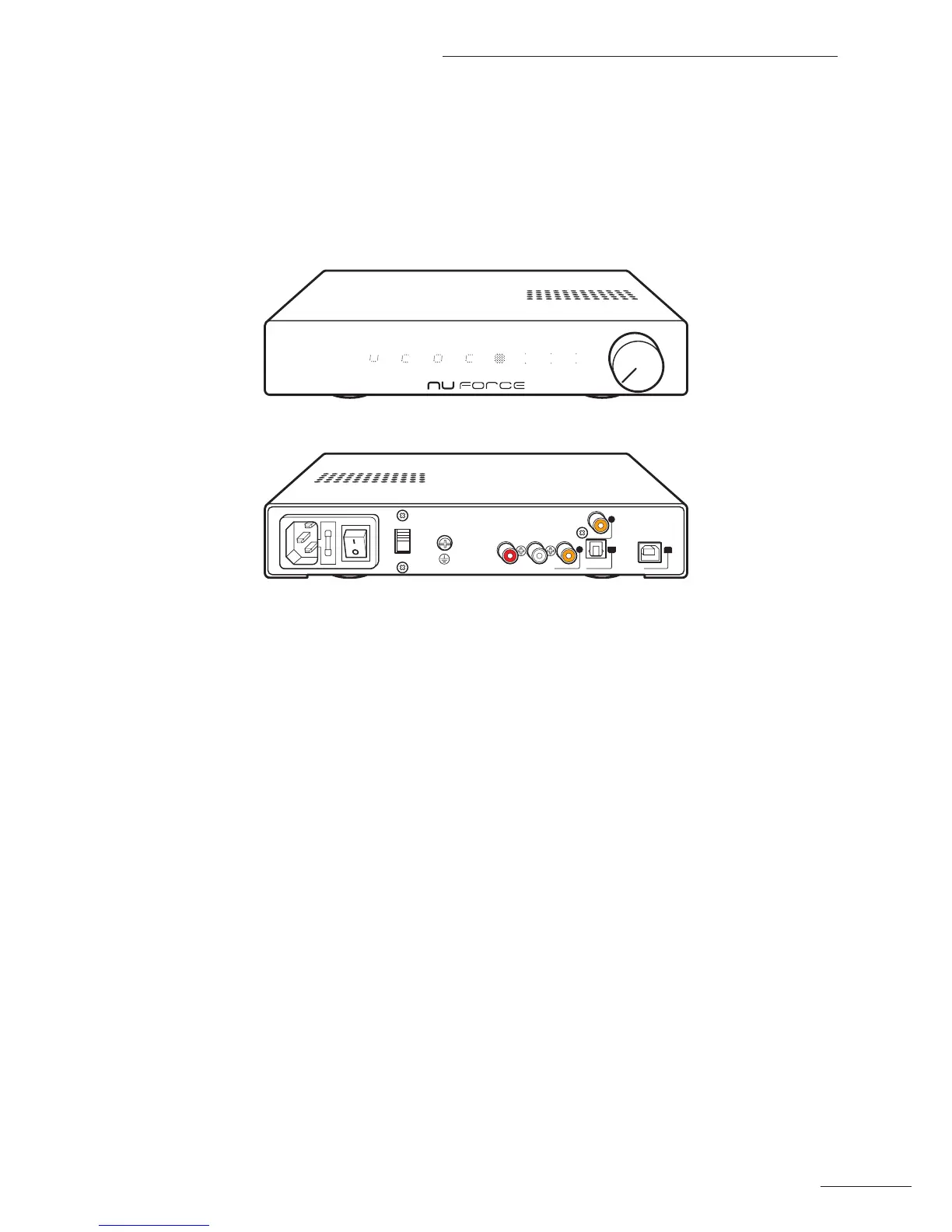
Product Overview
Front Panel
44.1k
48.0k
88.2k
96.0k
176.4k
192.0k
Back Panel
AC 100(115)V / 230(240)V
FUSE T2.5A 250V
OPTICAL
3
USB
1
COAXIAL
2
COAXIAL
4
100V
115V
RL
240V
230V
Make sure that the AC Voltage selector switch at the rear of the unit is switched to the appropriate voltage for
your country. All DAC80s are shipped with the switch set to 230VAC in order to prevent accidental damage.
Turn ON the AC power switch at the rear of the unit. The DAC80 will now be in standby mode.
The logic On/O is enabled by pushing the knob or using the remote. The DAC80 consumes less than 1W in
standby and approximately 10W when ON.
When turned ON from the standby state, the DAC80 requires six seconds to stabilize. During that period, the LED
will blink and the output will be muted.


 To Next Page