- 06 - - 07 -
2
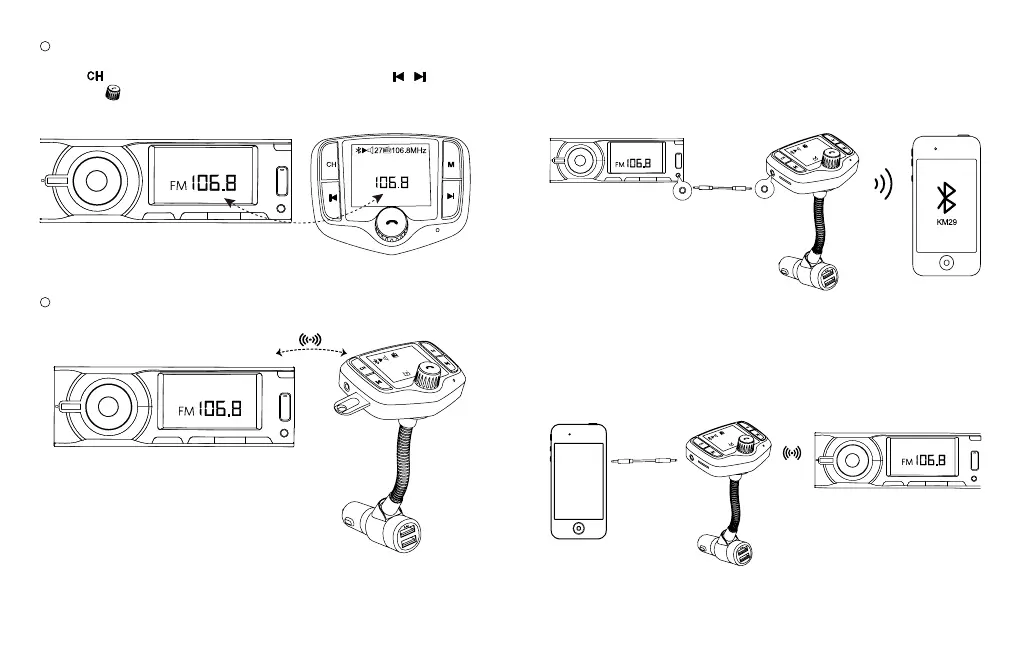
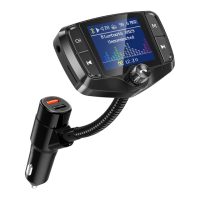
Turn on your car radio, turn the car FM radio till you nd an unoccupied
frequency from 88.1~107.9MHz, usually you will hear white noise.
Press button on “KM29” to enter frequency mode, then press / ,
or rotate
to set it same frequency with your car radio.
3
Insert a micro SD card or USB ash drive into “KM29”, it will automatically detect
and play the MP3/WMA/FLAC/WAV format music.
NOTE: Please only use micro SD card or USB ash drive in FAT format up to 32G
memory; it only supports music in MP3/WMA/ FLAC/WAV formats.
1
2
2
7
1
0
6
.8
M
H
z
B
lu
e
to
o
th
K
M
2
9
U
n
c
o
n
n
e
c
t
e
d
Aux Out
If noise is not bearable through FM streaming (all frequencies are occupied or too much
interference ), you are suggested to use 3.5mm audio cable to connect between “KM29”
and your car Aux-in port. (not all vehicles have 3.5 mm audio port).
Aux In
If your device doesn’t support Bluetooth, you can use the audio cable, and connect your
device to KM29 AUX port; then streamed to car stereo speakers through FM radio.
1
2
2
7
1
0
6
.8
M
Hz
B
l
u
e
t
o
o
t
h
K
M
2
9
U
n
c
o
n
n
e
c
t
e
d
1
2
2
7
1
0
6
.
8
M
H
z
B
lu
e
to
o
th
K
M
2
9
Unconnected


 To Next Page